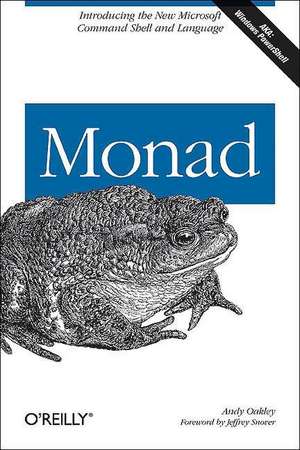
Monad (Aka Powershell)
Autor Andy Oakleyen Limba Engleză Paperback – 17 ian 2006
Reflecting the best of legacy tools such as bash and the Korn shell, PowerShell also breaks new ground in its command language design and its use of the object-oriented .NET Framework. And there is no better way to learn how to put PowerShell to work than to get your hands on Monad, O'Reilly's innovative, hands-on introduction to the tool. This concise 200-page book is an exciting tour of some of the new capabilities thatPowerShell puts into the hands of system administrators and power users, and is the perfect complement to existing PowerShell documentation.
With more than 40 hands-on activities, the book covers every angle, from using PowerShell commands and its object-oriented pipelines to querying systems, generating reports and writing scripts that automate existing tasks. Adding to the lure is the fact that the book is written by Microsoft manager, Andy Oakley with a Foreword by PowerShell architect Jeffrey Snover-so you can be certain that it's teeming with inside information. Monad lets you see for yourself how PowerShell can significantly improve your productivity.
Because the PowerShell technology has wide appeal, so, too, does this compact guide. Developers, administrators, and power users alike can all benefit from its insight. If you're someone who habitually drifts toward the c-m-d keys, knows all of the switches to most command tools, or spends time authoring batch files to solve new challenges, this book is right up your alley. And if your organization plans to upgrade soon to Exchange 2007 or MOM V3, there's no time to waste.
Breaking News: A PowerShell RC1 Update to the book is now available at no charge from the book's catalog page on oreilly.com
Preț: 168.25 lei
Preț vechi: 210.31 lei
-20%
Puncte Express: 252
Carte disponibilă
Livrare economică 25 noiembrie-09 decembrie
Livrare prin curier în România Termenul estimat este afișat lângă disponibilitate.
Transport gratuit de la 400.00 lei Plată online sau ramburs, în funcție de opțiunile comenzii.
Retur gratuit în 14 zile Comandă securizată și suport în română.
Specificații
ISBN-13: 9780596100094
ISBN-10: 0596100094
Pagini: 206
Dimensiuni: 151 x 230 x 19 mm
Greutate: 0.29 kg
Editura: O'Reilly
Locul publicării:United States
ISBN-10: 0596100094
Pagini: 206
Dimensiuni: 151 x 230 x 19 mm
Greutate: 0.29 kg
Editura: O'Reilly
Locul publicării:United States
V-ar putea interesa
-
 Microsoft Powershell, VBScript and JScript BibleWilliam R Stanek-20%Preț: 475.41 lei594.27 lei
 -
 Windows PowerShell Step by StepEd Wilson-20%Preț: 301.20 lei376.50 lei
 -
 Microsoft Windows Operating System EssentialsT Carpenter-20%Preț: 189.88 lei237.34 lei
 -
 PowerShell 7 for IT ProsThomas Lee-20%Preț: 250.38 lei312.98 lei
 -
 -20%Preț: 272.60 lei340.76 lei
 -
 Microsoft Power Platform For DummiesJack A. Hyman-20%Preț: 202.19 lei252.74 lei
 -
 -20%Preț: 144.32 lei180.41 lei
 -
 -20%Preț: 176.97 lei221.21 lei
 -
 Microsoft 365 Office All-In-One for DummiesPaul McFedries-20%Preț: 208.80 lei261.01 lei
 -
 Microsoft Excel 365 BibleMichael Alexander-20%Preț: 290.19 lei362.74 lei
 -
 Microsoft 365 Excel For DummiesDavid H. Ringstrom-20%Preț: 143.21 lei179.02 lei
 -
 -20%Preț: 144.71 lei180.89 lei
 -
 Linux Command Line and Shell Scripting BibleRichard Blum-20%Preț: 410.86 lei513.56 lei
 -
 -36%Preț: 191.51 lei297.70 lei
 -
 -20%Preț: 370.73 lei463.41 lei
 -
 -20%Preț: 233.43 lei291.80 lei
 -
 Practical Automation with PowerShellMatthew Dowst-20%Preț: 373.56 lei466.94 lei
 -
 -20%Preț: 342.57 lei428.22 lei
 -
 -34%Preț: 306.64 lei467.40 lei
 -
 SharePoint Online Administrator PlaybookDeviprasad Panda-20%Preț: 238.96 lei298.70 lei
Notă biografică
Andy Oakley is a graduate of Jesus College, Cambridge, England with a degree in Computer Science. Currently, as a Lead Program Manager at Microsoft, he is building the new publishing system for MSDN which hosts the hundreds of thousands of pages of developer documentation published by Microsoft.
Cuprins
Foreword; Preface; Who This Book Is For; How This Book Is Organized; What You Need to Use This Book; Conventions Used in This Book; Using Code Examples; How to Contact Us; Safari® Enabled; Acknowledgments; Chapter 1: Introducing MSH; 1.1 Get MSH; 1.2 Get to Know Verb-Noun Syntax and Cmdlets; 1.3 Access the Registry Like a Filesystem; 1.4 Create a Pipeline to Pass Information; 1.5 Display Data; 1.6 What's Next?; Chapter 2: Customizing MSH; 2.1 Load and Save Scripts; 2.2 Save Keystrokes with Aliases; 2.3 Work with the Command Line; 2.4 Make Yourself at Home; 2.5 Find Out What a Command Will Do Before Running It; 2.6 What's Next?; Chapter 3: Scripting MSH; 3.1 The .NET Framework; 3.2 Work with Structured Objects; 3.3 Store Information in Variables; 3.4 Control Script Flow with Comparisons; 3.5 Do Repetitive Work with Loops; 3.6 Capture Reusable Behavior in a Function; 3.7 Transform Objects as They Pass Through the Pipeline; 3.8 What's Next?; Chapter 4: Managing MSH Scope and State; 4.1 Control Access to Variables and Functions; 4.2 Work with Special Characters; 4.3 Use Wildcards to Define a Set of Items; 4.4 Take String Comparison Beyond -eq, -lt, and -gt; 4.5 When Things Go Wrong; 4.6 What's Next?; Chapter 5: Adding to the MSH Toolkit; 5.1 Extend the Toolkit with Generic Cmdlets; 5.2 Work with Text Files; 5.3 Work with Structured File Formats; 5.4 How Variables Relate to the .NET Framework; 5.5 Calling Methods of the .NET Class Library; 5.6 Using new-object with COM Objects; 5.7 What's Next?; Chapter 6: Working with Operating System Components; 6.1 Monitoring the Event Log; 6.2 Auditing System Services; 6.3 Get System Information from WMI; 6.4 Manage Filesystem Permissions; 6.5 What's Next?; Chapter 7: Putting MSH to Work; 7.1 Invoke Commands with & 7.2 Parse Text-Based Application Output; 7.3 Fill In the Blanks: Take Input from the Console; 7.4 Untangle GOTO-Based Batch Files; 7.5 Recap: Replacing Common Batch File Syntax; 7.6 Renaming Multiple Files at Once; 7.7 Match and Replace Content in a Text File; 7.8 List Recently Changed Files; 7.9 Counting Types of Files; 7.10 Find Out Which Command Is Being Run; 7.11 Downloading Content from the Web; 7.12 Shorthand for Frequently Used Data; 7.13 Returning System Uptime; 7.14 Simple UI Automation; 7.15 Colorize the Output of get-childitem; 7.16 What's Left?; Appendix A: Syntax and Grammar; A.1 Cmdlets; A.2 Operators; A.3 Data Types; A.4 Automatic Variables; A.5 Global Variables; A.6 Preference Variables; A.7 Execution Flow; A.8 Loops; A.9 Functions and Filters; A.10 Resolution Order; Appendix B: Standard Cmdlets, Functions, and Aliases; B.1 Standard Cmdlets; B.2 Standard Functions; B.3 Aliases; Colophon;
Descriere
Built on the .NET Framework, Monad provides a powerful infrastructure for the automation of a range of administrative tasks. This book is a tour of some of the important capabilities that Monad puts into the hands of system administrators and power users.