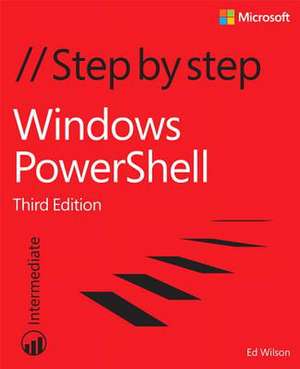
Windows PowerShell Step by Step
Autor Ed Wilsonen Limba Engleză Paperback – 22 oct 2015
Observăm că Windows Powershell Step by Step pune un accent deosebit pe resursele practice, oferind acces direct la codul sursă și fișierele de pornire prin intermediul TechNet Script Center Script Repository. Această ancorare în realitatea tehnică este esențială pentru un administrator de sistem care dorește să testeze imediat conceptele prezentate. Volumul este structurat într-o progresie logică de 22 de capitole, pornind de la utilizarea de bază a cmdlet-urilor și avansând spre subiecte complexe precum remoting, gestiunea joburilor și dezvoltarea de module și funcții avansate. Merită menționat că autorul Ed Wilson alocă spațiu considerabil tehnologiilor critice de infrastructură, dedicând secțiuni extinse pentru WMI (Windows Management Instrumentation) și Active Directory. Abordarea diferă de cea din Windows Powershell Fast Start 2nd Edition prin gradul ridicat de aplicabilitate și detaliu; în timp ce volumul menționat oferă o introducere succintă de 130 de pagini, lucrarea de față utilizează cele 656 de pagini pentru a ghida cititorul prin laboratoare structurate și exerciții de tip „One Step Further”. Această metodologie transformă teoria în competență practică, permițând utilizatorului să adapteze scripturile la propriile nevoi de producție. Ne-a atras atenția și includerea unor capitole despre debugging și gestionarea erorilor, aspecte adesea trecute cu vederea în manualele introductive, dar vitale pentru scalarea automatizării. De asemenea, structura cărții facilitează învățarea tehnologiilor moderne precum Desired State Configuration (DSC) și PowerShell Gallery, asigurând o acoperire completă a ecosistemului PowerShell 5.0.
Preț: 301.20 lei
Preț vechi: 376.50 lei
-20%
Carte disponibilă
Livrare economică 04-18 noiembrie
Specificații
ISBN-10: 0735675112
Pagini: 656
Dimensiuni: 187 x 229 x 36 mm
Greutate: 1.15 kg
Ediția:3. Auflage
Editura: Microsoft Press
V-ar putea interesa
-
 Microsoft Copilot Pro Step by StepLisa Crosbie-20%Preț: 256.32 lei320.40 lei
 -
 Microsoft Powershell, VBScript and JScript BibleWilliam R Stanek-20%Preț: 468.92 lei586.15 lei
 -
 Exam Ref 70-743 Upgrading Your Skills to MCSACharles Pluta-20%Preț: 144.22 lei180.28 lei
 -
 Exam Ref 70-742 Identity with Windows Server 2016Andrew Warren-20%Preț: 203.06 lei253.82 lei
 -
 -34%Preț: 169.00 lei256.31 lei
 -
 Microsoft Windows Operating System EssentialsT Carpenter-20%Preț: 189.88 lei237.34 lei
 -
 PowerShell 7 for IT ProsThomas Lee-20%Preț: 250.38 lei312.98 lei
 -
 -20%Preț: 272.60 lei340.76 lei
 -
 Windows 11 All-in-One For Dummies, 2nd EditionCiprian Adrian Rusen-20%Preț: 214.39 lei267.99 lei
 -
 Windows 11 for Seniors for Dummies, 2nd EditionCurt Simmons-20%Preț: 118.48 lei148.10 lei
 -
 -20%Preț: 144.32 lei180.41 lei
 -
 -20%Preț: 138.46 lei173.08 lei
 -
 Foundations of CentOS LinuxChivas Sicam-20%Preț: 250.84 lei313.55 lei
 -
 -20%Preț: 202.86 lei253.58 lei
 -
 -36%Preț: 189.08 lei297.70 lei
 -
 -20%Preț: 346.81 lei433.51 lei
 -
 -20%Preț: 295.23 lei369.03 lei
 -
 Practical Automation with PowerShellMatthew Dowst-20%Preț: 373.56 lei466.94 lei
 -
 -20%Preț: 333.34 lei416.68 lei
De ce să citești această carte
Recomandăm acest volum administratorilor IT și inginerilor de sistem care au nevoie de o metodă structurată pentru a stăpâni automatizarea în mediile Microsoft. Cititorul câștigă capacitatea de a construi, depana și implementa scripturi complexe pentru Active Directory și WMI. Este un instrument practic esențial datorită exercițiilor aplicate și a celor mai bune practici de scripting incluse, care asigură scrierea unui cod eficient și securizat.
Despre autor
Ed Wilson este un expert recunoscut în tehnologii Microsoft, deținând certificări prestigioase precum MCSE, MCT și Master ASE, alături de CCNA. În prezent, ocupă funcția de Senior Networking Specialist în cadrul Full Service Networking, un partener Microsoft Solution Provider din Cincinnati, Ohio. Experiența sa vastă în administrarea rețelelor este reflectată în numeroasele cărți de specialitate pe care le-a co-autorat, fiind considerat o autoritate în domeniul scripting-ului și automatizării sistemelor Windows.
Descriere scurtă
Notă biografică
Cuprins
- Introduction
- Chapter 1: Overview of Windows PowerShell 5.0
- Chapter 2: Using Windows PowerShell cmdlets
- Chapter 3: Understanding and using Windows PowerShell providers
- Chapter 4: Using Windows PowerShell remoting and jobs
- Chapter 5: Using Windows PowerShell scripts
- Chapter 6: Working with functions
- Chapter 7: Creating advanced functions and modules
- Chapter 8: Using the Windows PowerShell ISE
- Chapter 9: Working with Windows PowerShell profiles
- Chapter 10: Using WMI
- Chapter 11: Querying WMI
- Chapter 12: Remoting WMI
- Chapter 13: Calling WMI methods on WMI classes
- Chapter 14: Using the CIM cmdlets
- Chapter 15: Working with Active Directory
- Chapter 16: Working with the AD DS module
- Chapter 17: Deploying Active Directory by using Windows PowerShell
- Chapter 18: Debugging scripts
- Chapter 19: Handling errors
- Chapter 20: Using the Windows PowerShell workflow
- Chapter 21: Managing Windows PowerShell DSC
- Chapter 22: Using the PowerShell Gallery
- Appendix A: Windows PowerShell scripting best practices
- Appendix B: Regular expressions quick reference
- Index
- About the author