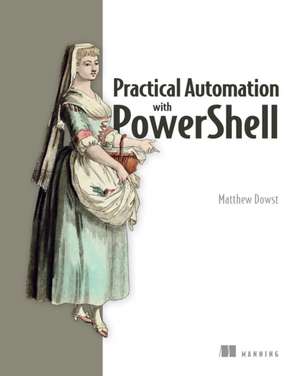
Practical Automation with PowerShell
Autor Matthew Dowsten Limba Engleză Paperback – 24 apr 2023
ABORDAREA PRACTICĂ: Practical Automation with Powershell nu este un manual teoretic despre sintaxă, ci un ghid de inginerie aplicată, unde raportul dintre conceptele de design și implementarea de cod este optimizat pentru eficiență imediată. Ne-a atras atenția modul în care Matthew Dowst transformă PowerShell dintr-un simplu interpretor de comenzi într-un veritabil motor de automatizare enterprise. Apreciem faptul că autorul nu se limitează la execuția locală, ci extinde ecosistemul către soluții cloud și baze de date SQL. Cititorul care a aplicat ideile din Mastering Windows PowerShell Scripting - Second Edition va găsi aici elementele care completează ciclul de viață al unui script: de la securizarea credențialelor și gestionarea datelor sensibile, până la crearea de interfețe grafice pentru colegii non-tehnici. Structura cărții este organizată progresiv în trei părți: inițierea în automatizare, scrierea scripturilor adaptabile și managementul acestora la scară largă. Partea a doua este deosebit de valoroasă, acoperind execuția la distanță și bunele practici de codare, în timp ce partea a treia se concentrează pe partajarea codului în echipă și testarea acestuia. Subliniem importanța capitolelor dedicate integrării cu Jenkins și Azure Automation, detalii care transformă un administrator de sistem într-un specialist DevOps. Spre deosebire de Building Better PowerShell Code, care se axează pe optimizarea sintaxei, acest volum oferă un plan complet pentru construirea unui mediu de scripting rezilient și scalabil, incluzând soluții de frontend prin SharePoint pentru a democratiza accesul la automatizări în cadrul organizației.
Preț: 373.56 lei
Preț vechi: 466.94 lei
-20%
Carte disponibilă
Livrare economică 09-23 noiembrie
Livrare express 23-29 octombrie pentru 46.71 lei
Specificații
ISBN-10: 1617299553
Pagini: 325
Dimensiuni: 186 x 232 x 25 mm
Greutate: 0.77 kg
Editura: Manning Publications
V-ar putea interesa
-
 -20%Preț: 190.32 lei237.91 lei
 -
 Windows PowerShell Step by StepEd Wilson-20%Preț: 301.20 lei376.50 lei
 -
 PowerShell 7 for IT ProsThomas Lee-20%Preț: 250.38 lei312.98 lei
 -
 Microsoft 365 For DummiesJennifer Reed-20%Preț: 139.39 lei174.24 lei
 -
 -20%Preț: 272.60 lei340.76 lei
 -
 Microsoft Power Platform For DummiesJack A. Hyman-20%Preț: 198.49 lei248.11 lei
 -
 -20%Preț: 176.97 lei221.21 lei
 -
 Microsoft 365 Excel For DummiesDavid H. Ringstrom-20%Preț: 143.21 lei179.02 lei
 -
 -20%Preț: 144.71 lei180.89 lei
 -
 Python Automation For DummiesAlan Simpson-20%Preț: 146.52 lei183.15 lei
 -
 -36%Preț: 189.08 lei297.62 lei
 -
 -20%Preț: 346.81 lei433.51 lei
 -
 -20%Preț: 295.23 lei369.03 lei
 -
 -20%Preț: 343.40 lei429.25 lei
 -
 -34%Preț: 293.68 lei447.85 lei
 -
 -35%Preț: 302.79 lei467.40 lei
 -
 -36%Preț: 297.72 lei463.54 lei
 -
 -37%Preț: 186.29 lei295.65 lei
 -
 SharePoint Online Administrator PlaybookDeviprasad Panda-20%Preț: 231.04 lei288.79 lei
 -
 Mastering ASP.NET Core 10Mabrouk Mahdhi-20%Preț: 250.42 lei313.02 lei
De ce să citești această carte
Recomandăm această carte administratorilor de sistem și profesioniștilor IT care doresc să treacă de la execuția manuală a scripturilor la automatizări complexe, sigure și partajabile. Veți câștiga competențe critice în gestionarea securizată a datelor și integrarea cu fluxuri CI/CD. Este un instrument esențial pentru oricine dorește să livreze soluții de automatizare profesionale, nu doar simple linii de cod.
Despre autor
Matthew Dowst este un expert recunoscut în domeniul consultanței și managementului IT, având o experiență de peste 15 ani în domeniu. Expertiza sa vastă se concentrează pe eficientizarea proceselor operaționale prin utilizarea tehnologiilor Microsoft. În Practical Automation with Powershell, Dowst își folosește deceniile de practică pentru a oferi o viziune pragmatică asupra modului în care PowerShell poate acționa ca un multiplicator de forță în centrele de date moderne, punând accent pe reutilizarea codului și securitatea mediilor de producție.