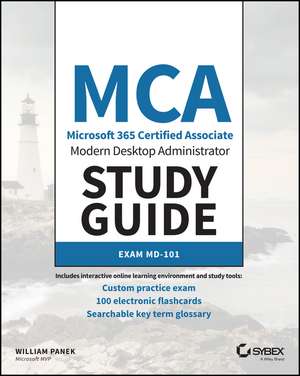
MCA Modern Desktop Administrator Study Guide
Autor William Paneken Limba Engleză Paperback – 17 mar 2020
Preț: 333.40 lei
Puncte Express: 500
Carte disponibilă
Livrare economică 16-30 iunie
Specificații
ISBN-13: 9781119605942
ISBN-10: 1119605946
Pagini: 384
Dimensiuni: 189 x 233 x 25 mm
Greutate: 0.63 kg
Editura: Wiley
Locul publicării:Hoboken, United States
ISBN-10: 1119605946
Pagini: 384
Dimensiuni: 189 x 233 x 25 mm
Greutate: 0.63 kg
Editura: Wiley
Locul publicării:Hoboken, United States
V-ar putea interesa
-
 -20%Preț: 374.94 lei468.68 lei
 -
 Exam Ref MD-102 Microsoft Endpoint AdministratorAndrew Warren-20%Preț: 207.00 lei258.75 lei
 -
 -20%Preț: 315.01 lei393.76 lei
 -
 Exam Ref MD-100 Windows 10Andrew Bettany-20%Preț: 231.66 lei289.57 lei
 -
 -20%Preț: 138.84 lei173.55 lei
 -
 Exam Ref MS-101 Microsoft 365 Mobility and SecurityBrian Svidergol-39%Preț: 151.85 lei248.76 lei
 -
 -20%Preț: 230.84 lei288.54 lei
 -
 Exam Ref MS-101 Microsoft 365 Mobility and SecurityBrian Svidergol-20%Preț: 138.91 lei173.64 lei
 -
 Exam Ref MD-101 Managing Modern DesktopsAndrew Bettany-20%Preț: 229.23 lei286.54 lei
 -
 -20%Preț: 354.33 lei442.91 lei
 -
 Exam Ref MS-102 Microsoft 365 AdministratorOrin Thomas-20%Preț: 264.01 lei330.01 lei
 -
 -25%Preț: 550.73 lei730.99 lei
 -
 -20%Preț: 277.48 lei346.84 lei
 -
 Exam Ref 70-742 Identity with Windows Server 2016Andrew Warren-20%Preț: 198.53 lei248.17 lei
 -
 McSa Microsoft Windows 10 Study GuideWilliam PanekPreț: 364.20 lei
 -
 McSa Windows Server 2016 Practice TestsCrystal PanekPreț: 199.33 lei
 -
 -20%Preț: 109.49 lei136.86 lei
 -
 Mastering Windows Server 2022 with Azure Cloud ServicesWilliam Panek-20%Preț: 302.77 lei378.47 lei
 -
 -20%Preț: 764.77 lei955.97 lei
 -
 Exam Ref 70-697 Configuring Windows DevicesAndrew Bettany-20%Preț: 80.56 lei100.71 lei
 -
 -20%Preț: 225.49 lei281.86 lei
 -
 Exam Ref 70-697 Configuring Windows DevicesAndrew Bettany-20%Preț: 141.70 lei177.13 lei
Notă biografică
ABOUT THE AUTHOR WILLIAM PANEK, MCP, MCSE, MCSA, MCTS, MCITP, CCNA, is a Five-Time Microsoft MVP Winner. He has taught at Boston University, Clark University, and the University of Maryland, and presently conducts live online classes for StormWind Studios (www.stormwind.com). Will has been a consultant and trainer for the United States Secret Service, Cisco, the United States Air Force, and the United States Army. He also creates training videos to help students prepare for various Microsoft exams.
Cuprins
Introduction xxi Assessment Test xxxi Part I Exam MD-100 1 Chapter 1 Windows 10 Installation 3 Understanding the Basics 4 Windows 10 Features 8 Windows 10 Architecture 10 Preparing to Install Windows 10 11 Windows 10 Home 11 Windows 10 Pro 12 Windows 10 Enterprise 13 Windows 10 Enterprise E3 and E5 14 Windows 10 Requirements 14 New Install or Upgrade? 17 Disk Partitioning 20 Language and Locale 21 Installing Windows 10 22 Performing a Clean Install of Windows 10 22 Performing an Upgrade to Windows 10 31 Troubleshooting Installation Problems 36 Supporting Multiple-Boot Options 38 Using Windows Activation 39 Understanding Automated Deployment Options 40 An Overview of the Microsoft Deployment Toolkit 41 An Overview of Unattended Installation 46 An Overview of Windows Deployment Services 48 An Overview of the System Preparation Tool and Disk Imaging 51 Overview of the Windows Assessment and Deployment Kit 55 Windows Configuration Designer 56 Summary of Windows 10 Deployment Options 56 Deploying Unattended Installations 57 Using the System Preparation Tool to Prepare an Installation for Imaging 59 Using Windows Configuration Designer to Create a Disk Image 61 Using the Deployment Image Servicing and Management Tool 63 Using Windows System Image Manager to Create Answer Files 65 Windows Update 66 The Update Process 66 Using Windows Update 68 Using Command-Line Options 69 Installing Windows Store Updates 70 Summary 71 Exam Essentials 72 Video Resources 73 Review Questions 74 Chapter 2 Configuring Users 77 Understanding User Accounts 78 Account Types 79 Built-In Accounts 80 Local and Domain User Accounts 81 Working with User Accounts 82 Using the Local Users and Groups Utility 82 Using the User Accounts Option in Control Panel 84 Creating New Users 85 Disabling User Accounts 90 Deleting User Accounts 91 Renaming User Accounts 93 Changing a User's Password 94 Using Windows Hello, Pictures, and Biometrics 94 Using Device Guard 95 Understanding Credential Guard 98 Configuring Device Health Attestation 99 Managing User Properties 101 Managing User Group Membership 101 Setting Up User Profiles, Logon Scripts, and Home Folders 103 Troubleshooting User Account Authentication 109 Managing and Creating Groups 110 Using Built-In Groups 111 Creating Groups 115 Managing Group Membership 116 Deleting Groups 118 Managing Security Using GPOs and LGPOs 118 Understanding the GPO and LGPO Basics 118 Using the Group Policy Result Tool 120 Managing and Applying LGPOs 121 Configuring Local Security Policies 123 Using Account Policies 124 Using Local Policies 130 Configuring User Account Control 138 Privilege Elevation 138 Registry and File Virtualization 140 Understanding Smart Cards 140 Configuring Remote Management 143 Remote Assistance 143 Remote Desktop 148 Enabling PowerShell Remoting 150 Configuring a VPN Connection 151 Transparent Caching 153 Broadband Tethering 153 Using PowerShell 155 Summary 157 Exam Essentials 157 Video Resources 157 Review Questions 158 Chapter 3 Managing Data 161 Managing File and Folder Security 162 Folder Options 163 Understanding Dynamic Access Control 167 Securing Access to Files and Folders 168 Determining and Viewing Effective Permissions for NTFS 172 Determining NTFS Permissions for Copied or Moved Files 174 Managing Network Access 174 Creating and Managing Shared Folders 175 Configuring Share Permissions 176 Configuring OneDrive 178 Understanding Hardware Security 181 Using BitLocker Drive Encryption 182 Features of BitLocker 183 Windows 7 vs. Windows 10 185 Using the BitLocker Administration and Monitoring Utility 187 Understanding Smart Cards 188 Summary 188 Exam Essentials 189 Video Resources 189 Review Questions 190 Chapter 4 Managing the Windows 10 Environment 193 Managing Windows 194 Manipulating the Desktop Environment 195 Configuring Personalization 204 Using Control Panel 209 Using the Microsoft Management Console 218 Using the System Icon 219 Understanding the Settings Window 222 Using PowerShell 224 Configuring Mobility Options 225 Configuring Offline Files and Synchronization 225 Configuring Power Policies 227 Configuring Windows to Go 233 Managing Windows 10 Services 236 Configuring Internet Browsers 238 Cortana 239 Browser Controls 240 Pinning Sites to the Taskbar 240 Searchable Address Bar 240 Security and Privacy Enhancements 240 Using the Browser's Compatibility View 240 Using Protected Mode for IE11 241 Using InPrivate Browsing 242 Configuring Windows Internet Explorer 11 Options 243 Summary 247 Exam Essentials 247 Video Resources 248 Review Questions 249 Chapter 5 Configuring Security and Devices 253 Understanding Filesystems 254 Filesystem Selection 255 Filesystem Conversion 257 Configuring NTFS 258 Configuring Hardware 259 Understanding Devices 259 Using Device Manager 261 Installing and Updating Device Drivers 265 Driver Signing 275 Managing I/O Devices 275 Configuring Removable Storage Devices 275 Managing Printers 278 Configuring Windows Defender Firewall 291 Understanding the Windows Defender Firewall Basics 292 Windows Defender Firewall with Advanced Security 292 Summary 297 Exam Essentials 297 Video Resources 298 Review Questions 299 Chapter 6 Configuring Network Connectivity 301 Understanding the Basics 302 Peer-to-Peer Networks 302 On-site Active Directory Networks 304 Cloud-Based Azure Active Directory 306 Other Microsoft Networking Terms and Roles 306 Configuring NIC Devices 309 Configuring a Network Adapter 310 Troubleshooting a Network Adapter 316 Configuring Wireless NIC Devices 316 Configuring Wi-Fi Direct 324 Understanding TCP/IP 326 Benefits and Features of TCP/IP 327 Basics of IP Addressing and Configuration 329 Using IPv6 Addresses 334 Configuring TCP/IP on Windows 10 344 Testing Your IP Configuration 346 Configuring Windows 10 on a Network 348 Summary 350 Exam Essentials 351 Video Resources 351 Review Questions 352 Chapter 7 Configuring Recovery 355 Understanding Recovery 357 Knowing the Startup/Boot Options 358 Starting in Safe Mode 359 Enabling Boot Logging 362 Using Other Startup Setting Options 364 Understanding System Restore 365 Using the System Image Recovery 366 Using the Startup Repair Tool 367 Maintaining Windows 10 with Backup and Restore 368 Creating a Backup 369 Restoring Files from a Backup 370 Recovering Files from OneDrive 371 Using the Wbadmin Command Utility 372 Using Advanced Backup Options 373 Using System Protection 375 Creating Restore Points 376 Restoring Restore Points 376 Cleaning Up Old Restore Points 377 Using the Recycle Bin 377 Monitoring Windows 378 Introducing Performance Monitor 379 Using Other Performance-Monitoring Tools 388 Summary 397 Exam Essentials 398 Video Resources 399 Review Questions 400 Appendix Answer to Review Questions 403 Chapter 1: Windows 10 Installation 404 Chapter 2: Configuring Users 404 Chapter 3: Managing Data 405 Chapter 4: Managing the Windows 10 Environment 406 Chapter 5: Configuring Security and Devices 407 Chapter 6: Configuring Network Connectivity 408 Chapter 7: Configuring Recovery 409 Index 411