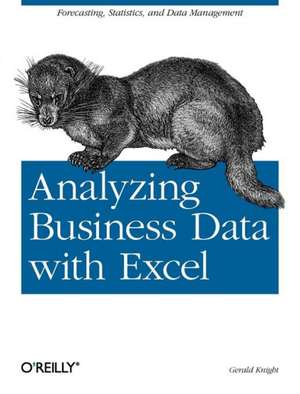
Analyzing Business Data with Excel
Autor Gerald Knighten Limba Engleză Paperback – 7 feb 2006
Preț: 189.94 lei
Preț vechi: 237.43 lei
-20%
Puncte Express: 285
Carte disponibilă
Livrare economică 31 octombrie-14 noiembrie
Livrare prin curier în România Termenul estimat este afișat lângă disponibilitate.
Transport gratuit de la 400.00 lei Plată online sau ramburs, în funcție de opțiunile comenzii.
Retur gratuit în 14 zile Comandă securizată și suport în română.
Specificații
ISBN-13: 9780596100735
ISBN-10: 0596100736
Pagini: 262
Dimensiuni: 177 x 234 x 19 mm
Greutate: 0.42 kg
Editura: O'Reilly
Locul publicării:United States
ISBN-10: 0596100736
Pagini: 262
Dimensiuni: 177 x 234 x 19 mm
Greutate: 0.42 kg
Editura: O'Reilly
Locul publicării:United States
V-ar putea interesa
-
 -20%Preț: 224.59 lei280.73 lei
 -
 -20%Preț: 224.11 lei280.14 lei
 -
 -20%Preț: 303.71 lei379.63 lei
 -
 Business Statistics using ExcelGlyn Davis-30%Preț: 447.66 lei641.44 lei
 -
 Excel 2016 in DepthBill Jelen-20%Preț: 207.50 lei259.37 lei
 -
 Business Analysis with Microsoft ExcelConrad Carlberg-20%Preț: 235.69 lei294.61 lei
 -
 Excel Dashboards and ReportsMichael Alexander-20%Preț: 199.84 lei249.81 lei
 -
 Data Analysis Using SQL and ExcelGordon S LinoffPreț: 408.25 lei
 -
 Data Visualization with Excel Dashboards and ReportsDick KusleikaPreț: 248.83 lei
 -
 Excel Data Analysis For Dummies, 5th EditionPaul McFedries-20%Preț: 210.98 lei263.72 lei
 -
 Succeeding in Business with Microsoft Excel 2013Frank Akaiwa-20%Preț: 423.22 lei529.03 lei
 -
 -26%Preț: 624.02 lei840.70 lei
 -
 Microsoft Excel 365 BibleDick Kusleika-20%Preț: 289.14 lei361.43 lei
 -
 Microsoft 365 Excel All-in-One For DummiesDavid H Ringstrom-20%Preț: 237.38 lei296.73 lei
 -
 Excel Quick and EasyDick Kusleika-20%Preț: 80.53 lei100.67 lei
 -
 Microsoft Excel 2019 Formulas and FunctionsPaul McFedries-20%Preț: 211.11 lei263.89 lei
 -
 Microsoft Excel 2019 Step by StepCurtis Frye-20%Preț: 210.12 lei262.65 lei
 -
 Python for Excel Users: Know Excel? You Can Learn PythonTracy Stephens-36%Preț: 233.27 lei364.10 lei
Notă biografică
Gerald Knight has nearly 30 years experience in the computer industry as a developer, teacher, and consultant. During an over twenty-year career at FedEx, he was a project leader and system architect working on imaging and revenue control systems. He has specialized in Excel development for the last ten years. Now retired, he consults and occasionally writes in Memphis, Tennessee.
Cuprins
Preface; Who Should Read This Book; What's in This Book; How to Use This Book Effectively; Sample Code; Using Code Examples; We'd Like Your Feedback!; Safari® Enabled; Acknowledgments;
Chapter 1: Excel and Statistics; 1.1 Array Formulas; 1.2 Addressing Cells Indirectly; 1.3 Statistical Functions;
Chapter 2: Pivot Tables and Problem Solving; 2.1 Pivot Table Basics; 2.2 Changing the Data; 2.3 Pivot Table Options;
Chapter 3: Workload Forecasting; 3.1 The Procedure; 3.2 Building an Application;
Chapter 4: Modeling; 4.1 Regression; 4.2 Defining the Problem; 4.3 Refining Metrics; 4.4 Analysis; 4.5 Building the Model; 4.6 Analyzing the Results; 4.7 Testing Non-Linear Relationships;
Chapter 5: Measuring Quality; 5.1 Statistical Process Control; 5.2 Running the Application; 5.3 Application Design; 5.4 Customizing the Application;
Chapter 6: Monitoring Complex Systems; 6.1 The Application; 6.2 The Data; 6.3 Settings; 6.4 Workarea; 6.5 Macros;
Chapter 7: Queuing; 7.1 The Data; 7.2 The Application; 7.3 The Logic;
Chapter 8: Custom Queuing Presentation; 8.1 The Application; 8.2 The Data; 8.3 The Logic; 8.4 VBA; 8.5 Extending the Application;
Chapter 9: Optimizing; 9.1 Goal Seek; 9.2 The Solver;
Chapter 10: Importing Data; 10.1 Text Files; 10.2 Databases; 10.3 XML;
Chapter 11: The Trouble with Data; 11.1 Numbers; 11.2 Dates; 11.3 Reports; 11.4 Equivalence;
Chapter 12: Effective Display Techniques; 12.1 Respect the Information and the Audience; 12.2 Large Worksheets; 12.3 Charts; 12.4 Pictures and Other Objects; 12.5 Complexity; 12.6 Repeated Elements; 12.7 Information Density; 12.8 Emphasis and Focus;
Colophon;