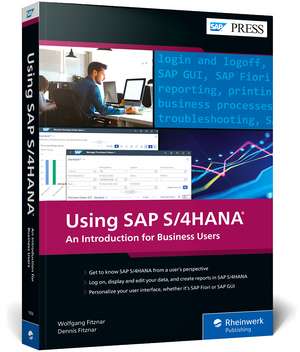
Using SAP S/4HANA: SAP Press Englisch
Autor Wolfgang Fitznar, Dennis Fitznaren Limba Engleză Paperback – 22 apr 2022
In this book, you'll learn about:
a. User Operations
Get started in your new system! Learn how to log in, navigate, and display, maintain, and report on your company's data.
b. Customization Options
Use SAP S/4HANA according to your specifications and preferences! Adapt your reporting settings and personalize your user interface so that it works for you, whether you're using the new UI (SAP Fiori) or the classic look of SAP GUI.
c. Business Processes
See how to complete day-to-day tasks in key lines of business. Perform procurement activities in materials management, ordering and invoicing in sales, and business transactions in finance such as displaying open items or a balance sheet.
Highlights Include:
1) Logon and navigation
2) Reporting
3) Personalization
4) Procurement
5) Sales
6) Financial accounting
7) Special functions
8) Troubleshooting
9) SAP Fiori applications
10) SAP GUI transactions
Din seria SAP Press Englisch
- 20%
 Preț: 498.30 lei
 - 8%
 Preț: 531.17 lei
 - 8%
 Preț: 555.09 lei
 - 20%
 Preț: 572.67 lei
 - 20%
 Preț: 559.11 lei
 - 20%
 Preț: 397.01 lei
 - 20%
 Preț: 629.08 lei
 - 8%
 Preț: 592.24 lei
 - 20%
 Preț: 445.86 lei
 - 20%
 Preț: 400.07 lei
 - 20%
 Preț: 653.14 lei
 - 20%
 Preț: 649.45 lei
 - 20%
 Preț: 664.42 lei
 - 20%
 Preț: 530.81 lei
 - 8%
 Preț: 547.17 lei
 - 20%
 Preț: 435.19 lei
 - 20%
 Preț: 452.40 lei
 - 20%
 Preț: 464.95 lei
 - 20%
 Preț: 505.55 lei
 - 20%
 Preț: 640.26 lei
 - 20%
 Preț: 540.18 lei
 - 20%
 Preț: 659.08 lei
 - 20%
 Preț: 402.39 lei
 - 9%
 Preț: 775.27 lei
 - 20%
 Preț: 697.04 lei
 - 20%
 Preț: 620.76 lei
 - 8%
 Preț: 534.89 lei
 - 20%
 Preț: 486.65 lei
 - 20%
 Preț: 558.22 lei
 - 8%
 Preț: 556.57 lei
 - 20%
 Preț: 638.55 lei
 - 8%
 Preț: 540.88 lei
 - 20%
 Preț: 639.44 lei
 - 20%
 Preț: 563.14 lei
 - 20%
 Preț: 605.46 lei
 - 8%
 Preț: 412.12 lei
 - 20%
 Preț: 423.56 lei
 - 8%
 Preț: 515.14 lei
 - 20%
 Preț: 683.97 lei
 - 20%
 Preț: 515.48 lei
 - 20%
 Preț: 571.29 lei
 - 20%
 Preț: 562.79 lei
 - 20%
 Preț: 450.06 lei
 - 20%
 Preț: 453.39 lei
 - 20%
 Preț: 610.03 lei
 - 8%
 Preț: 418.29 lei
 - 20%
 Preț: 622.38 lei
 - 20%
 Preț: 405.55 lei
 - 20%
 Preț: 408.42 lei
Preț: 160.12 lei
Preț vechi: 200.14 lei
-20%
Puncte Express: 240
Carte disponibilă
Livrare economică 06-20 noiembrie
Livrare express 22-28 octombrie pentru 219.36 lei
Livrare prin curier în România Termenul estimat este afișat lângă disponibilitate.
Transport gratuit de la 400.00 lei Plată online sau ramburs, în funcție de opțiunile comenzii.
Retur gratuit în 14 zile Comandă securizată și suport în română.
Specificații
ISBN-13: 9781493219568
ISBN-10: 1493219561
Pagini: 420
Dimensiuni: 173 x 252 x 27 mm
Greutate: 0.87 kg
Editura: Rheinwerk Verlag GmbH
Seria SAP Press Englisch
ISBN-10: 1493219561
Pagini: 420
Dimensiuni: 173 x 252 x 27 mm
Greutate: 0.87 kg
Editura: Rheinwerk Verlag GmbH
Seria SAP Press Englisch
V-ar putea interesa
-
 Using SAP ErpOlaf Schulz-20%Preț: 144.12 lei180.15 lei
 -
 Logistics with SAP S/4HANADeb Bhattacharjee-20%Preț: 424.04 lei530.06 lei
 -
 SAP S/4HANA Financial Accounting Certification GuideStefanos Pougkas-20%Preț: 400.07 lei500.09 lei
 -
 Configuring Sales in SAP S/4HANAChristian van Helfteren-20%Preț: 479.99 lei599.98 lei
 -
 SAP Business One: Business User GuideCarl Britton Lewis-20%Preț: 415.87 lei519.84 lei
 -
 Reporting with SAP S/4HANA: Business User GuideBrijesh Singh-20%Preț: 649.45 lei811.81 lei
 -
 Sourcing and Procurement with SAP S/4HANAJustin Ashlock-20%Preț: 569.53 lei711.91 lei
 -
 Materials Management with SAP S/4HANAJawad Akhtar-20%Preț: 490.02 lei612.53 lei
 -
 Material Requirements Planning with SAP S/4HANACaetano Almeida-20%Preț: 452.79 lei565.99 lei
 -
 Group Reporting with SAP S/4HANAEric Ryan-20%Preț: 481.05 lei601.32 lei
 -
 Integrating Materials Management in SAP S/4HANAMurthy K. Puttashamaiah-20%Preț: 523.15 lei653.95 lei
 -
 Configuring SAP S/4HANA FinanceStoil Jotev-20%Preț: 452.80 lei566.00 lei
 -
 Quality Management with SAP S/4HANAJawad Akhtar-20%Preț: 527.23 lei659.04 lei
 -
 Production Planning with SAP S/4HANAJawad Akhtar-20%Preț: 538.02 lei672.52 lei
 -
 Controlling with SAP S/4HANA: Business User GuideJanet Salmon-20%Preț: 465.78 lei582.23 lei
 -
 Margin Analysis with SAP S/4HANAKathrin Schmalzing-20%Preț: 467.37 lei584.20 lei
 -
 SAP Fiori Apps for SAP S/4HANAAnand Seetharaju-20%Preț: 355.46 lei444.32 lei
 -
 Inventory Management with SAP S/4HANABernd Roedel-20%Preț: 434.20 lei542.75 lei
Cuprins
... Foreword ... 17
... Preface ... 19
... Target Groups ... 20
... Objectives and Parts of the Book ... 21
... How to Work with This Book ... 22
... Data for Training in the System ... 22
... Test Access for SAP Fiori ... 22
... Acknowledgments ... 23
... Introduction ... 25
... What Does SAP S/4HANA Have to Offer? ... 25
... SAP GUI and SAP Fiori User Interfaces ... 29
... Company Structure in the SAP System ... 32
... Master Data and Documents in the SAP System ... 35
... Summary ... 37
... Using SAP GUI ... 39
1 ... First Steps with SAP GUI ... 41
1.1 ... Log On and Off of SAP GUI ... 41
1.2 ... Select Display Themes and Colors ... 50
1.3 ... Explore the SAP GUI Screen Elements ... 53
1.4 ... Display Transaction Codes ... 60
1.5 ... Create a Favorites Menu ... 63
1.6 ... Set User Data Appropriately ... 66
1.7 ... Summary ... 68
2 ... Displaying and Maintaining Data with SAP GUI Transactions ... 69
2.1 ... Start a Transaction ... 69
2.2 ... Navigate in a Transaction ... 73
2.3 ... Record Data ... 78
2.4 ... Use Value Help to Show Input Options ... 83
2.5 ... Use Search Help to Find Documents and Master Data ... 86
2.6 ... Use the Field Help ... 93
2.7 ... Work with Multiple Windows ... 96
2.8 ... Summary ... 99
3 ... Reporting with SAP GUI ... 101
3.1 ... Find and Call Reports ... 101
3.2 ... Find the Right Data by Selection ... 105
3.3 ... Working with Lists: Find and Filter Data ... 111
3.4 ... Print Lists or Save as PDF Files ... 115
3.5 ... Download Lists ... 116
3.6 ... Summary ... 121
4 ... Changing SAP GUI Reports ... 123
4.1 ... Save Default Values in a Report Variant ... 123
4.2 ... Call Up a Report Variant ... 127
4.3 ... Maintain Report Variants ... 129
4.4 ... Get Creative: Design the Layout ... 132
4.5 ... Save a Layout ... 138
4.6 ... Call a Layout ... 142
4.7 ... Maintain Layouts ... 143
4.8 ... Summary ... 149
5 ... Personalizing and Optimizing SAP GUI ... 151
5.1 ... Optimize the Favorites Menu ... 152
5.2 ... Save Typing with Default Values (User Parameters) ... 157
5.3 ... Personal Value Lists ... 163
5.4 ... Summary ... 168
... Using SAP Fiori ... 169
6 ... First Steps with SAP Fiori ... 171
6.1 ... Log On and Off with SAP Fiori ... 171
6.2 ... Customize the Appearance ... 175
6.3 ... Your New Home: The SAP Fiori Launchpad ... 178
6.4 ... Find and Run SAP Fiori Apps ... 184
6.5 ... Add and Remove SAP Fiori Apps ... 188
6.6 ... Summary ... 192
7 ... Displaying and Maintaining Data with SAP Fiori Apps ... 193
7.1 ... Legacy Apps and Real SAP Fiori Apps ... 193
7.2 ... Launch and Navigate an SAP Fiori App Faster ... 197
7.3 ... Navigate in a Transactional SAP Fiori App ... 199
7.4 ... Make a Change ... 206
7.5 ... Create Data ... 209
7.6 ... Find Field Values with Value Help ... 210
7.7 ... Find Master Data and Documents ... 213
7.8 ... Enterprise Search for Global Search ... 217
7.9 ... Help for Self-Help ... 221
7.10 ... Work Optimally with the Browser ... 223
7.11 ... Summary ... 225
8 ... Reporting with SAP Fiori Apps ... 227
8.1 ... Find and Launch SAP Fiori Apps with Tables ... 227
8.2 ... Filter Tables in Header ... 230
8.3 ... Print Tables or Save Them as PDF Files ... 236
8.4 ... Download Tables ... 237
8.5 ... Visualize Data with Analytical SAP Fiori Apps ... 239
8.6 ... Summary ... 248
9 ... Customizing SAP Fiori Reports ... 249
9.1 ... Views for Filters ... 249
9.2 ... Customize Tables in Transactional Apps ... 257
9.3 ... Customize Tables in Analytical SAP Fiori Apps ... 266
9.4 ... Create Your Own SAP Fiori Apps ... 270
9.5 ... Summary ... 272
10 ... Personalizing and Optimizing SAP Fiori ... 273
10.1 ... Optimize the Homepage with Tile Groups ... 273
10.2 ... Edit Tiles ... 279
10.3 ... Set Default Values for Real SAP Fiori Apps ... 287
10.4 ... Settings for Legacy Apps ... 289
10.5 ... Summary ... 291
... Running Core Business Processes ... 293
11 ... Materials Management: Coordinating Procurement ... 295
11.1 ... Purchase-to-Pay Process ... 296
11.2 ... Organizational Units for Procurement ... 297
11.3 ... Presets and Training Data ... 298
11.4 ... Supplier as a Business Partner ... 301
11.5 ... Display Purchasing Data in the Material Master ... 308
11.6 ... Display the Material Stock ... 315
11.7 ... Create an Order ... 318
11.8 ... Display the Order and Output It as a PDF ... 322
11.9 ... Enter a Goods Receipt ... 324
11.10 ... Enter a Supplier Invoice ... 328
11.11 ... Display a Supplier Invoice ... 332
11.12 ... Summary ... 335
12 ... Sales and Distribution: From the Order to the Invoice ... 337
12.1 ... The Order-to-Cash Process ... 337
12.2 ... Organizational Units ... 339
12.3 ... Preferences ... 340
12.4 ... Customer as a Business Partner ... 343
12.5 ... Display Sales Data in the Material Master ... 349
12.6 ... Create a Sales Order ... 352
12.7 ... Show Order List and Order Confirmation ... 355
12.8 ... Create an Outbound Delivery ... 360
12.9 ... Confirm Picking and Post Goods Issue ... 362
12.10 ... Create the Outgoing Invoice ... 365
12.11 ... Display the Invoice and Output It as a PDF ... 368
12.12 ... Summary ... 371
13 ... Financial Accounting: Posting and Evaluating Business Transactions ... 373
13.1 ... Organizational Units ... 373
13.2 ... Components of the Financial System ... 375
13.3 ... Default Settings for Financial Accounting and Controlling ... 376
13.4 ... General Ledger ... 378
13.5 ... Business Partner in Finance ... 384
13.6 ... Accounts Receivable ... 387
13.7 ... Accounts Payable ... 401
13.8 ... Summary ... 406
... The Authors ... 407
... Index ... 409
... Preface ... 19
... Target Groups ... 20
... Objectives and Parts of the Book ... 21
... How to Work with This Book ... 22
... Data for Training in the System ... 22
... Test Access for SAP Fiori ... 22
... Acknowledgments ... 23
... Introduction ... 25
... What Does SAP S/4HANA Have to Offer? ... 25
... SAP GUI and SAP Fiori User Interfaces ... 29
... Company Structure in the SAP System ... 32
... Master Data and Documents in the SAP System ... 35
... Summary ... 37
... Using SAP GUI ... 39
1 ... First Steps with SAP GUI ... 41
1.1 ... Log On and Off of SAP GUI ... 41
1.2 ... Select Display Themes and Colors ... 50
1.3 ... Explore the SAP GUI Screen Elements ... 53
1.4 ... Display Transaction Codes ... 60
1.5 ... Create a Favorites Menu ... 63
1.6 ... Set User Data Appropriately ... 66
1.7 ... Summary ... 68
2 ... Displaying and Maintaining Data with SAP GUI Transactions ... 69
2.1 ... Start a Transaction ... 69
2.2 ... Navigate in a Transaction ... 73
2.3 ... Record Data ... 78
2.4 ... Use Value Help to Show Input Options ... 83
2.5 ... Use Search Help to Find Documents and Master Data ... 86
2.6 ... Use the Field Help ... 93
2.7 ... Work with Multiple Windows ... 96
2.8 ... Summary ... 99
3 ... Reporting with SAP GUI ... 101
3.1 ... Find and Call Reports ... 101
3.2 ... Find the Right Data by Selection ... 105
3.3 ... Working with Lists: Find and Filter Data ... 111
3.4 ... Print Lists or Save as PDF Files ... 115
3.5 ... Download Lists ... 116
3.6 ... Summary ... 121
4 ... Changing SAP GUI Reports ... 123
4.1 ... Save Default Values in a Report Variant ... 123
4.2 ... Call Up a Report Variant ... 127
4.3 ... Maintain Report Variants ... 129
4.4 ... Get Creative: Design the Layout ... 132
4.5 ... Save a Layout ... 138
4.6 ... Call a Layout ... 142
4.7 ... Maintain Layouts ... 143
4.8 ... Summary ... 149
5 ... Personalizing and Optimizing SAP GUI ... 151
5.1 ... Optimize the Favorites Menu ... 152
5.2 ... Save Typing with Default Values (User Parameters) ... 157
5.3 ... Personal Value Lists ... 163
5.4 ... Summary ... 168
... Using SAP Fiori ... 169
6 ... First Steps with SAP Fiori ... 171
6.1 ... Log On and Off with SAP Fiori ... 171
6.2 ... Customize the Appearance ... 175
6.3 ... Your New Home: The SAP Fiori Launchpad ... 178
6.4 ... Find and Run SAP Fiori Apps ... 184
6.5 ... Add and Remove SAP Fiori Apps ... 188
6.6 ... Summary ... 192
7 ... Displaying and Maintaining Data with SAP Fiori Apps ... 193
7.1 ... Legacy Apps and Real SAP Fiori Apps ... 193
7.2 ... Launch and Navigate an SAP Fiori App Faster ... 197
7.3 ... Navigate in a Transactional SAP Fiori App ... 199
7.4 ... Make a Change ... 206
7.5 ... Create Data ... 209
7.6 ... Find Field Values with Value Help ... 210
7.7 ... Find Master Data and Documents ... 213
7.8 ... Enterprise Search for Global Search ... 217
7.9 ... Help for Self-Help ... 221
7.10 ... Work Optimally with the Browser ... 223
7.11 ... Summary ... 225
8 ... Reporting with SAP Fiori Apps ... 227
8.1 ... Find and Launch SAP Fiori Apps with Tables ... 227
8.2 ... Filter Tables in Header ... 230
8.3 ... Print Tables or Save Them as PDF Files ... 236
8.4 ... Download Tables ... 237
8.5 ... Visualize Data with Analytical SAP Fiori Apps ... 239
8.6 ... Summary ... 248
9 ... Customizing SAP Fiori Reports ... 249
9.1 ... Views for Filters ... 249
9.2 ... Customize Tables in Transactional Apps ... 257
9.3 ... Customize Tables in Analytical SAP Fiori Apps ... 266
9.4 ... Create Your Own SAP Fiori Apps ... 270
9.5 ... Summary ... 272
10 ... Personalizing and Optimizing SAP Fiori ... 273
10.1 ... Optimize the Homepage with Tile Groups ... 273
10.2 ... Edit Tiles ... 279
10.3 ... Set Default Values for Real SAP Fiori Apps ... 287
10.4 ... Settings for Legacy Apps ... 289
10.5 ... Summary ... 291
... Running Core Business Processes ... 293
11 ... Materials Management: Coordinating Procurement ... 295
11.1 ... Purchase-to-Pay Process ... 296
11.2 ... Organizational Units for Procurement ... 297
11.3 ... Presets and Training Data ... 298
11.4 ... Supplier as a Business Partner ... 301
11.5 ... Display Purchasing Data in the Material Master ... 308
11.6 ... Display the Material Stock ... 315
11.7 ... Create an Order ... 318
11.8 ... Display the Order and Output It as a PDF ... 322
11.9 ... Enter a Goods Receipt ... 324
11.10 ... Enter a Supplier Invoice ... 328
11.11 ... Display a Supplier Invoice ... 332
11.12 ... Summary ... 335
12 ... Sales and Distribution: From the Order to the Invoice ... 337
12.1 ... The Order-to-Cash Process ... 337
12.2 ... Organizational Units ... 339
12.3 ... Preferences ... 340
12.4 ... Customer as a Business Partner ... 343
12.5 ... Display Sales Data in the Material Master ... 349
12.6 ... Create a Sales Order ... 352
12.7 ... Show Order List and Order Confirmation ... 355
12.8 ... Create an Outbound Delivery ... 360
12.9 ... Confirm Picking and Post Goods Issue ... 362
12.10 ... Create the Outgoing Invoice ... 365
12.11 ... Display the Invoice and Output It as a PDF ... 368
12.12 ... Summary ... 371
13 ... Financial Accounting: Posting and Evaluating Business Transactions ... 373
13.1 ... Organizational Units ... 373
13.2 ... Components of the Financial System ... 375
13.3 ... Default Settings for Financial Accounting and Controlling ... 376
13.4 ... General Ledger ... 378
13.5 ... Business Partner in Finance ... 384
13.6 ... Accounts Receivable ... 387
13.7 ... Accounts Payable ... 401
13.8 ... Summary ... 406
... The Authors ... 407
... Index ... 409