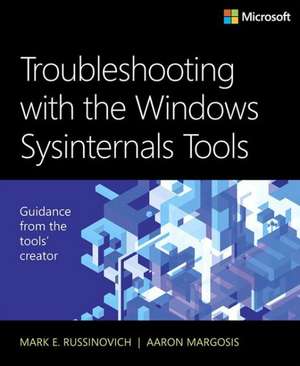
Troubleshooting with the Windows Sysinternals Tools
Autor Mark Russinovich, Mark E. Russinovich, Aaron Margosisen Limba Engleză Paperback – 17 oct 2016
Ecosistemul utilitarelor Sysinternals reprezintă coloana vertebrală a diagnosticării avansate în mediul Windows, iar Troubleshooting with the Windows Sysinternals Tools servește drept manualul tehnic definitiv pentru acest set de instrumente. Ne-a atras atenția în mod deosebit rigoarea cu care Mark Russinovich și Aaron Margosis explică funcționarea internă a sistemului prin prisma unor instrumente precum Process Explorer, Autoruns sau Process Monitor. Observăm o abordare extrem de practică, axată pe rezolvarea blocajelor, erorilor de sistem și problemelor de performanță prin date brute, nu prin supoziții. Structura volumului este una progresivă: după o introducere în conceptele de bază ale nucleului Windows (Part I), urmează un ghid detaliat de utilizare organizat pe funcționalități — de la securitate și Active Directory până la stocare și rețea (Part II). Punctul culminant este secțiunea 'The Case of the Unexplained' (Part III), unde autorii demonstrează cum pot fi descifrate mesaje de eroare criptice, crash-uri de sistem sau comportamente suspecte de tip malware. Cititorul care a aplicat ideile din Windows Performance Analysis Field Guide de Clint Huffman va găsi aici instrumentele necesare pentru a trece de la monitorizarea performanței la intervenția chirurgicală asupra proceselor și fișierelor. Această lucrare ocupă un loc central în opera lui Mark Russinovich. Dacă în romanele sale, Zero Day și Trojan Horse, acesta explorează vulnerabilitățile cibernetice dintr-o perspectivă narativă, iar în seria Windows Internals, Part 2 detaliază arhitectura teoretică, prezentul ghid reprezintă puntea de legătură aplicată. Este instrumentul prin care teoria arhitecturală devine o metodologie de depanare în timp real, oferind administratorilor de sistem o precizie tehnică pe care ghidurile generaliste nu o pot atinge.
Preț: 292.26 lei
Preț vechi: 365.32 lei
-20%
Carte disponibilă
Livrare economică 09-23 noiembrie
Livrare express 24-30 octombrie pentru 65.54 lei
Specificații
ISBN-10: 0735684448
Pagini: 688
Dimensiuni: 187 x 229 x 37 mm
Greutate: 1.04 kg
Ediția:2. Auflage
Editura: Microsoft Press
V-ar putea interesa
-
 Microsoft Copilot Pro Step by StepLisa Crosbie-20%Preț: 256.32 lei320.40 lei
 -
 BPF Performance ToolsBrendan Gregg-20%Preț: 398.39 lei497.99 lei
 -
 Understanding Software DynamicsRichard Sites-20%Preț: 310.88 lei388.60 lei
 -
 McFedries, P: Insider Power Techniques for Microsoft WindowsPaul McFedries-28%Preț: 112.61 lei156.99 lei
 -
 Microsoft Windows Operating System EssentialsT Carpenter-20%Preț: 189.88 lei237.34 lei
 -
 -20%Preț: 215.45 lei269.32 lei
 -
 Windows 11 All-in-One For Dummies, 2nd EditionCiprian Adrian Rusen-20%Preț: 214.39 lei267.99 lei
 -
 Windows 11 for Seniors for Dummies, 2nd EditionCurt Simmons-20%Preț: 118.48 lei148.10 lei
 -
 Microsoft Power Platform For DummiesJack A. Hyman-20%Preț: 198.49 lei248.11 lei
 -
 Teach Yourself VISUALLY Windows 11Paul McFedries-20%Preț: 165.76 lei207.19 lei
 -
 Microsoft 365 Office All-In-One for DummiesPaul McFedries-20%Preț: 175.66 lei219.57 lei
 -
 -20%Preț: 176.07 lei220.08 lei
 -
 Teach Yourself VISUALLY Microsoft 365Paul McFedries-20%Preț: 170.73 lei213.41 lei
 -
 -20%Preț: 144.71 lei180.89 lei
 -
 macOS Tahoe For DummiesHart-DavisPreț: 173.89 lei
 -
 -34%Preț: 325.41 lei496.70 lei
 -
 Troubleshooting Java, Second EditionLaurentiu Spilca-20%Preț: 337.14 lei421.42 lei
 -
 -35%Preț: 304.45 lei468.52 lei
 -
 -36%Preț: 283.89 lei440.71 lei
 -
 .NET 10 RevealedKajetan Duszy¿ski-20%Preț: 240.60 lei300.75 lei
De ce să citești această carte
Recomandăm această carte administratorilor de sistem și inginerilor de suport care doresc să stăpânească instrumentele standard ale industriei direct de la sursă. Veți câștiga o înțelegere profundă a modului în care Windows interacționează cu procesele și fișierele, învățând să utilizați suita Sysinternals pentru a rezolva probleme complexe de malware, performanță și erori de sistem pe care instrumentele standard de interfață nu le pot detecta.
Despre autor
Mark Russinovich este Technical Fellow la Microsoft, deținând cea mai înaltă poziție tehnică din cadrul companiei. Cofondator al Winternals și creator al celebrei suite de utilitare Sysinternals, s-a alăturat Microsoft în 2006. Expertiza sa vastă în arhitectura sistemelor de operare este reflectată atât în lucrări tehnice de referință, precum seria Windows Internals, Part 2, cât și în romane de ficțiune tehnologică ce abordează securitatea cibernetică. Este un colaborator constant al publicațiilor TechNet și Windows IT Pro Magazine, fiind recunoscut la nivel mondial drept una dintre cele mai autoritare voci în domeniul ingineriei software Windows.
Notă biografică
Aaron Margosis is a Principal Consultant with Microsoft's Global Cybersecurity Practice, where he has worked with security-conscious customers since 1999. Aaron specializes in Windows security, least-privilege, application compatibility, and the configuration of locked-down environments. He is a top speaker at Microsoft conferences, and created many of the tools commonly used by organizations implementing high-security environments, including LUA Buglight, Policy Analyzer, IE Zone Analyzer, LGPO.exe (Local Group Policy Object utility), and MakeMeAdmin, which can be downloaded through his blog (https://blogs.msdn.microsoft. or through two team blogs for which he is a primary author (https://blogs.technet. and https://blogs.technet..
Descriere scurtă
Cuprins
- Part I Getting started
- Chapter 1 Getting started with the Sysinternals utilities
- Chapter 2 Windows core concepts
- Chapter 3 Process Explorer
- Chapter 4 Autoruns
- Part II Usage guide
- Chapter 5 Process Monitor
- Chapter 6 ProcDump
- Chapter 7 PsTools
- Chapter 8 Process and diagnostic utilities
- Chapter 9 Security utilities
- Chapter 10 Active Directory utilities
- Chapter 11 Desktop utilities
- Chapter 12 File utilities
- Chapter 13 Disk utilities
- Chapter 14 Network and communication utilities
- Chapter 15 System information utilities
- Chapter 16 Miscellaneous utilities
- Part III Troubleshooting-"The Case of the
- Chapter 17 Error messages
- Chapter 18 Crashes
- Chapter 19 Hangs and sluggish performance
- Chapter 20 Malware
- Chapter 21 Understanding system behavior
- Chapter 22 Developer troubleshooting