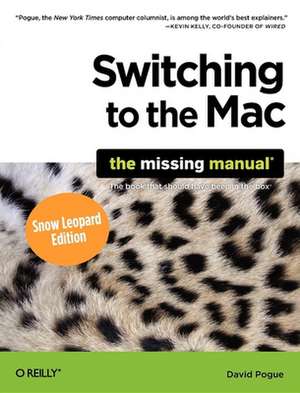
Switching to the Mac: The Missing Manual, Snow Leopard Edition
Autor David Pogueen Limba Engleză Paperback – 12 ian 2010
Learning to use a Mac is not a piece of cake, but once you do, the rewards are oh-so-much better. No viruses, worms, or spyware. No questionable firewalls, inefficient permissions, or other strange features. Just a beautiful machine with a thoroughly reliable system. Whether you're using Windows XP or Vista, we've got you covered.
If you're ready to take on Mac OS X Snow Leopard, the latest edition of this bestselling guide tells you everything you need to know:
- Transferring your stuff -- Moving photos, MP3s, and Microsoft Office documents is the easy part. This book gets you through the tricky things: extracting your email, address book, calendar, Web bookmarks, buddy list, desktop pictures, and MP3 files.
- Learning Snow Leopard -- Once you've moved into the Mac, a final task awaits: Learning your way around. Fortunately, you're in good hands with the author of Mac OS X: The Missing Manual, the #1 bestselling guide to the Macintosh.
Re-creating your software suite --Big-name programs (Word, Photoshop, Firefox, Dreamweaver, and so on) are available in both Mac and Windows versions, but hundreds of other programs are available only for Windows. This guide identifies the Mac equivalents and explains how to move your data to them.
Preț: 162.08 lei
Preț vechi: 202.60 lei
-20%
Puncte Express: 243
Carte disponibilă
Livrare economică 30 octombrie-13 noiembrie
Livrare prin curier în România Termenul estimat este afișat lângă disponibilitate.
Transport gratuit de la 400.00 lei Plată online sau ramburs, în funcție de opțiunile comenzii.
Retur gratuit în 14 zile Comandă securizată și suport în română.
Specificații
ISBN-13: 9780596804251
ISBN-10: 0596804253
Pagini: 648
Dimensiuni: 179 x 236 x 35 mm
Greutate: 1.03 kg
Ediția:Snow Leopard.
Editura: O'Reilly
ISBN-10: 0596804253
Pagini: 648
Dimensiuni: 179 x 236 x 35 mm
Greutate: 1.03 kg
Ediția:Snow Leopard.
Editura: O'Reilly
V-ar putea interesa
-
 Mac Basics In Simple StepsTom Myer-20%Preț: 81.68 lei102.11 lei
 -
 Windows 8 for the Over 50s In Simple StepsJoli Ballew-20%Preț: 79.37 lei99.20 lei
 -
 iMac For Dummies, 11th EditionMark L. Chambers-20%Preț: 140.90 lei176.12 lei
 -
 macOS Monterey for DummiesBob Levitus-20%Preț: 149.15 lei186.44 lei
 -
 macOS Sonoma for DummiesGuy Hart-Davis-20%Preț: 155.61 lei194.52 lei
 -
 Teach Yourself Visually Macbook Pro and Macbook AirGuy Hart-Davis-20%Preț: 164.36 lei205.45 lei
 -
 MacBook For Dummies, 10th EditionMark L. Chambers-20%Preț: 140.74 lei175.92 lei
 -
 Windows 11 All-in-One For Dummies, 2nd EditionCiprian Adrian Rusen-20%Preț: 214.39 lei267.99 lei
 -
 Windows 11 for Seniors for Dummies, 2nd EditionCurt Simmons-20%Preț: 118.48 lei148.10 lei
 -
 macOS Sequoia For DummiesG. Hart-DavisPreț: 211.39 lei
 -
 Microsoft 365 Office All-In-One for DummiesPaul McFedries-20%Preț: 174.69 lei218.37 lei
 -
 Teach Yourself VISUALLY Microsoft 365Paul McFedries-20%Preț: 170.73 lei213.41 lei
 -
 Macs For Seniors For Dummies, 5th EditionMark L. Chambers-20%Preț: 142.80 lei178.50 lei
 -
 macOS Tahoe For DummiesHart-DavisPreț: 173.96 lei
 -
 Get Started on your MacRod Lawton-40%Preț: 50.76 lei84.65 lei
 -
 Mac Tips, Tricks & Shortcuts in Easy StepsDrew Provan-20%Preț: 81.45 lei101.82 lei
 -
 macOS Big Sur in Easy StepsNick Vandome-20%Preț: 80.19 lei100.23 lei
 -
 MacBook in easy stepsNick Vandome-20%Preț: 79.70 lei99.62 lei
Cuprins
- The Missing Credits
- Introduction
- Part I: Welcome to Macintosh
- Chapter 1: How the Mac Is Different
- Chapter 2: Folders, Dock, & Windows
- Chapter 3: Files, Icons, & Spotlight
- Chapter 4: Documents, Programs, & Spaces
- Part II: Making the Move
- Chapter 5: Seven Ways to Transfer Your Files
- Chapter 6: Transferring Email & Contacts
- Chapter 7: Special Software, Special Problems
- Chapter 8: Windows on Macintosh
- Chapter 9: Hardware on the Mac
- Part III: Making Connections
- Chapter 10: Internet Setup & MobileMe
- Chapter 11: Mail & Address Book
- Chapter 12: Safari & iChat
- Part IV: Putting Down Roots
- Chapter 13: Accounts, Parental Controls, & Security
- Chapter 14: Networking, File Sharing, & Screen Sharing
- Chapter 15: System Preferences
- Chapter 16: The Free Programs
- Part V: Appendixes
- Installation & Troubleshooting
- The "Where'd It Go?" Dictionary
- The Master Mac OS X Secret Keystroke List
- Colophon
Descriere
Helps you make a transition from Windows to Mac. This guide offers you information you need to know: transferring your stuff - Moving photos, MP3s, and Microsoft Office documents is the easy part. It gets you through the tricky things: extracting your email, address book, calendar, Web bookmarks, buddy list, desktop pictures, and MP3 files.