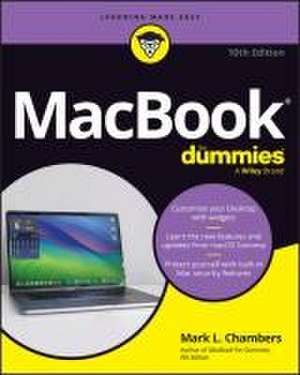
Macbook for Dummies
Autor Mark L Chambersen Limba Engleză Paperback – 12 iun 2024
Preț: 142.71 lei
Preț vechi: 178.39 lei
-20%
Puncte Express: 214
Carte disponibilă
Livrare economică 20 noiembrie-04 decembrie
Livrare express 05-11 noiembrie pentru 33.72 lei
Livrare prin curier în România Termenul estimat este afișat lângă disponibilitate.
Transport gratuit de la 400.00 lei Plată online sau ramburs, în funcție de opțiunile comenzii.
Retur gratuit în 14 zile Comandă securizată și suport în română.
Specificații
ISBN-13: 9781394252749
ISBN-10: 1394252749
Pagini: 432
Dimensiuni: 186 x 230 x 26 mm
Greutate: 0.59 kg
Ediția:10th edition
Editura: Wiley
Locul publicării:Hoboken, United States
ISBN-10: 1394252749
Pagini: 432
Dimensiuni: 186 x 230 x 26 mm
Greutate: 0.59 kg
Ediția:10th edition
Editura: Wiley
Locul publicării:Hoboken, United States
V-ar putea interesa
-
 iMac For Dummies, 11th EditionMark L. Chambers-20%Preț: 142.86 lei178.58 lei
 -
 Macs All-In-One for DummiesPaul McFedries-20%Preț: 249.73 lei312.15 lei
 -
 Teach Yourself Visually Macbook Pro and Macbook AirGuy Hart-Davis-20%Preț: 169.40 lei211.74 lei
 -
 Windows 11 All-in-One For Dummies, 2nd EditionCiprian Adrian Rusen-20%Preț: 214.39 lei267.99 lei
 -
 Windows 11 for Seniors for Dummies, 2nd EditionCurt Simmons-20%Preț: 118.48 lei148.10 lei
 -
 Computers for Seniors for DummiesFaithe Wempen-20%Preț: 98.90 lei123.63 lei
 -
 Apple Vision Pro For DummiesMarc Saltzman-20%Preț: 173.62 lei217.02 lei
 -
 macOS Sequoia For DummiesG. Hart-DavisPreț: 211.70 lei
 -
 Windows 11 For DummiesAlan Simpson-20%Preț: 99.21 lei124.01 lei
 -
 iPhone for Dummies, 2025 EditionGuy Hart-Davis-20%Preț: 199.96 lei249.95 lei
 -
 Microsoft 365 Office All-In-One for DummiesPaul McFedries-20%Preț: 174.95 lei218.68 lei
 -
 Microsoft 365 Word For Dummies, 2nd EditionDan Gookin-20%Preț: 141.41 lei176.77 lei
 -
 iPad For Seniors For Dummies, 2025-2026 EditionDwight Spivey-20%Preț: 145.60 lei182.00 lei
 -
 Macs For Seniors For Dummies, 5th EditionMark L. Chambers-20%Preț: 141.17 lei176.47 lei
 -
 ChatGPT For Dummies, 2nd EditionPam Baker-20%Preț: 97.96 lei122.44 lei
 -
 Microsoft 365 Excel For DummiesDavid H. Ringstrom-20%Preț: 143.21 lei179.02 lei
 -
 -20%Preț: 140.94 lei176.17 lei
 -
 iPhone For Dummies, 2026 EditionHart-DavisPreț: 138.25 lei
 -
 macOS Tahoe For DummiesHart-Davis-20%Preț: 147.87 lei184.84 lei
Notă biografică
Mark L. Chambers has been an author, computer consultant, and programmer for decades. He has written over 30 computer books, including MacBook® For Dummies, 9th Edition, Macs For Seniors For Dummies, 4th Edition, and iMac For Dummies, 10th Edition. Mark is currently a full-time author and tech editor-and an unabashed Mac fan.
Cuprins
Introduction 1
Part 1: Tie Myself Down with a Desktop? Preposterous! 5
Chapter 1: Hey, It Really Does Have Everything I Need 7
Chapter 2: Turning On Your Portable Powerhouse 27
Chapter 3: The MacBook Owner's Introduction to macOS Sonoma 39
Part 2: Shaking Hands with macOS Sonoma 83
Chapter 4: What's New in Sonoma? 85
Chapter 5: A Nerd's Guide to System Settings 91
Chapter 6: Searching Amidst MacBook Chaos 117
Chapter 7: Using Reminders, Notes, Notifications, Maps, and News 127
Part 3: Connecting and Communicating 145
Chapter 8: Let's Go on Safari! 147
Chapter 9: Expanding Your Horizons with iCloud 169
Chapter 10: Creating a Multiuser MacBook 177
Chapter 11: Working Well with Networks 197
Chapter 12: Hooking Up with Your World 215
Part 4: Living the iLife 223
Chapter 13: The Multimedia Joys of Music and TV 225
Chapter 14: Focusing on Photos 247
Chapter 15: Making Film History with iMovie 267
Chapter 16: Recording Your Hits with GarageBand 289
Part 5: Getting Productive and Maintaining Your MacBook 307
Chapter 17: Desktop Publishing with Pages 309
Chapter 18: Creating Spreadsheets with Numbers 323
Chapter 19: Building Presentations with Keynote 341
Chapter 20: When Good Mac Laptops Go Bad 355
Chapter 21: Tackling the Housekeeping 369
Part 6: The Part of Tens 383
Chapter 22: Ten (Plus) Laptop Rules to Follow 385
Chapter 23: Ten Things to Avoid Like the Plague 395
Index 403
Part 1: Tie Myself Down with a Desktop? Preposterous! 5
Chapter 1: Hey, It Really Does Have Everything I Need 7
Chapter 2: Turning On Your Portable Powerhouse 27
Chapter 3: The MacBook Owner's Introduction to macOS Sonoma 39
Part 2: Shaking Hands with macOS Sonoma 83
Chapter 4: What's New in Sonoma? 85
Chapter 5: A Nerd's Guide to System Settings 91
Chapter 6: Searching Amidst MacBook Chaos 117
Chapter 7: Using Reminders, Notes, Notifications, Maps, and News 127
Part 3: Connecting and Communicating 145
Chapter 8: Let's Go on Safari! 147
Chapter 9: Expanding Your Horizons with iCloud 169
Chapter 10: Creating a Multiuser MacBook 177
Chapter 11: Working Well with Networks 197
Chapter 12: Hooking Up with Your World 215
Part 4: Living the iLife 223
Chapter 13: The Multimedia Joys of Music and TV 225
Chapter 14: Focusing on Photos 247
Chapter 15: Making Film History with iMovie 267
Chapter 16: Recording Your Hits with GarageBand 289
Part 5: Getting Productive and Maintaining Your MacBook 307
Chapter 17: Desktop Publishing with Pages 309
Chapter 18: Creating Spreadsheets with Numbers 323
Chapter 19: Building Presentations with Keynote 341
Chapter 20: When Good Mac Laptops Go Bad 355
Chapter 21: Tackling the Housekeeping 369
Part 6: The Part of Tens 383
Chapter 22: Ten (Plus) Laptop Rules to Follow 385
Chapter 23: Ten Things to Avoid Like the Plague 395
Index 403