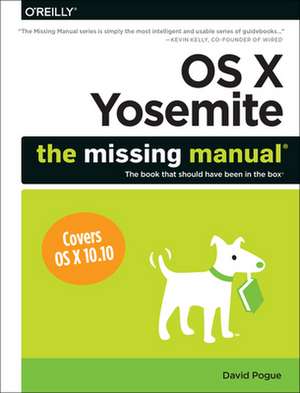
OS X Yosemite: The Missing Manual
Autor David Pogueen Limba Engleză Paperback – 27 ian 2015
Preț: 219.75 lei
Preț vechi: 274.68 lei
-20%
Puncte Express: 330
Carte disponibilă
Livrare economică 10-24 noiembrie
Livrare prin curier în România Termenul estimat este afișat lângă disponibilitate.
Transport gratuit de la 400.00 lei Plată online sau ramburs, în funcție de opțiunile comenzii.
Retur gratuit în 14 zile Comandă securizată și suport în română.
Specificații
ISBN-13: 9781491947166
ISBN-10: 1491947160
Pagini: 874
Dimensiuni: 181 x 231 x 48 mm
Greutate: 1.49 kg
Editura: O'Reilly
ISBN-10: 1491947160
Pagini: 874
Dimensiuni: 181 x 231 x 48 mm
Greutate: 1.49 kg
Editura: O'Reilly
V-ar putea interesa
-
 Mac Basics In Simple StepsTom Myer-20%Preț: 87.32 lei109.16 lei
 -
 My macOSJohn Ray-20%Preț: 140.06 lei175.08 lei
 -
 iMac For Dummies, 11th EditionMark L. Chambers-20%Preț: 140.90 lei176.12 lei
 -
 macOS Monterey for DummiesBob Levitus-20%Preț: 149.15 lei186.44 lei
 -
 macOS Sonoma for DummiesGuy Hart-Davis-20%Preț: 160.84 lei201.04 lei
 -
 Teach Yourself Visually Macbook Pro and Macbook AirGuy Hart-Davis-20%Preț: 164.36 lei205.45 lei
 -
 Macbook for DummiesMark L Chambers-20%Preț: 142.86 lei178.57 lei
 -
 macOS Sequoia For DummiesG. Hart-DavisPreț: 211.39 lei
 -
 Preț: 184.86 lei
 -
 Teach Yourself VISUALLY Microsoft 365Paul McFedries-20%Preț: 170.73 lei213.41 lei
 -
 iPad For Seniors For Dummies, 2025-2026 EditionDwight Spivey-20%Preț: 146.12 lei182.65 lei
 -
 Macs For Seniors For Dummies, 5th EditionMark L. Chambers-20%Preț: 142.80 lei178.50 lei
 -
 iPhone For Dummies, 2026 EditionHart-DavisPreț: 138.37 lei
 -
 macOS Tahoe For DummiesHart-Davis-20%Preț: 147.87 lei184.84 lei
 -
 macOS Sierra in Easy StepsNick Vandome-20%Preț: 77.57 lei96.96 lei
 -
 macOS Big Sur in Easy StepsNick Vandome-20%Preț: 80.19 lei100.23 lei
 -
 MacBook in easy stepsNick Vandome-20%Preț: 79.70 lei99.62 lei
Cuprins
The Missing Credits;
About the Author;
About the Creative Team;
Introduction;
The Mac Becomes an iPad;
What's New in Yosemite;
About This Book;
The Very Basics;
Part One: The OS X Desktop;
Chapter 1: Folders & Windows;
1.1 Getting into OS X;
1.2 Windows and How to Work Them;
1.3 The Four Window Views;
1.4 Icon View;
1.5 List View;
1.6 Column View;
1.7 Cover Flow View;
1.8 Yosemite's New Preview Pane;
1.9 Quick Look;
1.10 Finder Tabs;
1.11 Logging Out, Shutting Down;
1.12 Getting Help in OS X;
Chapter 2: Organizing Your Stuff;
2.1 The OS X Folder Structure;
2.2 Icon Names;
2.3 Selecting Icons;
2.4 Moving and Copying Icons;
2.5 Aliases: Icons in Two Places at Once;
2.6 Finder Tags;
2.7 The Trash;
2.8 Get Info;
2.9 Shortcut Menus, Action Menus;
Chapter 3: Spotlight;
3.1 The Spotlight Menu;
3.2 The Searching Window;
3.3 Customizing Spotlight;
3.4 Smart Folders;
Chapter 4: Dock, Desktop & Toolbars;
4.1 The Dock;
4.2 Setting Up the Dock;
4.3 Using the Dock;
4.4 The Finder Toolbar;
4.5 Designing Your Desktop;
4.6 Menulets: The Missing Manual;
Part Two: Programs in OS X;
Chapter 5: Documents, Programs & Mission Control;
5.1 The Mac App Store;
5.2 Other Ways to Get Mac Software;
5.3 Opening OS X Programs;
5.4 Launchpad;
5.5 Windows That Auto-Reopen;
5.6 The "Heads-Up" Program Switcher;
5.7 Full Screen Mode;
5.8 Mission Control: Death to Window Clutter;
5.9 Dashboard;
5.10 Exposé;
5.11 Hiding Programs the Old-Fashioned Way;
5.12 How Documents Know Their Parents;
5.13 Keyboard Control;
5.14 The Save and Open Dialog Boxes;
5.15 Auto Save and Versions;
5.16 iCloud Drive;
5.17 Cocoa and Carbon;
Chapter 6: Data: Typing, Dictating, Sharing & Backing Up;
6.1 The Mac Keyboard;
6.2 Notes on Right-Clicking;
6.3 Power Typing;
6.4 Dictation;
6.5 The Many Languages of OS X Text;
6.6 Data Detectors;
6.7 Moving Data Between Documents;
6.8 Exchanging Data with Other Macs;
6.9 Exchanging Data with Windows PCs;
6.10 The Share Button ( );
6.11 Time Machine;
Chapter 7: Mac+iPhone: Handoff, AirDrop & Continuity;
7.1 Mac as Speakerphone;
7.2 Texting from the Mac;
7.3 Instant Hotspot;
7.4 Handoff;
7.5 AirDrop;
Chapter 8: Windows on the Mac;
8.1 Boot Camp;
8.2 Windows in a Window;
Part Three: The Components of OS X;
Chapter 9: System Preferences;
9.1 The System Preferences Window;
9.2 Accessibility;
9.3 App Store;
9.4 Bluetooth;
9.5 CDs & DVDs;
9.6 Date & Time;
9.7 Desktop & Screen Saver;
9.8 Dictation & Speech;
9.9 Displays;
9.10 Dock;
9.11 Energy Saver;
9.12 Extensions;
9.13 General;
9.14 iCloud;
9.15 Internet Accounts;
9.16 Keyboard;
9.17 Language & Region;
9.18 Mission Control;
9.19 Mouse;
9.20 Network;
9.21 Notifications;
9.22 Parental Controls;
9.23 Printers & Scanners;
9.24 Security & Privacy;
9.25 Sharing;
9.26 Sound;
9.27 Spotlight;
9.28 Startup Disk;
9.29 Time Machine;
9.30 Trackpad;
9.31 Users & Groups;
Chapter 10: Notifications;
10.1 Insta-Respond to Bubbles;
10.2 Shutting Up the Bubbles;
10.3 The Notification Center;
Chapter 11: The Free Programs of OS X;
11.1 Your Free OS X Programs;
11.2 App Store;
11.3 Automator;
11.4 Calculator;
11.5 Calendar;
11.6 Chess;
11.7 Contacts;
11.8 Dashboard;
11.9 Dictionary;
11.10 DVD Player;
11.11 FaceTime;
11.12 Font Book;
11.13 Game Center;
11.14 GarageBand;
11.15 iBooks;
11.16 iChat;
11.17 Image Capture;
11.18 iPhoto/Photos;
11.19 iMovie;
11.20 iTunes;
11.21 Launchpad;
11.22 Mail;
11.23 Maps;
11.24 Messages;
11.25 Mission Control;
11.26 Notes;
11.27 Numbers, Pages;
11.28 Photo Booth;
11.29 Preview;
11.30 Reminders;
11.31 QuickTime Player;
11.32 Safari;
11.33 Stickies;
11.34 System Preferences;
11.35 TextEdit;
11.36 Time Machine;
11.37 Utilities: Your OS X Toolbox;
Chapter 12: Disks, Drives & iTunes;
12.1 Disks Today;
12.2 Disks In, Disks Out;
12.3 Startup Disks;
12.4 Erasing a Disk;
12.5 Burning CDs and DVDs;
12.6 iTunes: The Digital Jukebox;
Part Four: The Technologies of OS X;
Chapter 13: Accounts, Security & Gatekeeper;
13.1 Introducing Accounts;
13.2 Creating an Account;
13.3 Parental Controls;
13.4 Editing Accounts;
13.5 Setting Up the Login Process;
13.6 Signing In, Logging Out;
13.7 Sharing Across Accounts;
13.8 Fast User Switching;
13.9 OS X and Security;
13.10 Gatekeeper;
13.11 FileVault;
13.12 The Firewall;
13.13 The Password Assistant;
13.14 The Keychain;
13.15 Five Privacy Shields;
Chapter 14: Networking, File Sharing & AirDrop;
14.1 Wiring the Network;
14.2 File Sharing: Three Ways;
14.3 AirDrop;
14.4 Sharing Your Public Folder;
14.5 Sharing Any Folder;
14.6 Accessing Shared Files;
14.7 Networking with Windows;
14.8 Screen Sharing;
14.9 More Dialing In from the Road;
Chapter 15: Graphics, Fonts & Printing;
15.1 Mac Meets Printer;
15.2 Making the Printout;
15.3 Managing Printouts;
15.4 Printer Sharing;
15.5 Faxing;
15.6 PDF Files;
15.7 Fonts-and Font Book;
15.8 ColorSync;
15.9 Graphics in OS X;
15.10 Screen-Capture Keystrokes;
Chapter 16: Sound, Movies & Speech;
16.1 Playing Sounds;
16.2 Recording Sounds;
16.3 QuickTime Player;
16.4 The Mac Reads to You;
16.5 VoiceOver;
16.6 Ink: Handwriting Recognition;
Part Five: OS X Online;
Chapter 17: Internet Setup & iCloud;
17.1 The Best News You've Heard All Day;
17.2 Network Central and Multihoming;
17.3 Broadband Connections;
17.4 Cellular Modems;
17.5 Tethering (Personal Hotspot);
17.6 Dial-Up Modem Connections;
17.7 Switching Locations;
17.8 Internet Sharing;
17.9 Meet iCloud;
17.10 iCloud Drive;
17.11 Photos;
17.12 Find My Mac, Find My iPhone;
17.13 Back to My Mac;
17.14 Family Sharing;
17.15 More iCloud Features;
Chapter 18: Mail & Contacts;
18.1 Setting Up Mail;
18.2 Checking Your Mail;
18.3 Tailoring the Look of Mail;
18.4 Writing Messages;
18.5 Stationery;
18.6 Reading Email;
18.7 VIPs;
18.8 The Anti-Spam Toolkit;
18.9 Contacts (Address Book);
Chapter 19: Safari;
19.1 The Unified Address/Search Bar;
19.2 Bookmarks, Favorites, and Top Sites;
19.3 Full Screen and Gestures;
19.4 Customizing the Toolbar;
19.5 Saved Passwords: The iCloud Keychain;
19.6 15 Tips for Better Surfing;
19.7 Tabbed Browsing;
19.8 Privacy and Security Features;
Chapter 20: Messages;
20.1 Welcome to Messages;
20.2 Setting Up Messages;
20.3 Let the Chat Begin;
20.4 Text Chatting;
20.5 Audio Chats;
20.6 Video Chats;
20.7 Sharing Your Screen;
Chapter 21: FTP, SSH & VPN;
21.1 FTP;
21.2 Connecting from the Road;
21.3 Remote Access with SSH;
21.4 Virtual Private Networking;
Part Six: Appendixes;
Installing OS X Yosemite;
Hardware Requirements;
Psychological Requirements;
The Standard Installation;
The Setup Assistant;
The Homemade Installer Disk;
Troubleshooting;
Minor Eccentric Behavior;
Frozen Programs (Force Quitting);
Recovery Mode: Three Emergency Disks;
Application Won't Open;
Startup Problems;
Fixing the Disk;
Where to Get Troubleshooting Help;
The Windows-to-Mac Dictionary;
About [this program];
The Master OS X Secret Keystroke List;
Startup Keystrokes;
Colophon;
About the Author;
About the Creative Team;
Introduction;
The Mac Becomes an iPad;
What's New in Yosemite;
About This Book;
The Very Basics;
Part One: The OS X Desktop;
Chapter 1: Folders & Windows;
1.1 Getting into OS X;
1.2 Windows and How to Work Them;
1.3 The Four Window Views;
1.4 Icon View;
1.5 List View;
1.6 Column View;
1.7 Cover Flow View;
1.8 Yosemite's New Preview Pane;
1.9 Quick Look;
1.10 Finder Tabs;
1.11 Logging Out, Shutting Down;
1.12 Getting Help in OS X;
Chapter 2: Organizing Your Stuff;
2.1 The OS X Folder Structure;
2.2 Icon Names;
2.3 Selecting Icons;
2.4 Moving and Copying Icons;
2.5 Aliases: Icons in Two Places at Once;
2.6 Finder Tags;
2.7 The Trash;
2.8 Get Info;
2.9 Shortcut Menus, Action Menus;
Chapter 3: Spotlight;
3.1 The Spotlight Menu;
3.2 The Searching Window;
3.3 Customizing Spotlight;
3.4 Smart Folders;
Chapter 4: Dock, Desktop & Toolbars;
4.1 The Dock;
4.2 Setting Up the Dock;
4.3 Using the Dock;
4.4 The Finder Toolbar;
4.5 Designing Your Desktop;
4.6 Menulets: The Missing Manual;
Part Two: Programs in OS X;
Chapter 5: Documents, Programs & Mission Control;
5.1 The Mac App Store;
5.2 Other Ways to Get Mac Software;
5.3 Opening OS X Programs;
5.4 Launchpad;
5.5 Windows That Auto-Reopen;
5.6 The "Heads-Up" Program Switcher;
5.7 Full Screen Mode;
5.8 Mission Control: Death to Window Clutter;
5.9 Dashboard;
5.10 Exposé;
5.11 Hiding Programs the Old-Fashioned Way;
5.12 How Documents Know Their Parents;
5.13 Keyboard Control;
5.14 The Save and Open Dialog Boxes;
5.15 Auto Save and Versions;
5.16 iCloud Drive;
5.17 Cocoa and Carbon;
Chapter 6: Data: Typing, Dictating, Sharing & Backing Up;
6.1 The Mac Keyboard;
6.2 Notes on Right-Clicking;
6.3 Power Typing;
6.4 Dictation;
6.5 The Many Languages of OS X Text;
6.6 Data Detectors;
6.7 Moving Data Between Documents;
6.8 Exchanging Data with Other Macs;
6.9 Exchanging Data with Windows PCs;
6.10 The Share Button ( );
6.11 Time Machine;
Chapter 7: Mac+iPhone: Handoff, AirDrop & Continuity;
7.1 Mac as Speakerphone;
7.2 Texting from the Mac;
7.3 Instant Hotspot;
7.4 Handoff;
7.5 AirDrop;
Chapter 8: Windows on the Mac;
8.1 Boot Camp;
8.2 Windows in a Window;
Part Three: The Components of OS X;
Chapter 9: System Preferences;
9.1 The System Preferences Window;
9.2 Accessibility;
9.3 App Store;
9.4 Bluetooth;
9.5 CDs & DVDs;
9.6 Date & Time;
9.7 Desktop & Screen Saver;
9.8 Dictation & Speech;
9.9 Displays;
9.10 Dock;
9.11 Energy Saver;
9.12 Extensions;
9.13 General;
9.14 iCloud;
9.15 Internet Accounts;
9.16 Keyboard;
9.17 Language & Region;
9.18 Mission Control;
9.19 Mouse;
9.20 Network;
9.21 Notifications;
9.22 Parental Controls;
9.23 Printers & Scanners;
9.24 Security & Privacy;
9.25 Sharing;
9.26 Sound;
9.27 Spotlight;
9.28 Startup Disk;
9.29 Time Machine;
9.30 Trackpad;
9.31 Users & Groups;
Chapter 10: Notifications;
10.1 Insta-Respond to Bubbles;
10.2 Shutting Up the Bubbles;
10.3 The Notification Center;
Chapter 11: The Free Programs of OS X;
11.1 Your Free OS X Programs;
11.2 App Store;
11.3 Automator;
11.4 Calculator;
11.5 Calendar;
11.6 Chess;
11.7 Contacts;
11.8 Dashboard;
11.9 Dictionary;
11.10 DVD Player;
11.11 FaceTime;
11.12 Font Book;
11.13 Game Center;
11.14 GarageBand;
11.15 iBooks;
11.16 iChat;
11.17 Image Capture;
11.18 iPhoto/Photos;
11.19 iMovie;
11.20 iTunes;
11.21 Launchpad;
11.22 Mail;
11.23 Maps;
11.24 Messages;
11.25 Mission Control;
11.26 Notes;
11.27 Numbers, Pages;
11.28 Photo Booth;
11.29 Preview;
11.30 Reminders;
11.31 QuickTime Player;
11.32 Safari;
11.33 Stickies;
11.34 System Preferences;
11.35 TextEdit;
11.36 Time Machine;
11.37 Utilities: Your OS X Toolbox;
Chapter 12: Disks, Drives & iTunes;
12.1 Disks Today;
12.2 Disks In, Disks Out;
12.3 Startup Disks;
12.4 Erasing a Disk;
12.5 Burning CDs and DVDs;
12.6 iTunes: The Digital Jukebox;
Part Four: The Technologies of OS X;
Chapter 13: Accounts, Security & Gatekeeper;
13.1 Introducing Accounts;
13.2 Creating an Account;
13.3 Parental Controls;
13.4 Editing Accounts;
13.5 Setting Up the Login Process;
13.6 Signing In, Logging Out;
13.7 Sharing Across Accounts;
13.8 Fast User Switching;
13.9 OS X and Security;
13.10 Gatekeeper;
13.11 FileVault;
13.12 The Firewall;
13.13 The Password Assistant;
13.14 The Keychain;
13.15 Five Privacy Shields;
Chapter 14: Networking, File Sharing & AirDrop;
14.1 Wiring the Network;
14.2 File Sharing: Three Ways;
14.3 AirDrop;
14.4 Sharing Your Public Folder;
14.5 Sharing Any Folder;
14.6 Accessing Shared Files;
14.7 Networking with Windows;
14.8 Screen Sharing;
14.9 More Dialing In from the Road;
Chapter 15: Graphics, Fonts & Printing;
15.1 Mac Meets Printer;
15.2 Making the Printout;
15.3 Managing Printouts;
15.4 Printer Sharing;
15.5 Faxing;
15.6 PDF Files;
15.7 Fonts-and Font Book;
15.8 ColorSync;
15.9 Graphics in OS X;
15.10 Screen-Capture Keystrokes;
Chapter 16: Sound, Movies & Speech;
16.1 Playing Sounds;
16.2 Recording Sounds;
16.3 QuickTime Player;
16.4 The Mac Reads to You;
16.5 VoiceOver;
16.6 Ink: Handwriting Recognition;
Part Five: OS X Online;
Chapter 17: Internet Setup & iCloud;
17.1 The Best News You've Heard All Day;
17.2 Network Central and Multihoming;
17.3 Broadband Connections;
17.4 Cellular Modems;
17.5 Tethering (Personal Hotspot);
17.6 Dial-Up Modem Connections;
17.7 Switching Locations;
17.8 Internet Sharing;
17.9 Meet iCloud;
17.10 iCloud Drive;
17.11 Photos;
17.12 Find My Mac, Find My iPhone;
17.13 Back to My Mac;
17.14 Family Sharing;
17.15 More iCloud Features;
Chapter 18: Mail & Contacts;
18.1 Setting Up Mail;
18.2 Checking Your Mail;
18.3 Tailoring the Look of Mail;
18.4 Writing Messages;
18.5 Stationery;
18.6 Reading Email;
18.7 VIPs;
18.8 The Anti-Spam Toolkit;
18.9 Contacts (Address Book);
Chapter 19: Safari;
19.1 The Unified Address/Search Bar;
19.2 Bookmarks, Favorites, and Top Sites;
19.3 Full Screen and Gestures;
19.4 Customizing the Toolbar;
19.5 Saved Passwords: The iCloud Keychain;
19.6 15 Tips for Better Surfing;
19.7 Tabbed Browsing;
19.8 Privacy and Security Features;
Chapter 20: Messages;
20.1 Welcome to Messages;
20.2 Setting Up Messages;
20.3 Let the Chat Begin;
20.4 Text Chatting;
20.5 Audio Chats;
20.6 Video Chats;
20.7 Sharing Your Screen;
Chapter 21: FTP, SSH & VPN;
21.1 FTP;
21.2 Connecting from the Road;
21.3 Remote Access with SSH;
21.4 Virtual Private Networking;
Part Six: Appendixes;
Installing OS X Yosemite;
Hardware Requirements;
Psychological Requirements;
The Standard Installation;
The Setup Assistant;
The Homemade Installer Disk;
Troubleshooting;
Minor Eccentric Behavior;
Frozen Programs (Force Quitting);
Recovery Mode: Three Emergency Disks;
Application Won't Open;
Startup Problems;
Fixing the Disk;
Where to Get Troubleshooting Help;
The Windows-to-Mac Dictionary;
About [this program];
The Master OS X Secret Keystroke List;
Startup Keystrokes;
Colophon;