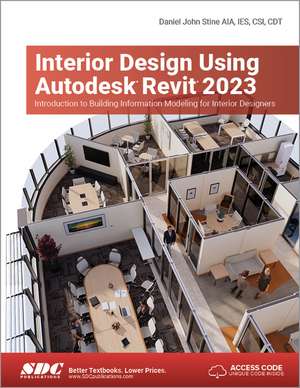
Interior Design Using Autodesk Revit 2023: Introduction to Building Information Modeling for Interior Designers
Autor Daniel John Stineen Limba Engleză Paperback – 28 sep 2022
Ecosistemul Building Information Modeling (BIM) a devenit standardul industrial, iar Interior Design Using Autodesk Revit 2023 se concentrează strict pe instrumentele și tehnicile esențiale pentru designerii de interior. În loc să piardă timpul cu elemente structurale complexe, volumul ne introduce direct într-un flux de lucru optimizat: primim un model arhitectural gata configurat (pereți exteriori, grinzi, acoperiș) și ne concentrăm pe compartimentarea și amenajarea unui birou de avocatură pe două niveluri. Considerăm că această abordare este ideală pentru cei care doresc să treacă rapid de la concept la execuție tehnică.
Structura celor 20 de capitole este riguros organizată pentru a reflecta etapele unui proiect real. Descoperim aici o progresie logică, de la gestionarea materialelor și crearea planurilor de pardoseală, până la detalii avansate de mobilier custom, cum este recepția, și configurarea sistemelor de iluminat pentru randări fotorealiste. Complementar volumului Design Integration Using Autodesk Revit 2023, care oferă o perspectivă multidisciplinară asupra BIM (arhitectură, structură, MEP), titlul de față izolează nevoile specifice ale designerului, permițând o aprofundare a detaliilor de finisaj și a programării spațiilor.
Daniel John Stine își consolidează poziția de expert în formare tehnică, integrând în acest curs peste 850 de pagini de instrucțiuni și aproape cinci ore de tutoriale video. Față de lucrarea sa anterioară, Residential Design Using Autodesk Revit 2025, care se adresa începătorilor absoluți în zona rezidențială, volumul curent ridică ștacheta către mediul comercial și profesional. Este o resursă tehnică ce nu se limitează la modelarea 3D, ci abordează și aspecte critice de management de proiect, precum extragerea tabelelor de cantități (schedules) și utilizarea funcției de „worksharing” pentru echipele care colaborează pe același model.
Preț: 505.49 lei
Preț vechi: 631.87 lei
-20%
Carte disponibilă
Livrare economică 06-20 noiembrie
Livrare express 22-28 octombrie pentru 82.20 lei
Specificații
ISBN-10: 1630575135
Pagini: 850
Dimensiuni: 210 x 280 x 46 mm
Greutate: 1.9 kg
Ediția:1
Editura: SDC Publications
Colecția SDC Publications
V-ar putea interesa
-
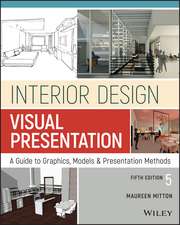 Interior Design Visual PresentationMaureen MittonPreț: 417.06 lei
 -
 -20%Preț: 401.63 lei502.04 lei
 -
 Interior Design CourseTomris TangazPreț: 143.13 lei
 -
 Revit Architecture 2022 for DesignersDouglas R. Seidler-32%Preț: 396.10 lei584.42 lei
 -
 -20%Preț: 467.82 lei584.77 lei
 -
 -20%Preț: 470.65 lei588.31 lei
 -
 -20%Preț: 448.95 lei561.18 lei
 -
 Commercial Design Using Autodesk Revit 2023Daniel John Stine-20%Preț: 495.40 lei619.26 lei
 -
 Commercial Design Using Autodesk Revit 2024Daniel John Stine-20%Preț: 498.32 lei622.91 lei
 -
 -20%Preț: 561.96 lei702.45 lei
 -
 -20%Preț: 533.87 lei667.33 lei
 -
 SketchUp 2024 for Interior Designers: Studio CompanionMaria Delgado-20%Preț: 429.80 lei537.25 lei
 -
 Residential Design Using Autodesk Revit 2025Daniel John Stine-20%Preț: 521.32 lei651.66 lei
 -
 Commercial Design Using Autodesk Revit 2025Daniel John Stine-20%Preț: 521.34 lei651.68 lei
 -
 -20%Preț: 582.95 lei728.68 lei
 -
 -20%Preț: 520.57 lei650.70 lei
 -
 Revit Architecture 2024 for DesignersDouglas R. Seidler-28%Preț: 421.59 lei585.95 lei
 -
 Revit Architecture 2026 for DesignersDouglas R. Seidler-26%Preț: 421.38 lei567.47 lei
Public țintă
Professional Training and Undergraduate AdvancedDe ce să citești această carte
Recomandăm această carte studenților și profesioniștilor care vor să stăpânească Revit din perspectiva designului de interior. Câștigul major este trecerea de la simpla modelare la un flux de lucru BIM complet, susținut de 100 de tutoriale video. Este instrumentul perfect pentru a învăța cum să transformi o structură brută într-un spațiu de birouri complet echipat, pregătit pentru prezentări fotorealiste și documentație tehnică de execuție.
Descriere scurtă
The overall premise of the book is to help you learn Revit while developing the interior of a two story law office. At the start of the book you are provided an architectural model with established columns, beams, exterior walls, minimal interior walls and roofs in which to work. This allows more emphasis to be placed on interior design rather than primary architectural elements. The chapters' chronology generally follows the typical design process. You will find this book helps you more accurately and efficiently develop your design ideas and skills.
The first chapter introduces you to Revit, Building Information Modeling (BIM) and the basics of opening, saving and creating a new project. The second provides a quick introduction to modeling basic elements in Revit including walls, doors, windows and more. This chapter is designed to show you how powerful Revit truly is and to get you excited for the rest of the book.
The remainder of the book is spent developing the interior space of the law office with an established space program. You will learn how to view and navigate within the provided 3D architectural model, manage and create materials and develop spaces with walls, doors and windows. Once all the spaces are added to the model, several areas are explored and used as the basis to cover Revit commands and workflows.
At the end of this tutorial, you will be able to model floor finishes, ceilings with soffits, casework, custom reception desk, restrooms, furniture and light fixtures. Additional features such as tags, schedules and photorealistic rendering will be covered.
About the Videos
Access to nearly 100 videos, almost five hours of content, are also included with your purchase of this book. These videos break down each topic into several short videos so that you can easily navigate to a specific aspect of a tool or feature in Autodesk Revit. This makes the videos both a powerful learning tool and convenient video reference. The videos make it easy to see the menu selections and will make learning Revit straightforward and simple. It's like having the author by your side showing you exactly how to use all the major tools in Autodesk Revit.