
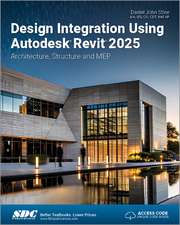
Design Integration Using Autodesk Revit 2024: Architecture, Structure and MEP
Autor Daniel John Stineen Limba Engleză Paperback – 18 aug 2023
Ecosistemul Autodesk Revit 2024 este abordat aici în toată complexitatea sa, oferind o perspectivă integrată asupra fluxului de lucru BIM (Building Information Modeling). În Design Integration Using Autodesk Revit 2024, descoperim o metodologie riguroasă care unifică disciplinele de arhitectură, structuri și instalații (MEP) într-un singur model informațional. Considerăm că forța acestui volum rezidă în abordarea practică: nu se limitează la prezentarea instrumentelor, ci ghidează cititorul prin construcția virtuală a unui sediu de birouri, de la primele planuri de nivel până la randări fotorealiste și seturi complete de documente pentru șantier.
Structura progresivă este evidentă încă din primele capitole dedicate fundamentelor interfeței, continuând natural spre sisteme structurale, circulație verticală și detaliere. Spre deosebire de Interior Design Using Autodesk Revit 2024, care se concentrează strict pe amenajări interioare într-un spațiu deja existent, acest volum oferă o viziune de ansamblu, incluzând modelarea rețelelor de conducte, a sistemelor electrice și a topografiei terenului. Dacă Autodesk Revit 2024 Black Book v-a oferit cadrul teoretic și fluxurile de lucru inițiale, lucrarea lui Daniel John Stine oferă instrumentele practice și rigoarea necesară pentru a coordona un proiect multidisciplinar.
În contextul operei sale, această carte reprezintă puntea de legătură între volumele specializate, precum Residential Design Using Autodesk Revit 2025 sau Commercial Design Using Autodesk Revit 2025, fiind cea mai cuprinzătoare resursă pentru înțelegerea modului în care diferitele specialități interacționează în interiorul aceluiași software. Cele aproape cinci ore de conținut video incluse transformă lectura dintr-un exercițiu teoretic într-o experiență de învățare asistată, facilitând asimilarea rapidă a tehnicilor de lucru profesionale.
Preț: 561.96 lei
Preț vechi: 702.45 lei
-20%
Carte disponibilă
Livrare economică 07-21 noiembrie
Livrare express 24-30 octombrie pentru 72.63 lei
Specificații
ISBN-10: 1630575844
Pagini: 900
Dimensiuni: 210 x 280 x 40 mm
Greutate: 1.58 kg
Ediția:1
Editura: SDC Publications
Colecția SDC Publications
V-ar putea interesa
-
 Design-Tech: Building Science for ArchitectsJason Alread-8%Preț: 496.29 lei539.45 leiRecomandat
 -
 -20%Preț: 401.63 lei502.04 lei
 -
 -20%Preț: 467.82 lei584.77 lei
 -
 -20%Preț: 505.49 lei631.87 lei
 -
 -20%Preț: 448.95 lei561.18 lei
 -
 Commercial Design Using Autodesk Revit 2023Daniel John Stine-20%Preț: 495.40 lei619.26 lei
 -
 Commercial Design Using Autodesk Revit 2024Daniel John Stine-20%Preț: 498.32 lei622.91 lei
 -
 -20%Preț: 533.87 lei667.33 lei
 -
 -20%Preț: 459.10 lei573.87 lei
 -
 -20%Preț: 519.21 lei649.02 lei
 -
 SketchUp 2024 for Interior Designers: Studio CompanionMaria Delgado-20%Preț: 429.80 lei537.25 lei
 -
 Residential Design Using Autodesk Revit 2025Daniel John Stine-20%Preț: 521.32 lei651.66 lei
 -
 Commercial Design Using Autodesk Revit 2025Daniel John Stine-20%Preț: 521.34 lei651.68 lei
 -
 -20%Preț: 582.95 lei728.68 lei
 -
 -20%Preț: 520.57 lei650.70 lei
 -
 -20%Preț: 371.28 lei464.10 lei
 -
 Revit Architecture 2024 for DesignersDouglas R. Seidler-28%Preț: 421.59 lei585.95 lei
 -
 Revit Architecture 2026 for DesignersDouglas R. Seidler-26%Preț: 421.38 lei567.47 lei
Public țintă
Professional Practice & Development, Professional Training, and Undergraduate AdvancedDe ce să citești această carte
Recomandăm această carte profesioniștilor și studenților care doresc să stăpânească interoperabilitatea în BIM. Cititorul câștigă o viziune clară asupra modului în care arhitectura, structura și instalațiile se integrează tehnic în Revit 2024. Este un instrument esențial pentru oricine dorește să coordoneze proiecte complexe, beneficiind de tutoriale video detaliate și un proiect practic complet, parcurs pas cu pas.
Descriere scurtă
Throughout the book you develop a two story law office. The drawings start with the floor plans and develop all the way to photo-realistic renderings similar to the one on the cover of this book. Along the way the building’s structure, ductwork, plumbing and electrical (power and lighting) are modeled. By the end, you will have a thorough knowledge of many of the Revit basics needed to be productive in a classroom or office environment. Even if you will only be working with one component of Revit in your chosen profession, this book will give you important knowledge on how the other disciplines will be doing their work and valuable insight into the overall process.
The first four chapters cover many of the Revit basics needed to successfully and efficiently work with the software. Once the fundamentals are covered, the remaining chapters walk you through a building project which is started from scratch so nothing is taken for granted by you or the author.
About Bonus Material
Each book comes with access to the following:
- Extensive video instruction shows you how to use all the major tools in Autodesk Revit.
- Bonus chapters include an introduction to Revit Families, Rooms and Spaces, Lighting Design, Autodesk Showcase and much more.
- A bonus draft copy of the Roof Study Workbook which includes information on controlling the top surface of the roof in Revit
About the Videos
Access to nearly 100 videos, almost five hours of content, are also included with your purchase of this book. These videos break down each topic into several short videos so that you can easily navigate to a specific aspect of a tool or feature in Autodesk Revit. This makes the videos both a powerful learning tool and convenient video reference. The videos make it easy to see the menu selections and will make learning Revit straightforward and simple. It's like having the author by your side showing you exactly how to use all the major tools in Autodesk Revit.