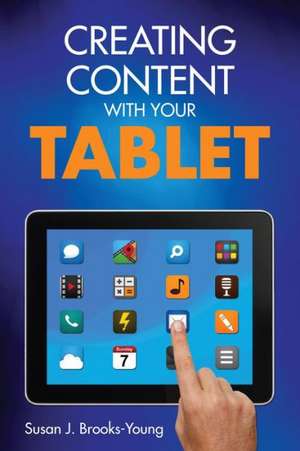
Creating Content With Your Tablet
Autor Susan J. Brooks-Youngen Limba Engleză Paperback – 14 ian 2014
- Confidently plan and manage mobile technology activities across grade levels
- Explore new uses and applications for multiple devices
- Use rubrics and checklists to evaluate appropriate, cross-platform educational apps
- Manage content-specific tablet use in learning centers or small groups
- Tap student ingenuity and improve critical thinking skills
Preț: 225.22 lei
Puncte Express: 338
Carte tipărită la comandă
Livrare economică 28 decembrie 26 - 11 ianuarie 27
Livrare prin curier în România Termenul estimat este afișat lângă disponibilitate.
Transport gratuit de la 400.00 lei Plată online sau ramburs, în funcție de opțiunile comenzii.
Retur gratuit în 14 zile Comandă securizată și suport în română.
Specificații
ISBN-13: 9781452271835
ISBN-10: 1452271836
Pagini: 136
Ilustrații: black & white line drawings
Dimensiuni: 152 x 229 x 8 mm
Greutate: 0.21 kg
Ediția:1
Editura: Corwin
Locul publicării:Thousand Oaks, United States
ISBN-10: 1452271836
Pagini: 136
Ilustrații: black & white line drawings
Dimensiuni: 152 x 229 x 8 mm
Greutate: 0.21 kg
Ediția:1
Editura: Corwin
Locul publicării:Thousand Oaks, United States
V-ar putea interesa
-
 Design for How People LearnJulie DirksenPreț: 271.84 lei
-
 Preț: 103.37 lei
-
 Good Practice in Science Teaching: What Research Has to SayJonathan Osborne-24%Preț: 213.05 lei281.13 lei
-
 Preț: 482.03 lei
-
 WikiworldJuha SuorantaPreț: 237.71 lei
-
 Technology Leadership for School ImprovementRosemary Papa-23%Preț: 949.05 lei1232.53 lei
-
 Empowering Students With TechnologyAlan NovemberPreț: 245.18 lei
-
 Teaching Digital NativesMarc R. PrenskyPreț: 296.81 lei
-
 Preț: 300.31 lei
-
 Digital Learning for All, NowJonathan P. Costa Sr.Preț: 283.15 lei
-
 Apps for LearningHarry J. DickensPreț: 212.03 lei
-
 Worlds of MakingLaura FlemingPreț: 94.84 lei
-
 -24%Preț: 186.37 lei245.05 lei
Recenzii
"Very practical for a classroom teacher. The discussion questions at the end of each chapter are excellent for a book study or district that is moving towards tablet implementation."
"The planning guide in Chapter 8 was especially helpful. It will provide a scaffold for teachers to help them plan lessons while at the same time reminding them of quality lesson design principles."
"Creating Content With Your Tablet provides educators with simple, easy steps to implement tablet technology with the Common Core Standards. I am encouraged to try the apps in this book. It makes the connection between modern technology and what teachers are already doing in the classroom seem seamless. "
“Susan is a master teacher whom I’ve personally watched as she guided experienced and inexperienced teachers and helped them learn how to incorporate tablet technology very effectively into a preschool environment. Creating Content With Your Tablet is just one more top-notch example of Susan’s skill as a teacher who provides clear, precise, targeted instruction with living examples for those who are trying to implement a new teaching tool. The Common Core State Standards for Literacy place a strong emphasis on content creation on the part of students. Teachers, with the help of authors like Susan Brooks-Young, will be empowered when they read her book to lead students to the level of content creation.”
Cuprins
About the Author
Publisher's Acknowledgments
Introduction
1. There's an App for That!
Apps - An Overview
How Will Apps Be Used?
Finding the Right App
App and File Management
Discussion Points
Additional Resources
2. Photography and Tablets
Visual Literacy
Camera Basics
Camera Apps
Strategies for Classroom Use
Activity Suggestions
Discussion Points
Additional Resources
3. Video and Tablets
Consuming and Creating Video
Video Basics
Video Apps
Strategies for Classroom Use
Activity Suggestions
Discussion Points
Additional Resources
4. Using Tablets to Enhance Speaking and Listening
Listening and Speaking - Skills for Life
Audio Recording Basics
Apps for Recording Audio
Strategies for Classroom Use
Activity Suggestions
Discussion Points
Additional Resources
5. Student Authors - Compose and Publish
The Case for Student Writing
ePublishing - An Overview
Tools and Apps for Writing and Publishing
Tools and Apps for Publishing eBooks
Apps for Reading eBooks
Strategies for Classroom Use
Activity Suggestions
Discussion Points
Additional Resources
6. QR Codes in the Classroom
QR Codes Defined
Generating QR Codes
Scanning QR Codes
Strategies for Classroom Use
Activity Suggestions
Discussion Points
Additional Resources
7. More Ideas for Creating Content
Drawing
Screencasting
Animating
Discussion Points
Additional Resources
8. Incorporating Tablets Into Instruction
What's an Apptivity?
Apptivity Planning
In Summary
Discussion Points
Additional Resources
Publisher's Acknowledgments
Introduction
1. There's an App for That!
Apps - An Overview
How Will Apps Be Used?
Finding the Right App
App and File Management
Discussion Points
Additional Resources
2. Photography and Tablets
Visual Literacy
Camera Basics
Camera Apps
Strategies for Classroom Use
Activity Suggestions
Discussion Points
Additional Resources
3. Video and Tablets
Consuming and Creating Video
Video Basics
Video Apps
Strategies for Classroom Use
Activity Suggestions
Discussion Points
Additional Resources
4. Using Tablets to Enhance Speaking and Listening
Listening and Speaking - Skills for Life
Audio Recording Basics
Apps for Recording Audio
Strategies for Classroom Use
Activity Suggestions
Discussion Points
Additional Resources
5. Student Authors - Compose and Publish
The Case for Student Writing
ePublishing - An Overview
Tools and Apps for Writing and Publishing
Tools and Apps for Publishing eBooks
Apps for Reading eBooks
Strategies for Classroom Use
Activity Suggestions
Discussion Points
Additional Resources
6. QR Codes in the Classroom
QR Codes Defined
Generating QR Codes
Scanning QR Codes
Strategies for Classroom Use
Activity Suggestions
Discussion Points
Additional Resources
7. More Ideas for Creating Content
Drawing
Screencasting
Animating
Discussion Points
Additional Resources
8. Incorporating Tablets Into Instruction
What's an Apptivity?
Apptivity Planning
In Summary
Discussion Points
Additional Resources
Descriere
This practical resource enables teachers to confidently plan and manage effective mobile technology lessons, with step-by-step instructions for digital photography, video, ePublishing and more so that students are transformed into content creators.