Cantitate/Preț
Produs

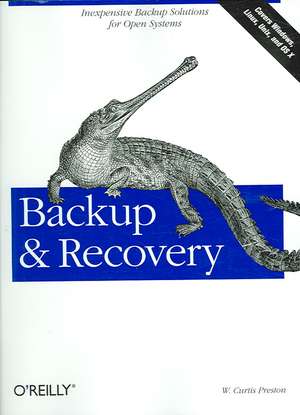
Backup & Recovery

Autor W. Curtis Preston
en Limba Engleză Paperback – 6 feb 2007

Ecosistemul tehnic analizat în Backup & Recovery este unul vast, axat pe soluții practice și accesibile pentru protecția datelor. Găsim în această carte o documentație extinsă pentru utilitarele fundamentale de sistem, precum tar, dump, cpio, ntbackup sau rsync, dar și pentru produse open source complexe care automatizează aceste procese, cum sunt AMANDA, Bacula sau BackupPC. Autorul W. Curtis Preston propune o abordare care prioritizează independența de soluțiile comerciale costisitoare, oferind alternative robuste pentru Unix, Linux, Windows și Mac OS X. Subliniem importanța secțiunilor dedicate procedurilor de „bare metal recovery”, esențiale pentru restabilirea completă a sistemelor AIX, HP-UX, Solaris sau VMWare direct pe hardware-ul original sau nou. Cartea nu se limitează doar la fișiere, ci extinde aplicabilitatea tehnicilor asupra bazelor de date critice, precum MySQL, PostgreSQL, Oracle și SQL-Server. Abordarea diferă de Pro Data Backup and Recovery prin faptul că este mai puțin abstractă și mult mai aplicabilă; în timp ce Steven Nelson se concentrează pe arhitecturi de mari dimensiuni și software comercial precum NetBackup, volumul de față oferă instrucțiuni concrete pentru implementarea unor sisteme de protecție folosind instrumente gratuite și disponibile imediat. Merită menționat că textul include și o analiză a tehnologiilor moderne de stocare, explicând concepte precum deduplicarea datelor, Continuous Data Protection (CDP) și Virtual Tape Libraries (VTL). Față de ediția sa anterioară, volumul este revizuit în proporție de 75%, devenind un manual tehnic indispensabil pentru administratorii care gestionează medii eterogene și bugete stricte.

Citește tot Restrânge

Preț: 28536 lei

Preț vechi: 35670 lei
-20%

Puncte Express: 428

Carte disponibilă

Livrare economică 05-19 octombrie

Livrare prin curier în România Termenul estimat este afișat lângă disponibilitate.
Transport gratuit de la 40000 lei Plată online sau ramburs, în funcție de opțiunile comenzii.
Retur gratuit în 14 zile Comandă securizată și suport în română.

Specificații

ISBN-13: 9780596102463
ISBN-10: 0596102461
Pagini: 758
Dimensiuni: 180 x 235 x 34 mm
Greutate: 1.06 kg
Ediția:1st ed.
Editura: O'Reilly
Locul publicării:United States

De ce să citești această carte

Recomandăm această carte administratorilor de sistem care doresc să implementeze strategii de backup profesionale fără a investi în licențe comerciale scumpe. Veți câștiga expertiză în utilizarea instrumentelor open source pentru protecția bazelor de date și recuperarea completă a sistemelor de operare, beneficiind de un ghid practic, orientat spre rezultate imediate în medii complexe (Unix, Windows, Mac).


Descriere

Packed with practical, freely available backup and recovery solutions for Unix, Linux, Windows, and Mac OS X systems -- as well as various databases -- this new guide is a complete overhaul of Unix Backup & Recovery by the same author, now revised and expanded with over 75% new material.Backup & Recovery starts with a complete overview of backup philosophy and design, including the basic backup utilities of tar, dump, cpio, ntbackup, ditto, and rsync. It then explains several open source backup products that automate backups using those utilities, including AMANDA, Bacula, BackupPC, rdiff-backup, and rsnapshot. Backup & Recovery then explains how to perform bare metal recovery of AIX, HP-UX, Linux, Mac OS, Solaris, VMWare, & Windows systems using freely-available utilities. The book also provides overviews of the current state of the commercial backup software and hardware market, including overviews of CDP, Data De-duplication, D2D2T, and VTL technology. Finally, it covers how to automate the backups of DB2, Exchange, MySQL, Oracle, PostgreSQL, SQL-Server, and Sybase databases - without purchasing a commercial backup product to do so.For environments of all sizes and budgets, this unique book shows you how to ensure data protection without resorting to expensive commercial solutions. You will soon learn to:Automate the backup of popular databases without a commercial utilityPerform bare metal recovery of any popular open systems platform, including your PC or laptopUtilize valuable but often unknown open source backup productsUnderstand the state of commercial backup software, including explanations of CDP and data de-duplication softwareAccess the current state of backup hardware, including Virtual Tape Libraries (VTLs)

Cuprins

Preface; I Wish I'd Had This Book; How This Book Is Organized; What's New in This Book; What's Missing?; Speaking of BackupCentral.com; Conventions Used in This Book; How to Contact Us; Safari® Enabled; This Book Was a Team Effort; Part 1: Introduction; Chapter 1: The Philosophy of Backup; Champagne Backup on a Beer Budget; Why Should I Read This Book?; Why Back Up?; Wax On, Wax Off: Finding a Balance; Chapter 2: Backing It All Up; Don't Skip This Chapter!; Deciding Why You Are Backing Up; Deciding What to Back Up; Deciding When to Back Up; Deciding How to Back Up; Storing Your Backups; Testing Your Backups; Monitoring Your Backups; Following Proper Development Procedures; Unrelated Miscellanea; Good Luck; Part 2: Open-Source Backup Utilities; Chapter 3: Basic Backup and Recovery Utilities; An Overview; Backing Up and Restoring with ntbackup; Using System Restore in Windows; Backing Up with the dump Utility; Restoring with the restore Utility; Limitations of dump and restore; Features to Check For; Backing Up and Restoring with the cpio Utility; Backing Up and Restoring with the tar Utility; Backing Up and Restoring with the dd Utility; Using rsync; Backing Up and Restoring with the ditto Utility; Comparing tar, cpio, and dump; Using ssh or rsh as a Conduit Between Systems; Chapter 4: Amanda; Summary of Important Features; Configuring Amanda; Backing Up Clients via NFS or Samba; Amanda Recovery; Community and Support Options; Future Plans; Chapter 5: BackupPC; BackupPC Features; How BackupPC Works; Installation How-To; Starting BackupPC; Per-Client Configuration; The BackupPC Community; The Future of BackupPC; Chapter 6: Bacula; Bacula Architecture; Bacula Features; An Example Configuration; Advanced Features; Future Directions; Chapter 7: Open-Source Near-CDP; rsync with Snapshots; rsnapshot; rdiff-backup; Part 3: Commercial Backup; Chapter 8: Commercial Backup Utilities; What to Look For; Full Support of Your Platforms; Backup of Raw Partitions; Backup of Very Large Filesystems and Files; Aggressive Requirements; Simultaneous Backup of Many Clients to One Drive; Disk-to-Disk-to-Tape Backup; Simultaneous Backup of One Client to Many Drives; Data Requiring Special Treatment; Storage Management Features; Reduction in Network Traffic; Support of a Standard or Custom Backup Format; Ease of Administration; Security; Ease of Recovery; Protection of the Backup Index; Robustness; Automation; Volume Verification; Cost; Vendor; Final Thoughts; Chapter 9: Backup Hardware; Decision Factors; Using Backup Hardware; Tape Drives; Optical Drives; Automated Backup Hardware; Disk Targets; Part 4: Bare-Metal Recovery; Chapter 10: Solaris Bare-Metal Recovery; Using Flash Archive; Preparing for an Interactive Restore; Setup of a Noninteractive Restore; Final Thoughts; Chapter 11: Linux and Windows; How It Works; The Steps in Theory; Assumptions; Alt-Boot Full Image Method; Alt-Boot Partition Image Method; Live Method; Alt-Boot Filesystem Method; Automate Bare-Metal Recovery with G4L; Commercial Solutions; Chapter 12: HP-UX Bare-Metal Recovery; System Recovery with Ignite-UX; Planning for Ignite-UX Archive Storage and Recovery; Implementation Example; System Cloning; Security; System Recovery and Disk Mirroring; Chapter 13: AIX Bare-Metal Recovery; IBM's mksysb and savevg Utilities; Backing Up with mksysb; Setting Up NIM; savevg Operations; Verifying a mksysb or savevg Backup; Restoring an AIX System with mksysb; System Cloning; Chapter 14: Mac OS X Bare-Metal Recovery; How It Works; A Sample Bare-Metal Recovery; Part 5: Database Backup; Chapter 15: Backing Up Databases; Can It Be Done?; Confusion: The Mysteries of Database Architecture; The Muck Stops Here: Databases in Plain English; What's the Big Deal?; Database Structure; An Overview of a Page Change; ACID Compliance; What Can Happen to an RDBMS?; Backing Up an RDBMS; Restoring an RDBMS; Documentation and Testing; Unique Database Requirements; Chapter 16: Oracle Backup and Recovery; Two Backup Methods; Oracle Architecture; Physical Backups Without rman; Physical Backups with rman; Flashback; Managing the Archived Redo Logs; Recovering Oracle; Logical Backups; A Broken Record; Chapter 17: Sybase Backup and Recovery; Sybase Architecture; The Power User's View; The DBA's View; Protecting Your Database; Backup Automation Through Scripting; Physical Backups with a Storage Manager; Recovering Your Database; Common Sybase Procedures; Sybase Recovery Procedure; Chapter 18: IBM DB2 Backup and Recovery; DB2 Architecture; The backup, restore, rollforward, and recover Commands; Recovering Your Database; Chapter 19: SQL Server; Overview of SQL Server; The Power User's View; The DBA's View; Backups; Logical (Table-Level) Backups; Restore and Recovery; Chapter 20: Exchange; Exchange Architecture; Storage Groups; Backup; Using ntbackup to Back Up; Restore; Exchange Restore; Chapter 21: PostgreSQL; PostgreSQL Architecture; Backup and Recovery; Point-in-Time Recovery; Chapter 22: MySQL; MySQL Architecture; MySQL Backup and Recovery Methodologies; Part 6: Potpourri; Chapter 23: VMware and Miscellanea; Backing Up VMware Servers; Volatile Filesystems; Demystifying dump; How Do I Read This Volume?; Gigabit Ethernet; Disk Recovery Companies; Yesterday; Trust Me About the Backups; Chapter 24: It's All About Data Protection; Business Reasons for Data Protection; Technical Reasons for Data Protection; Backup and Archive; What Needs to Be Backed Up?; What Needs to Be Archived?; Examples of Backup and Archive; Can Open-Source Backup Do the Job?; Disaster Recovery; Everything Starts with the Business; Storage Security; Conclusion; Colophon;