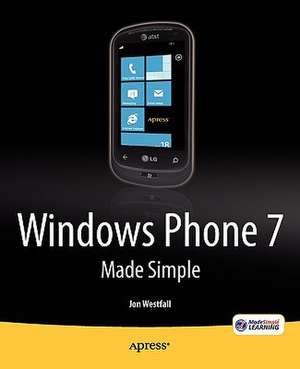
Windows Phone 7 Made Simple
Autor Msl Made Simple Learning, Jon Westfallen Limba Engleză Paperback – 3 feb 2011
Windows Phone 7 Made Simple offers a clear, visual, step-by-step approach to using your Windows Phone 7 smartphone, no matter what the manufacturer. Author Jon Westfall is an expert in mobile devices, recognized by Microsoft as a "Most Valuable Professional" with experience teaching both businesses and consumers. This book will get you started with the basics and then teach you tricks and shortcuts that will save you time and help you maximize your productivity.
Preț: 185.13 lei
Preț vechi: 231.41 lei
-20%
Puncte Express: 278
Carte disponibilă
Livrare economică 09-23 noiembrie
Livrare prin curier în România Termenul estimat este afișat lângă disponibilitate.
Transport gratuit de la 400.00 lei Plată online sau ramburs, în funcție de opțiunile comenzii.
Retur gratuit în 14 zile Comandă securizată și suport în română.
Specificații
ISBN-13: 9781430233121
ISBN-10: 1430233125
Pagini: 472
Ilustrații: XI, 472 p.
Dimensiuni: 191 x 236 x 23 mm
Greutate: 0.81 kg
Ediția:1st ed.
Editura: Apress
Locul publicării:Berkeley, CA, United States
ISBN-10: 1430233125
Pagini: 472
Ilustrații: XI, 472 p.
Dimensiuni: 191 x 236 x 23 mm
Greutate: 0.81 kg
Ediția:1st ed.
Editura: Apress
Locul publicării:Berkeley, CA, United States
V-ar putea interesa
-
 iPad Made SimpleGary Mazo-20%Preț: 176.10 lei220.12 lei
 -
 iPhone 4 Made SimpleMartin Trautschold-20%Preț: 168.95 lei211.19 lei
 -
 iPod Touch Made SimpleMartin Trautschold-20%Preț: 214.84 lei268.55 lei
 -
 Ilife '11 Made SimpleGlen Durdik-20%Preț: 169.60 lei212.00 lei
 -
 Windows 7 Made SimpleKevin Otnes-20%Preț: 182.47 lei228.09 lei
 -
 Building Apps for the Universal Windows PlatformAyan Chatterjee-20%Preț: 204.38 lei255.48 lei
 -
 -20%Preț: 260.18 lei325.23 lei
 -
 Beginning PowerShell for SharePoint 2016Nikolas Charlebois-Laprade-20%Preț: 459.38 lei574.23 lei
 -
 -20%Preț: 367.08 lei458.84 lei
 -
 -20%Preț: 228.99 lei286.24 lei
 -
 Beginning ASP.Net in VB .NetMatthew Macdonald-20%Preț: 292.11 lei365.13 lei
 -
 Beginning ASP.NET 2.0 in C# 2005Matthew Macdonald-20%Preț: 288.56 lei360.69 lei
 -
 Foundations of WFBrian Myers-20%Preț: 176.65 lei220.80 lei
 -
 Accelerated VB 2008Trey Nash-20%Preț: 200.34 lei250.43 lei
 -
 Beginning ASP.Net 3.5 in C# 2008Matthew Macdonald-20%Preț: 284.91 lei356.14 lei
 -
 Silverlight and ASP.NET RevealedMatthew Macdonald-20%Preț: 182.73 lei228.40 lei
 -
 A Programmer's Guide to ADO.NET in CMahesh Chand-20%Preț: 298.21 lei372.77 lei
 -
 XML Programming Using the Microsoft XML ParserWei-Meng Lee-20%Preț: 245.99 lei307.48 lei
 -
 The .NET LanguagesBrian Bischof-20%Preț: 147.04 lei183.80 lei
 -
 Visual Basic and Visual Basic .NET for Scientists and EngineersChristopher M. Frenz-20%Preț: 171.69 lei214.62 lei
 -
 Mobile .NetDerek Ferguson-20%Preț: 208.27 lei260.34 lei
 -
 Internet Programming with Visual BasicBudi Kurniawan-20%Preț: 224.31 lei280.39 lei
 -
 Programming VB .NET: A Guide For Experienced ProgrammersJonathan Morrison-20%Preț: 193.79 lei242.25 lei
Public țintă
Popular/generalCaracteristici
Aims to be first or one of the first consumer user device books on Windows Phone 7 Publishing date to coincide with Windows Phone 7 final release Written by expert smartphone trainers and authors of iPad Made Simple Windows Phone 7 could be big, as it's backed by Microsoft, and potentially supported by several million .NET/Windows programmers
Cuprins
- Setting Up Your Windows Phone
- Making Phone Calls
- Setting Up Accounts
- Using Email
- Setting Up and Using Facebook and Twitter
- Customizing Your Phone
- Setting Up Bluetooth and Wi-Fi
- Managing and Securing Your Phone
- Searching Your Phone and Using Speech
- Connecting With People: Using the People Live Tile
- Setting Alarms and Reminders
- Using and Customizing the Calendar
- Using Text Messaging
- Surfing the Web with Internet Explorer
- Taking Pictures and Putting Them Online
- Using Windows Live Services
- Using Microsoft OneNote Mobile
- Using Microsoft Office Word Mobile
- Using Microsoft Office Excel Mobile
- Using Microsoft PowerPoint Mobile
- Connecting to SharePoint
- Using Maps
- Connecting to the Zune Software
- Using Your Phone with Xbox LIVE
- Exploring the Marketplace
- Updating Your Phone
- Resources to Explore