Livrare prin curier de la 16.99 lei, gratuită de la 400 lei
Plată online sau ramburs
Retur gratuit în 14 zile
Despre carte
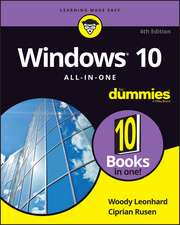
Ten minibooks in one get you thoroughly caught up on Windows 8.1! With new improvements and changes, Windows 8.1 offers a refreshed user interface, better integration between the new and traditional Windows interfaces, and more. This updated top–selling guide is what you need to get up to speed on everything Windows 8.1. Nine minibooks in one cover such essential topics as navigating the new Start Screen, understanding Windows 8.1 apps, securing Windows 8.1, and much more. Take the guesswork out of Windows 8.1 from day one with this complete, all–in–one resource.
Helps you get up to speed on the Windows 8.1 operating system, including its Start Screen, which is a feature sure to please traditional Windows users
Provides top–notch guidance from trusted and well–known Windows expert and author Woody Leonhard
Covers Windows 8.1 inside and out, including how to customize the Start screen, manage apps, and control privacy
Delves into core Windows 8.1 apps such as e–mail, people, and SkyDrive
Shows you how to connect online, add hardware, back up and update, and secure Windows 8.1
Discover new improvements, old favorites, and everything in between with Windows 8.1 All–in–One For Dummies.
Everything you wanted to know about Windows 8.1 in one convenient reference guide Windows 8.1 introduces features and updates designed to make Windows work better. This All–in–One guide explains the vast number of features built into Windows 8.1 and offers insight on how to make them work for you. Find advice on using the tiled Start screen, the traditional desktop, touchscreen capabilities, and dozens of built–in apps.
The screen of tomorrow tour the futuristic tiled Start screen and understand all its features and settings
Make it yours get the lock screen and logons working, sync your settings with the cloud, and maintain your privacy
App–happy explore the tiled apps for SkyDrive, Facebook, financial sites, news, games, and more
Your friendly desktop discover where to find the classic Windows interface and how to get there quickly from the Start screen
Take control explore Control Panel features and learn how to make Windows 8.1 look and work the way you want
Safe and sound master Windows maintenance and learn to protect your system from threats
What they don′t want you to know see how your PC can make friends with iPhones, Android tablets, Google Docs, and more
Open the book and find:
How to upgrade to Windows 8.1
How to search for apps, files, or websites
How to boot your computer directly to the desktop
Tips on setting up multiple e–mail accounts
How to bring your Facebook friends into your People list
Help you won′t get from Windows Help
Free apps and add–ons that enhance performance
Advice on improving Windows 8.1 security and privacy
Cuprins
Introduction 1 Book I: Starting Windows 8.1 9 Chapter 1: Windows 8.1 4 N00bs 11 Chapter 2: Windows 8.1 for the Experienced 41 Chapter 3: Which Version? 57 Chapter 4: Upgrades and Clean Installs 65 Book II: Personalizing Windows 8.1 83 Chapter 1: Getting Around Windows 8.1 85 Chapter 2: Changing the Lock and Logon Screens 103 Chapter 3: Working with Charms and Notifi cations 115 Chapter 4: Controlling Users 129 Chapter 5: Microsoft Account: To Sync or Not to Sync? 147 Chapter 6: Privacy Control 159 Book III: Navigating the Start Screen 171 Chapter 1: Controlling the Start Screen 173 Chapter 2: Searching in and with the Start Screen 197 Chapter 3: Sharing Among Tiled Apps 209 Chapter 4: Settings, Settings, More Settings, and Devices 219 Chapter 5: Taking Control of the Windows Store 229 Book IV: Maximizing Tiled Windows 8.1 Apps 241 Chapter 1: Running Metro Internet Explorer 243 Chapter 2: Using Metro Mail, People, and Calendar Apps 259 Chapter 3: The Windows 8.1 Photos App 287 Chapter 4: Xbox Music and Video 301 Book V: Connecting Online with Tiled Apps 315 Chapter 1: Using SkyDrive in Windows 8.1 317 Chapter 2: Using Skype in Windows 8.1 335 Chapter 3: Getting Started with Facebook 349 Chapter 4: Getting Started with Twitter 365 Chapter 5: Bing News, Finance, Travel, Sports, Fitness, and Food 377 Chapter 6: Games, Games, and Games 401 Book VI: Working on the Desktop 413 Chapter 1: Running the Desktop from Start to Finish 415 Chapter 2: Personalizing the Desktop 447 Chapter 3: Metro Mods for Desktop Users 471 Chapter 4: Maintaining Your System 489 Chapter 5: Using Windows (Live) Essentials 505 Chapter 6: Choosing and Using a Desktop Web Browser 533 Chapter 7: Music on the Desktop 573 Book VII: Controlling Your System 611 Chapter 1: Controlling Control Panel 613 Chapter 2: Troubleshooting and Getting Help 635 Chapter 3: Working with Libraries 661 Chapter 4: Storing in Storage Spaces 673 Chapter 5: Getting the Most from HomeGroups 681 Chapter 6: Running the Built–In Desktop Applications 701 Chapter 7: Working with Printers 713 Book VIII: Maintaining Windows 8.1 727 Chapter 1: File History, Backup, Data Restore, and Sync 729 Chapter 2: A Fresh Start: Restore and Reset 745 Chapter 3: Using and Avoiding Windows Update 761 Chapter 4: Monitoring Windows 783 Chapter 5: Using System Tools 801 Book IX: Securing Windows 8.1 819 Chapter 1: Spies, Spams, Scams They re Out to Get You 821 Chapter 2: Fighting Viri and Scum 853 Chapter 3: Running Built–In Security Programs 867 Chapter 4: Top Security Helpers 889 Book X: Enhancing Windows 8.1 903 Chapter 1: Using Your iPad and iPhone with Windows 8.1 905 Chapter 2: Kindle, Android, and Windows 8.1 925 Chapter 3: Getting Started with Gmail, Google Apps, and Drive 939 Chapter 4: Using Hotmail and Outlook.com 955 Chapter 5: Best Free Windows Add–Ons 967 Index 979
Notă biografică
Woody Leonhard is an award–winning technology author and columnist with over two decades of experience covering Microsoft Windows. He′s currently a Senior Editor for the Windows Secrets newsletter and a frequent contributor to InfoWorld.
Public țintă
Microsoft Windows remains the dominant operating system on PCs and other connected devices worldwide, yet consumers have been slow to warm to Windows 8. The dual interface offering a touch–optimized app screen and the traditional Windows work surface was widely panned in the media and drove some users away from buying new machines or upgrading old ones. Windows 8.1 addresses many of the problems, introducing changes that have been praised in the media. The final version of 8.1 is due in August as a free upgrade to existing Windows 8 users. Microsoft hopes it enhances the 5% share Windows 8 currently holds in the market.
Our target audience: Windows users who have recently upgraded or are looking to upgrade, as well as new users to Windows, who are looking for a comprehensive guide to installing this new OS, setting it up, and taking advantage of all of its new features.