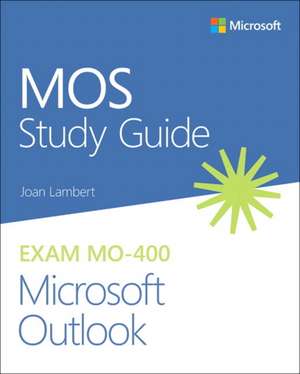
MOS Study Guide for Microsoft Outlook Exam MO-400
Autor Joan Lamberten Limba Engleză Paperback – 23 feb 2021
Sharpen the skills measured by these objectives: - Manage Outlook Settings and Processes - Manage Messages - Manage Schedules - Manage Contacts and Tasks
About MOS: Associate Certification A Microsoft Office Specialist (MOS): Associate certification validates your hands-on experience and competency with an Office product at an associate level. It demonstrates that you can apply the product's principal features correctly, can complete tasks independently, and are ready to enter the job market.
See full details at: microsoft.com/learn
Practice Files Available at: MicrosoftPressStore.com/MOSOutlook400/downloads
Preț: 124.06 lei
Preț vechi: 155.08 lei
-20%
Puncte Express: 186
Carte disponibilă
Livrare economică 06-20 noiembrie
Livrare express 23-29 octombrie pentru 21.57 lei
Livrare prin curier în România Termenul estimat este afișat lângă disponibilitate.
Transport gratuit de la 400.00 lei Plată online sau ramburs, în funcție de opțiunile comenzii.
Retur gratuit în 14 zile Comandă securizată și suport în română.
Specificații
ISBN-13: 9780136628637
ISBN-10: 013662863X
Pagini: 144
Dimensiuni: 195 x 235 x 9 mm
Greutate: 0.29 kg
Ediția:1. Auflage
Editura: Microsoft Press
ISBN-10: 013662863X
Pagini: 144
Dimensiuni: 195 x 235 x 9 mm
Greutate: 0.29 kg
Ediția:1. Auflage
Editura: Microsoft Press
V-ar putea interesa
-
 Microsoft Copilot Pro Step by StepLisa Crosbie-20%Preț: 256.32 lei320.40 lei
 -
 -20%Preț: 333.13 lei416.42 lei
 -
 Exam Ref MD-100 Windows 10Andrew Bettany-20%Preț: 231.66 lei289.57 lei
 -
 MOS Study Guide for Microsoft PowerPoint Exam MO-300Joan Lambert-20%Preț: 123.94 lei154.92 lei
 -
 Exam Ref MD-101 Managing Modern DesktopsAndrew Bettany-20%Preț: 236.49 lei295.60 lei
 -
 MOS 2013 Study Guide for Microsoft WordJoan Lambert-20%Preț: 17.47 lei21.84 lei
 -
 -20%Preț: 202.63 lei253.29 lei
 -
 Outlook 2019 for DummiesFaithe Wempen-20%Preț: 151.91 lei189.89 lei
 -
 -20%Preț: 115.13 lei143.91 lei
 -
 -20%Preț: 114.40 lei142.99 lei
 -
 -20%Preț: 312.85 lei391.06 lei
 -
 Office For Seniors For DummiesFaithe Wempen-20%Preț: 138.92 lei173.65 lei
 -
 Microsoft 365 Office All-In-One for DummiesPaul McFedries-20%Preț: 175.66 lei219.57 lei
 -
 Microsoft 365 Outlook For DummiesFaithe Wempen-20%Preț: 142.38 lei177.98 lei
 -
 Teach Yourself VISUALLY Microsoft 365Paul McFedries-20%Preț: 170.73 lei213.41 lei
 -
 Microsoft 365 Excel For DummiesDavid H. Ringstrom-20%Preț: 143.21 lei179.02 lei
 -
 -20%Preț: 138.46 lei173.08 lei
 -
 -20%Preț: 203.02 lei253.78 lei
 -
 -20%Preț: 201.51 lei251.89 lei
Cuprins
Introduction
Chapter 1 Manage Outlook settings and processes
Objective 1.1: Customize Outlook settings
Objective 1.2: Configure mail settings
Objective 1.3: Perform search operations
Objective 1.4: Print and save information
Chapter 2 Manage messages
Objective 2.1: Create messages
Objective 2.2: Insert message content
Objective 2.3: Organize and manage messages
3 Manage schedules
Objective 3.1: Create and manage calendars
Objective 3.2: Create appointments, meetings, and events
Objective 3.3: Organize and manage appointments, meetings, and events
4 Manage contacts and tasks
Objective 4.1: Create and manage contact records
Objective 4.2: Create and manage contact groups
Objective 4.3: Create and manage tasks
Notă biografică
Joan Lambert has worked closely with Microsoft technologies since 1986, and in the training and certification industry since 1997. As President and CEO of Online Training Solutions, Inc. (OTSI), Joan guides the translation of technical information and requirements into useful, relevant, and measurable resources for people who are seeking certification of their computer skills or who simply want to know how to get things done efficiently.Joan is the author or coauthor of more than four dozen books about Windows and Office (for Windows, Mac, and iPad), five generations of Microsoft Office Specialist certification study guides, video-based training courses for SharePoint and OneNote, QuickStudy guides for Windows and Office, and the GO! series book for Outlook 2016.Blissfully based in America’s Finest City, Joan is a Microsoft Certified Professional, Microsoft Office Specialist Master (for all versions of Office since Office 2003), Microsoft Certified Technology Specialist (for Windows and Windows Server), Microsoft Certified Technology Associate (for Windows), Microsoft Dynamics Specialist, and Microsoft Certified Trainer.