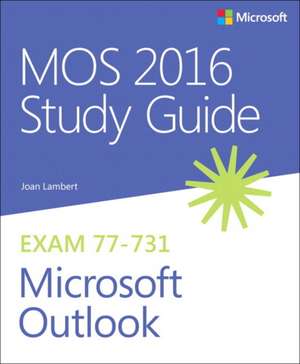
Mos 2016 Study Guide for Microsoft Outlook
Autor Joan Lamberten Limba Engleză Paperback – 6 dec 2016
Preț: 136.06 lei
Preț vechi: 170.09 lei
-20%
Puncte Express: 204
Preț estimativ în valută:
24.06€ • 28.13$ • 20.92£
24.06€ • 28.13$ • 20.92£
Carte tipărită la comandă
Livrare economică 07-21 martie
Specificații
ISBN-13: 9780735699380
ISBN-10: 0735699380
Pagini: 176
Dimensiuni: 187 x 228 x 15 mm
Greutate: 0.3 kg
Editura: Pearson Education
ISBN-10: 0735699380
Pagini: 176
Dimensiuni: 187 x 228 x 15 mm
Greutate: 0.3 kg
Editura: Pearson Education
V-ar putea interesa
-
 MOS Study Guide for Microsoft PowerPoint Exam MO-300Joan Lambert-20%Preț: 106.40 lei133.01 lei
 -
 -20%Preț: 258.03 lei322.54 lei
 -
 -25%Preț: 467.19 lei624.93 lei
 -
 MOS 2013 Study Guide for Microsoft WordJoan Lambert-20%Preț: 17.47 lei21.84 lei
 -
 Office 2016 All–in–One For DummiesP WeverkaPreț: 229.25 lei
 -
 Outlook 2019 for DummiesFaithe Wempen-20%Preț: 141.29 lei176.61 lei
 -
 McSa Windows Server 2016 Practice TestsCrystal PanekPreț: 192.20 lei
 -
 Preț: 130.15 lei
 -
 Preț: 127.83 lei
 -
 Preț: 352.15 lei
 -
 Microsoft 365 Office All-In-One for DummiesPaul McFedries-20%Preț: 166.43 lei208.05 lei
 -
 Microsoft 365 Excel Formulas & Functions for DummiesKen Bluttman-20%Preț: 139.47 lei174.34 lei
 -
 Microsoft 365 Outlook for DummiesFaithe Wempen-20%Preț: 134.78 lei168.46 lei
 -
 Teach Yourself Visually Microsoft 365Paul McFedries-20%Preț: 162.44 lei203.04 lei
 -
 Microsoft 365 Excel for DummiesDavid H Ringstrom-20%Preț: 113.78 lei142.22 lei
 -
 -20%Preț: 132.69 lei165.87 lei
 -
 Microsoft 365 Excel All-in-One For DummiesDavid H Ringstrom-20%Preț: 189.81 lei237.26 lei
 -
 Preț: 231.76 lei
 -
 Exam Ref 70-347 Enabling Office 365 ServicesOrin Thomas-20%Preț: 196.23 lei245.28 lei
 -
 -20%Preț: 194.77 lei243.47 lei
Notă biografică
Joan Lambert has worked closely with Microsoft technologies since 1986, and in the training and certification industry since 1997. As President and CEO of Online Training Solutions, Inc. (OTSI), Joan guides the translation of technical information and requirements into useful, relevant, and measurable resources for people who are seeking certification of their computer skills or who simply want to know how to get things done efficiently.
Joan is the author or coauthor of more than four dozen books about Windows and Office (for Windows, Mac, and iPad), five generations of Microsoft Office Specialist certification study guides, video-based training courses for SharePoint and OneNote, QuickStudy guides for Windows and Office, and the GO! series book for Outlook 2016.
Joan is the author or coauthor of more than four dozen books about Windows and Office (for Windows, Mac, and iPad), five generations of Microsoft Office Specialist certification study guides, video-based training courses for SharePoint and OneNote, QuickStudy guides for Windows and Office, and the GO! series book for Outlook 2016.
Cuprins
- Introduction
- Taking a Microsoft Office Specialist exam
- Exam 77-731: Microsoft Outlook 2016
- Prerequisites
- Objective group 1: Manage the Outlook environment for productivity
- Objective 1.1: Customize settings
- Objective 1.2: Print and save information
- Objective 1.3: Perform search operations in Outlook
- Objective group 2: Manage messages
- Objective 2.1: Configure mail settings
- Objective 2.2: Create messages
- Objective 2.3: Format messages
- Objective 2.4: Organize and manage messages
- Objective group 3: Manage schedules
- Objective 3.1: Create and manage calendars
- Objective 3.2: Create appointments, meetings, and events
- Objective 3.3: Organize and manage appointments, meetings, and events
- Objective group 4: Manage contacts and groups
- Objective 4.1: Create and manage contacts
- Objective 4.2: Create and manage contact groups