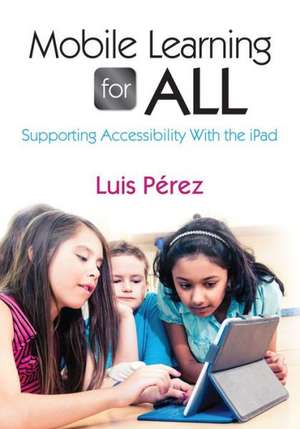
Mobile Learning for All
Autor Luis Perezen Limba Engleză Paperback – 23 mai 2013
Aligned to the principles of Universal Design for Learning, this book provides practical information for using iPads to meet the needs of all learners, including students with disabilities. Based on his own experiences working with people with disabilities, Luis Perez provides everything you need to turn your iPad into the ultimate teaching tool, including:
In-depth coverage of all of the built-in accessibility features (visual, auditory, motor)
Step-by-step directions for using the iPad to make lessons accessible, including numerous screenshots
Access to more than 20 closed-captioned video tutorials
Reviews of more than 150 apps
Preț: 286.21 lei
Puncte Express: 429
Carte tipărită la comandă
Livrare economică 15-29 decembrie
Livrare prin curier în România Termenul estimat este afișat lângă disponibilitate.
Transport gratuit de la 400.00 lei Plată online sau ramburs, în funcție de opțiunile comenzii.
Retur gratuit în 14 zile Comandă securizată și suport în română.
Specificații
ISBN-13: 9781452258553
ISBN-10: 1452258554
Pagini: 248
Dimensiuni: 178 x 254 x 14 mm
Greutate: 0.47 kg
Ediția:New.
Editura: Corwin
Locul publicării:Thousand Oaks, United States
ISBN-10: 1452258554
Pagini: 248
Dimensiuni: 178 x 254 x 14 mm
Greutate: 0.47 kg
Ediția:New.
Editura: Corwin
Locul publicării:Thousand Oaks, United States
V-ar putea interesa
-
 -41%Preț: 78.98 lei134.84 lei
 -
 -8%Preț: 406.59 lei441.95 lei
 -
 Understanding and Supporting Children with ADHDLesley A HughesPreț: 415.52 lei
 -
 Aiming HighMarie Parker-JenkinsPreț: 398.13 lei
 -
 Difficult Behavior in Early ChildhoodRonald MahPreț: 277.53 lei
 -
 Developing the Gifted and Talented Young LearnerMargaret Sutherland-15%Preț: 595.20 lei700.24 lei
 -
 Teaching Able, Gifted and Talented ChildrenClive TunnicliffePreț: 374.16 lei
 -
 The Learning Mentor ManualStephanie George-8%Preț: 410.57 lei446.26 lei
 -
 Saving Our Students, Saving Our SchoolsRobert D. BarrPreț: 385.99 lei
 -
 -21%Preț: 163.80 lei207.17 lei
 -
 -25%Preț: 244.34 lei325.35 lei
 -
 -25%Preț: 207.46 lei275.67 lei
 -
 -19%Preț: 149.88 lei185.35 lei
 -
 An Asperger Dictionary of Everyday Expressions: Second EditionIan Stuart-Hamilton-19%Preț: 148.86 lei184.79 lei
 -
 Social Skills Games for ChildrenDeborah Plummer-23%Preț: 148.90 lei193.30 lei
 -
 Preț: 336.71 lei
Recenzii
"Mobile Learning for All is a unique book that every classroom teacher should read! It’s full of practical uses of the many accessibility features on mobile devices to meet the needs of all students, especially those with disabilities."
"This is a major contribution to the fields of special education and rehabilitation. It is a wonderful resource for individuals with disabilities, their advocates and their families, and for educators and other professionals. Well done!"
"If I had the opportunity to purchase this book, I would purchase enough to give to all my team mates their own copy. Then I would have book groups and working meetings so we could all try out the many apps, with this book as our guide. Almost as good as having the author make the presentations about how to implement the iPad, UDL principles and best practice into our special education classes!"
"This is a major contribution to the fields of special education and rehabilitation. It is a wonderful resource for individuals with disabilities, their advocates and their families, and for educators and other professionals. Well done!"
"If I had the opportunity to purchase this book, I would purchase enough to give to all my team mates their own copy. Then I would have book groups and working meetings so we could all try out the many apps, with this book as our guide. Almost as good as having the author make the presentations about how to implement the iPad, UDL principles and best practice into our special education classes!"
Cuprins
List of Figures
List of Codes
Preface
Acknowledgments
About the Author
Introduction
1. Universal Design and Mobile Learning: Defining Universal Design
2. Getting Started with Accessibility on the iPad
3. Learning and Literacy Supports
4. Communication and Social Supports
5. Voiceover and Supports for Low Vision
6. Auditory Supports
7. Motor Supports
8. Executive Functioning Supports
9. Managing iOS Devices in the Classroom
10. Challenge Based Learning With the iPad
Conclusion
Appendix A: Additional Resources
Appendix B: VoiceOver Gestures
Appendix C: Keyboard Shortcuts for Using VoiceOver With an Apple Wireless Keyboard
References
Index
List of Codes
Preface
Acknowledgments
About the Author
Introduction
1. Universal Design and Mobile Learning: Defining Universal Design
2. Getting Started with Accessibility on the iPad
3. Learning and Literacy Supports
4. Communication and Social Supports
5. Voiceover and Supports for Low Vision
6. Auditory Supports
7. Motor Supports
8. Executive Functioning Supports
9. Managing iOS Devices in the Classroom
10. Challenge Based Learning With the iPad
Conclusion
Appendix A: Additional Resources
Appendix B: VoiceOver Gestures
Appendix C: Keyboard Shortcuts for Using VoiceOver With an Apple Wireless Keyboard
References
Index
Descriere
Provides practical informationa for using iPads to meet the needs of all leaders, including students with disabilities.