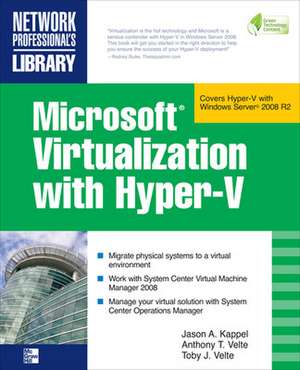
Microsoft Virtualization with Hyper-V
Autor Jason Kappel, Anthony Velte, Toby Velteen Limba Engleză Paperback – 16 oct 2009
Implement a Hyper-V virtualization solution
Microsoft Virtualization with Hyper-V shows you how to deploy Microsoft's next-generation hypervisor-based server virtualization technology in a corporate environment. You'll get step-by-step guidelines for getting Hyper-V up and running, followed by best practices for building a larger, fault-tolerant solution using System Center Virtual Machine Manager 2008. This hands-on guide explains how to migrate physical systems to the virtual environment; use System Center Operations Manager; and secure, back up, and restore your Hyper-V solution.
- Plan and implement a Hyper-V installation
- Configure Hyper-V components
- Install and configure System Center Virtual Machine Manager 2008
- Create and manage virtual machines
- Back up and restore virtual machines
- Monitor, back up, and restore the virtual solution
- Secure your Hyper-V environment
- Understand the virtual desktop infrastructure
- Use third-party virtualization tools for Hyper-V
Preț: 323.25 lei
Preț vechi: 404.06 lei
-20%
Puncte Express: 485
Carte disponibilă
Livrare economică 06-20 noiembrie
Livrare prin curier în România Termenul estimat este afișat lângă disponibilitate.
Transport gratuit de la 400.00 lei Plată online sau ramburs, în funcție de opțiunile comenzii.
Retur gratuit în 14 zile Comandă securizată și suport în română.
Specificații
ISBN-13: 9780071614030
ISBN-10: 0071614036
Pagini: 448
Dimensiuni: 188 x 231 x 24 mm
Greutate: 0.77 kg
Editura: McGraw Hill Education
Colecția McGraw-Hill
Locul publicării:United States
ISBN-10: 0071614036
Pagini: 448
Dimensiuni: 188 x 231 x 24 mm
Greutate: 0.77 kg
Editura: McGraw Hill Education
Colecția McGraw-Hill
Locul publicării:United States
V-ar putea interesa
-
 Microsoft Copilot Pro Step by StepLisa Crosbie-20%Preț: 256.32 lei320.40 lei
 -
 -20%Preț: 374.94 lei468.68 lei
 -
 -20%Preț: 220.07 lei275.08 lei
 -
 Exam Ref 70-743 Upgrading Your Skills to MCSACharles Pluta-20%Preț: 144.22 lei180.28 lei
 -
 -34%Preț: 169.00 lei256.31 lei
 -
 Microsoft Windows Operating System EssentialsT Carpenter-20%Preț: 189.88 lei237.34 lei
 -
 -20%Preț: 308.77 lei385.96 lei
 -
 Mastering Windows Server 2016 Hyper-VJohn Savill-20%Preț: 300.79 lei375.99 lei
 -
 -20%Preț: 303.98 lei379.98 lei
 -
 Preț: 308.19 lei
 -
 -20%Preț: 272.60 lei340.76 lei
 -
 -20%Preț: 461.21 lei576.50 lei
 -
 Windows 11 All-in-One For Dummies, 2nd EditionCiprian Adrian Rusen-20%Preț: 214.39 lei267.99 lei
 -
 Microsoft Power Platform For DummiesJack A. Hyman-20%Preț: 198.49 lei248.11 lei
 -
 Teach Yourself VISUALLY Microsoft 365Paul McFedries-20%Preț: 170.73 lei213.41 lei
 -
 Running Windows Server 2025 on Microsoft AzureWilliam Panek-20%Preț: 342.51 lei428.14 lei
 -
 -20%Preț: 202.86 lei253.58 lei
 -
 -20%Preț: 253.89 lei317.36 lei
 -
 Installing and Configuring Windows Server 2025Bekim Dauti-20%Preț: 264.04 lei330.05 lei
Cuprins
1 Virtualization Overview
2 Planning and Installation
3 Configuring Hyper-V Components
4 Planning and Designing Systems Center Virtual Machine Manager 2008
5 Installing and Configuring Systems Center Virtual Machine Manager 2008
6 Configuring Systems Center Virtual Machine Manager 2008
7 Creating and Managing Virtual Machines
8 Managing Your Virtual Machines
9 Backing Up, Restoring, and Disaster Recovery for Your Virtual Machines
10 Monitoring Your Virtual Solution
11 Hyper-V Security
12 Virtual Desktop Infrastructure
A Third Party Virtualization Tools for Hyper-V
B Windows Server 2008 Hyper-V Command Line Reference
2 Planning and Installation
3 Configuring Hyper-V Components
4 Planning and Designing Systems Center Virtual Machine Manager 2008
5 Installing and Configuring Systems Center Virtual Machine Manager 2008
6 Configuring Systems Center Virtual Machine Manager 2008
7 Creating and Managing Virtual Machines
8 Managing Your Virtual Machines
9 Backing Up, Restoring, and Disaster Recovery for Your Virtual Machines
10 Monitoring Your Virtual Solution
11 Hyper-V Security
12 Virtual Desktop Infrastructure
A Third Party Virtualization Tools for Hyper-V
B Windows Server 2008 Hyper-V Command Line Reference