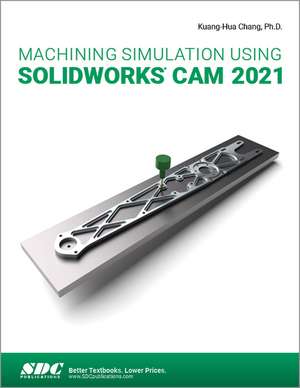
Machining Simulation Using SOLIDWORKS CAM 2021
Autor Kuang-Hua Changen Limba Engleză Paperback – 2 sep 2021
This book is intentionally kept simple. It’s written to help you become familiar with the practical applications of conducting machining simulations in SOLIDWORKS CAM. This book provides you with the basic concepts and steps needed to use the software, as well as a discussion of the G-codes generated. After completing this book, you should have a clear understanding of how to use SOLIDWORKS CAM for machining simulations and should be able to apply this knowledge to carry out machining assignments on your own product designs.
In order to provide you with a more comprehensive understanding of machining simulations, the book discusses NC (numerical control) part programming and verification, as well as introduces applications that involve bringing the G-code post processed by SOLIDWORKS CAM to a HAAS CNC mill and lathe to physically cut parts. This book points out important, practical factors when transitioning from virtual to physical machining. Since the machining capabilities offered in the 2021 version of SOLIDWORKS CAM are somewhat limited, this book introduces third-party CAM modules that are seamlessly integrated into SOLIDWORKS, including CAMWorks, HSMWorks, and Mastercam for SOLIDWORKS.
This book covers basic concepts, frequently used commands and options required for you to advance from a novice to an intermediate level SOLIDWORKS CAM user. Basic concepts and commands introduced include extracting machinable features (such as 2.5 axis features), selecting a machine and cutting tools, defining machining parameters (such as feed rate, spindle speed, depth of cut, and so on), generating and simulating toolpaths, and post processing CL data to output G-code for support of physical machining. The concepts and commands are introduced in a tutorial style presentation using simple but realistic examples. Both milling and turning operations are included.
One of the unique features of this book is the incorporation of the CL data verification by reviewing the G-code generated from the toolpaths. This helps you understand how the G-code is generated by using the respective post processors, which is an important step and an excellent way to confirm that the toolpaths and G-code generated are accurate and useful.
Preț: 408.55 lei
Preț vechi: 510.68 lei
-20%
Puncte Express: 613
Carte disponibilă
Livrare economică 06-20 noiembrie
Livrare express 23-29 octombrie pentru 40.92 lei
Livrare prin curier în România Termenul estimat este afișat lângă disponibilitate.
Transport gratuit pentru acest produs Plată online sau ramburs, în funcție de opțiunile comenzii.
Retur gratuit în 14 zile Comandă securizată și suport în română.
Specificații
ISBN-13: 9781630574147
ISBN-10: 1630574147
Pagini: 300
Dimensiuni: 210 x 280 x 19 mm
Greutate: 0.72 kg
Ediția:1
Editura: SDC Publications
Colecția SDC Publications
ISBN-10: 1630574147
Pagini: 300
Dimensiuni: 210 x 280 x 19 mm
Greutate: 0.72 kg
Ediția:1
Editura: SDC Publications
Colecția SDC Publications
V-ar putea interesa
-
 Virtual Machining Using CAMWorks 2020Kuang-Hua Chang-20%Preț: 322.44 lei403.05 lei
 -
 -20%Preț: 525.85 lei657.32 lei
 -
 Machining Simulation Using SOLIDWORKS CAM 2023Kuang-Hua Chang-20%Preț: 436.34 lei545.42 lei
 -
 -20%Preț: 442.16 lei552.69 lei
 -
 -20%Preț: 442.75 lei553.43 lei
 -
 -20%Preț: 537.18 lei671.48 lei
 -
 -20%Preț: 531.49 lei664.37 lei
 -
 Parametric Modeling with SOLIDWORKS 2025Paul Schilling-20%Preț: 545.41 lei681.76 lei
 -
 -20%Preț: 577.84 lei722.31 lei
 -
 A Hands-On Introduction to SOLIDWORKS 2025: Text and Video InstructionKirstie Plantenberg-20%Preț: 552.19 lei690.24 lei
 -
 SOLIDWORKS 2025 Quick StartDavid C. Planchard-20%Preț: 428.73 lei535.91 lei
 -
 -20%Preț: 538.48 lei673.10 lei
 -
 -20%Preț: 573.18 lei716.48 lei
 -
 -20%Preț: 591.17 lei738.97 lei
 -
 -20%Preț: 486.20 lei607.75 lei
 -
 -20%Preț: 515.38 lei644.23 lei
 -
 -20%Preț: 501.50 lei626.87 lei
 -
 Designing with SOLIDWORKS 2025Michael J. Rider-20%Preț: 503.52 lei629.40 lei
Public țintă
Professional Training and Undergraduate AdvancedCuprins
1. Introduction to SOLIDWORKS CAM 2. NC Part Programming 3. SOLIDWORKS CAM NC Editor 4. A Quick Run-Through 5. Machining 2.5 Axis Features 6. Machining a Freeform Surface and Limitations 7. Multipart Machining 8. Multiplane Machining 9. Tolerance-Based Machining 10. Turning a Stepped Bar 11. Turning a Stub Shaft 12. Machining a Robotic Forearm Member 13. Turning a Scaled Baseball Bat 14. Third-Party CAM Modules Appendix A: Machinable Features Appendix B: Machining Operations Appendix C: Alphabetical Address Codes Appendix D: Preparatory Functions Appendix E: Machine Functions
Descriere
This book will teach you all the important concepts and steps used to conduct machining simulations using SOLIDWORKS CAM. This book is intentionally kept simple. It’s written to help you become familiar with the practical applications of conducting machining simulations in SOLIDWORKS CAM.