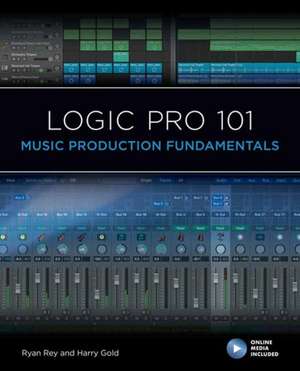
Logic Pro 101: Music Production Fundamentals: 101 Series
Autor Ryan Rey, Harry Gold Cu Frank D. Cook, Eric Kuehnlen Limba Engleză Paperback – 15 ian 2022
Logic Pro 101 and the included online media files will guide you through the fundamentals of music production, including:
Studio setup and configuration
Basic Logic Pro controls
Creating Logic Pro projects
Importing and working with audio and MIDI files
Recording audio and MIDI
Making selections and navigating
Editing audio and MIDI
Working in the Live Loops Grid
Basic mixing and exporting
The included exercises and hands-on projects will help you put your learning into practice. Launch your journey to producing better music using a tried and tested approach that has proven successful in certification programs worldwide. Get started today with Logic Pro 101-your path to music production success!
Preț: 270.33 lei
Preț vechi: 345.27 lei
-22%
Puncte Express: 405
Carte disponibilă
Livrare economică 13-27 noiembrie
Livrare prin curier în România Termenul estimat este afișat lângă disponibilitate.
Transport gratuit de la 400.00 lei Plată online sau ramburs, în funcție de opțiunile comenzii.
Retur gratuit în 14 zile Comandă securizată și suport în română.
Specificații
ISBN-13: 9781538158166
ISBN-10: 1538158167
Pagini: 372
Ilustrații: 150 colour photos; 20 tables; 20 textboxes
Dimensiuni: 188 x 234 x 22 mm
Greutate: 0.68 kg
Editura: Bloomsbury Publishing
Colecția Rowman & Littlefield
Seria 101 Series
Locul publicării:New York, United States
ISBN-10: 1538158167
Pagini: 372
Ilustrații: 150 colour photos; 20 tables; 20 textboxes
Dimensiuni: 188 x 234 x 22 mm
Greutate: 0.68 kg
Editura: Bloomsbury Publishing
Colecția Rowman & Littlefield
Seria 101 Series
Locul publicării:New York, United States
Cuprins
Acknowledgments
Introduction. Welcome to Apple Logic Pro
About This Book
Course Prerequisites .
Course Organization and Sequence
The NPT Digital Media Production Program
How Can I Learn More?
Conventions and Symbols Used in This Book
Chapter 1. Logic Pro Background
The Logic Pro Digital Audio Workstation
Logic Pro History and Evolution
Audio Characteristics: Waveform, Frequency, and Amplitude
Converting Audio to Digital
Logic Pro System Configurations
Shortcuts and Naming Conventions
Review/Discussion Questions
Exercise 1. Selecting Your Audio Production Gear
Chapter 2. Getting Started with Logic Pro
Target Systems
Software Installation and Operation
Logic Pro File Structure
Starting Logic Pro
The Logic Pro Menu Structure
Logic Pro Windows and Views
Review/Discussion Questions
Exercise 2. Identifying the Primary Logic Pro Windows and Views
Chapter 3. Logic Pro Basic Controls
Playback in the Main Window
Region Editing in the Workspace
Zooming and Scrolling in the Main Window
Selections and Rulers in the Main Window
Quick Help Tips
Review/Discussion Questions
Exercise 3. Primary Tools and Controls
Chapter 4. Creating Your First Project
Project Chooser
Creating and Configuring a Logic Pro Project
Working with Tracks
Controlling Playback
Saving, Locating, and Opening Logic Pro Files
Review/Discussion Questions
Exercise 4. Creating a Project
Chapter 5. Importing and Working with Media
Considerations Prior to Import
Import Methods
Other Methods of Importing Audio Files
Importing Video
Review/Discussion Questions
Exercise 5. Importing Audio
Chapter 6. Making Your First MIDI Recording
MIDI Basics
MIDI in Logic Pro
Setting the Base Meter and Tempo
Preparing to Record MIDI
Using Virtual Instruments
Recording MIDI
Creating and Editing MIDI Performances
Review/Discussion Questions
Exercise 6. Working with MIDI
Chapter 7. Making Your First Audio Recording
Before Recording
Preparing to Record
Recording and Managing Audio
Organizing after Recording
Review/Discussion Questions
Exercise 7. Recording Audio
Chapter 8. Selecting and Navigating
Working with Selections in the Tracks Area
Adjusting the View of Your Tracks
Adjusting the Project View
Organizing Your Project
Using Markers for Locations and Selections
Using Arrangement Markers
Living in Color
Submixing Workflows
Using Track Stacks to Submix
Review/Discussion Questions
Exercise 8. Recording, Configuring, and Adding Markers to an Arrangement
Chapter 9. Editing Your Media
Selecting Playback Options
Using the Grid, Division Value, and Snap Settings
Editing Regions
Flex Time and Pitch
Moving and Resizing Regions
Creating Fade Effects
Undoing Your Work
Review/Discussion Questions
Exercise 9. Editing Audio
Chapter 10. Mixing and Creating a Bounce
Basic Mixer Terminology
Working in the Mixer
Using Plug-In Processors
Applying Mix Automation
Backing Up Your Project
Creating a Stereo Mixdown
Review/Discussion Questions
Exercise 10. Automating Shared Effects and Exporting a Stereo Mix
Final Project 1. Creating a Musical Arrangement
Final Project 2. Creating a Mix
Introduction. Welcome to Apple Logic Pro
About This Book
Course Prerequisites .
Course Organization and Sequence
The NPT Digital Media Production Program
How Can I Learn More?
Conventions and Symbols Used in This Book
Chapter 1. Logic Pro Background
The Logic Pro Digital Audio Workstation
Logic Pro History and Evolution
Audio Characteristics: Waveform, Frequency, and Amplitude
Converting Audio to Digital
Logic Pro System Configurations
Shortcuts and Naming Conventions
Review/Discussion Questions
Exercise 1. Selecting Your Audio Production Gear
Chapter 2. Getting Started with Logic Pro
Target Systems
Software Installation and Operation
Logic Pro File Structure
Starting Logic Pro
The Logic Pro Menu Structure
Logic Pro Windows and Views
Review/Discussion Questions
Exercise 2. Identifying the Primary Logic Pro Windows and Views
Chapter 3. Logic Pro Basic Controls
Playback in the Main Window
Region Editing in the Workspace
Zooming and Scrolling in the Main Window
Selections and Rulers in the Main Window
Quick Help Tips
Review/Discussion Questions
Exercise 3. Primary Tools and Controls
Chapter 4. Creating Your First Project
Project Chooser
Creating and Configuring a Logic Pro Project
Working with Tracks
Controlling Playback
Saving, Locating, and Opening Logic Pro Files
Review/Discussion Questions
Exercise 4. Creating a Project
Chapter 5. Importing and Working with Media
Considerations Prior to Import
Import Methods
Other Methods of Importing Audio Files
Importing Video
Review/Discussion Questions
Exercise 5. Importing Audio
Chapter 6. Making Your First MIDI Recording
MIDI Basics
MIDI in Logic Pro
Setting the Base Meter and Tempo
Preparing to Record MIDI
Using Virtual Instruments
Recording MIDI
Creating and Editing MIDI Performances
Review/Discussion Questions
Exercise 6. Working with MIDI
Chapter 7. Making Your First Audio Recording
Before Recording
Preparing to Record
Recording and Managing Audio
Organizing after Recording
Review/Discussion Questions
Exercise 7. Recording Audio
Chapter 8. Selecting and Navigating
Working with Selections in the Tracks Area
Adjusting the View of Your Tracks
Adjusting the Project View
Organizing Your Project
Using Markers for Locations and Selections
Using Arrangement Markers
Living in Color
Submixing Workflows
Using Track Stacks to Submix
Review/Discussion Questions
Exercise 8. Recording, Configuring, and Adding Markers to an Arrangement
Chapter 9. Editing Your Media
Selecting Playback Options
Using the Grid, Division Value, and Snap Settings
Editing Regions
Flex Time and Pitch
Moving and Resizing Regions
Creating Fade Effects
Undoing Your Work
Review/Discussion Questions
Exercise 9. Editing Audio
Chapter 10. Mixing and Creating a Bounce
Basic Mixer Terminology
Working in the Mixer
Using Plug-In Processors
Applying Mix Automation
Backing Up Your Project
Creating a Stereo Mixdown
Review/Discussion Questions
Exercise 10. Automating Shared Effects and Exporting a Stereo Mix
Final Project 1. Creating a Musical Arrangement
Final Project 2. Creating a Mix