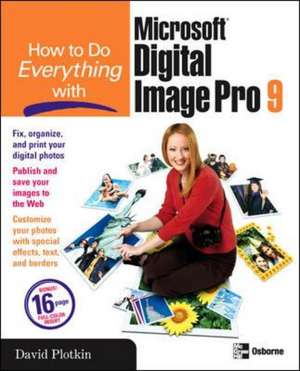
How to Do Everything with Microsoft Digital Image Pro 9
Autor David N Plotkinen Limba Engleză Paperback – 25 dec 2003
Preț: 164.26 lei
Preț vechi: 205.33 lei
-20%
Puncte Express: 246
Carte disponibilă
Livrare economică 13-27 noiembrie
Livrare prin curier în România Termenul estimat este afișat lângă disponibilitate.
Transport gratuit de la 400.00 lei Plată online sau ramburs, în funcție de opțiunile comenzii.
Retur gratuit în 14 zile Comandă securizată și suport în română.
Specificații
ISBN-13: 9780072231953
ISBN-10: 0072231955
Pagini: 400
Dimensiuni: 187 x 233 x 23 mm
Greutate: 0.71 kg
Editura: McGraw-Hill Education LLC (Professional Pod)
Locul publicării:United States
ISBN-10: 0072231955
Pagini: 400
Dimensiuni: 187 x 233 x 23 mm
Greutate: 0.71 kg
Editura: McGraw-Hill Education LLC (Professional Pod)
Locul publicării:United States
V-ar putea interesa
-
 Adobe Photoshop Classroom in a Book 2026 ReleaseConrad ChavezPreț: 462.81 lei
 -
 Preț: 351.15 lei
 -
 Adobe Photoshop Visual QuickStart GuideNigel French-20%Preț: 239.37 lei299.21 lei
 -
 Adobe Photoshop Classroom in a Book (2023 release)Conrad Chavez-20%Preț: 391.11 lei488.89 lei
 -
 -19%Preț: 163.81 lei203.45 lei
 -
 Digital Photography for the Over 50s In Simple StepsMarc CampbellPreț: 82.21 lei
 -
 Creative Photo EditingJohn Humphrey-20%Preț: 112.11 lei140.14 lei
 -
 Digital SLR Cameras & Photography for DummiesDavid D BuschPreț: 201.86 lei
 -
 Digital Photography For Dummies(r), 9th EditionJulie Adair KingPreț: 160.58 lei
 -
 Adobe Photoshop CC For Dummies, 3rd EditionPeter Bauer-20%Preț: 197.14 lei246.42 lei
 -
 Photoshop Elements For DummiesBarbara ObermeierPreț: 175.41 lei
 -
 -39%Preț: 80.80 lei133.22 lei
 -
 -25%Preț: 136.89 lei183.17 lei
 -
 The Digital Photography BookScott Kelby-24%Preț: 146.46 lei191.96 lei
 -
 Preț: 62.75 lei
 -
 -20%Preț: 286.12 lei357.65 lei
 -
 David Busch's Nikon Z50 II Guide to Digital PhotographyDavid D BuschPreț: 267.01 lei
Cuprins
Part I: Get to Know Digital Image Pro
1: Navigate in Digital Image Pro
2: Configure Digital Image Pro3: Get Your Images into Digital Image Pro
Part II: Make Simple Adjustments to Your Images
4: Make General Fixes to an Entire Image
5: Customize and Use the Paint Tools6: Touch Up Your Photo
7: Make Selections and Apply ChangesPart III: Make Changes Specific to Parts of Your Photos
8: Work with Objects and Layers
9: Add and Configure ShapesPart IV: Use Filters, Text, and Edges to GoBeyond the Darkroom
10: Add Text to Your Image
11: Apply Edges to Dress Up an Image12: Apply Filters to Customize Your Picture
13: Use Your Photos in a Project14: Modify Multiple Photos in the Mini Lab
15: Publishing and Sharing Your Photos16: Print Your Images
Notă biografică
David Plotkin (Walnut Creek, CA) has been interested in digital photography ever since it was invented, and heâ€s an experienced film photographer. He is a writer, with four published books to his credit, including How to do everything with FrontPage 2002 (McGraw-Hill/Osborne) and How to do everything with Adobe Photoshop Elements 2 (McGraw-Hill/Osborne). David has also contributed to other books on technology-related subjects and has written over 1,000 articles for various computer periodicals. Heâ€s also an experienced web site developer.
Textul de pe ultima copertă
Create professional-quality photos in no time with help from this step-by-step resource. David Plotkin draws from his experience as a photographer to provide real-world examples and practical approaches to getting the most from Digital Image Pro. Learn essential skills, such as how to correct flaws, organize your photos, and print, then tap into your creative side and master special effects, text, borders, and paint tools. Whether you're a seasoned or an amateur photographer, you'll find everything you need to know about Digital Image Pro inside this easy-to-use guide.
- Remove flaws and unwanted objects from your photos
- Fix contrast, brightness, color, and focus problems
- Eliminate red-eye in a few simple steps
- Restore treasured photographs by fixing scratches, tears, creases, and spots
- Turn your photos into calendars, greeting cards, and more
- Get real-world examples in the four-color insert
- Add personal touches such as text, borders, and shapes to your photos
- Publish and share your photos on the Web or print them on photo-quality paper
- Organize and catalog your photos for quick access