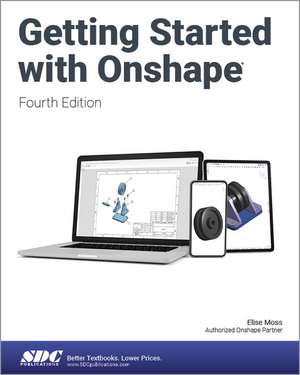
Getting Started with Onshape
Autor Elise Mossen Limba Engleză Paperback – 24 apr 2023
Problema principală a programelor CAD tradiționale rezidă adesea în cerințele hardware ridicate și procesele complexe de instalare. Getting Started with Onshape propune o alternativă modernă: proiectarea asistată de calculator bazată integral pe cloud, accesibilă oricui are un browser și o conexiune la internet. Putem afirma că acest volum, ajuns la a patra ediție, reprezintă puntea ideală pentru cei care doresc să treacă de la simpla curiozitate la execuția unor modele 3D riguroase, gata pentru producție.
Structura cursului este riguros organizată pe capitole practice. Se începe cu configurarea mediului de lucru, urmată imediat de proiecte aplicate, precum designul unui inel (Signet Ring Project) sau al unei trotinete (Scooter Project). Această progresie asigură asimilarea instrumentelor de bază înainte de a trece la asamblări complexe și generarea desenelor tehnice de execuție. Merită menționat că această ediție aduce noutăți esențiale pentru utilizatorii avansați, cum ar fi gestionarea componentelor din tablă (sheet metal) și utilizarea tabelelor de găuri, detalii critice în proiectarea industrială.
Autoarea Elise Moss își valorifică expertiza didactică acumulată în lucrări precum Autodesk AutoCAD 2025 Fundamentals sau seriile dedicate Autodesk Revit 2025 Architecture Basics. Spre deosebire de manualele sale pentru Autodesk, care vizează certificări profesionale specifice, volumul de față este mai versatil, fiind orientat către comunitatea de „makeri” și studenți. Cititorul care a aplicat ideile din Onshape For Beginners va găsi aici o aprofundare tehnică superioară, în special în ceea ce privește listele de materiale (BOM) și integrarea aplicațiilor din Onshape App Store, elemente care transformă un model digital într-un produs fizic prin exportul STL pentru imprimare 3D.
Preț: 447.21 lei
Preț vechi: 559.01 lei
-20%
Carte disponibilă
Livrare economică 07-21 noiembrie
Livrare express 27-31 octombrie pentru 50.49 lei
Specificații
ISBN-10: 1630575763
Pagini: 472
Dimensiuni: 210 x 280 x 27 mm
Greutate: 0.98 kg
Ediția:4
Editura: SDC Publications
Colecția SDC Publications
V-ar putea interesa
-
 Introduction to AutoCAD 2013: 2D and 3D DesignAlf Yarwood-8%Preț: 457.04 lei496.78 lei
 -
 Pro/Engineer Wildfire 4.0 EssentialsInc Kogent-20%Preț: 580.51 lei725.63 lei
 -
 SketchUp For Dummies, 2nd EditionBill Fane-20%Preț: 223.21 lei279.01 lei
 -
 3D Printing For Dummies, 3rd EditionRichard HornePreț: 166.93 lei
 -
 Preț: 119.09 lei
 -
 -20%Preț: 486.72 lei608.40 lei
 -
 -20%Preț: 532.79 lei665.99 lei
 -
 -20%Preț: 537.18 lei671.48 lei
 -
 -20%Preț: 561.76 lei702.20 lei
 -
 -20%Preț: 531.49 lei664.37 lei
 -
 Parametric Modeling with SOLIDWORKS 2025Paul Schilling-20%Preț: 545.41 lei681.76 lei
 -
 -20%Preț: 577.84 lei722.31 lei
 -
 SOLIDWORKS 2025 Quick StartDavid C. Planchard-20%Preț: 428.73 lei535.91 lei
 -
 -20%Preț: 486.20 lei607.75 lei
 -
 Designing with SOLIDWORKS 2025Michael J. Rider-20%Preț: 503.52 lei629.40 lei
 -
 -20%Preț: 513.73 lei642.17 lei
 -
 3D Printing and Maker Lab for KidsEldrid Sequeira-18%Preț: 112.49 lei137.46 lei
 -
 AutoCAD 2019 3D ModelingMunir Hamad-20%Preț: 353.85 lei442.30 lei
Public țintă
Professional Practice & Development, Professional Training, and Undergraduate AdvancedDe ce să citești această carte
Recomandăm această carte oricărui entuziast care dorește să învețe proiectare 3D fără investiții în software costisitor. Prin parcurgerea proiectelor practice, veți câștiga abilitatea de a trece de la o idee conceptuală la un model tehnic complet și, în final, la un obiect printat 3D. Este un ghid esențial pentru studenții la inginerie și membrii comunității Maker care caută un flux de lucru modern și eficient în cloud.
Descriere scurtă
Because Onshape can be used for free it opens up CAD to anybody who is interested in creating their own models, including members of the bourgeoning Maker community and students who want to learn how to use 3D design tools. Because Onshape is 100% cloud based, there is no software to install, and it is always up to date. New features are available to use as soon as they are ready. The good news is that the tools, as outlined in this book, will continue to work the same way even as Onshape evolves.
This book guides you through the very basics of how to create models, make engineering drawings and bill of materials, and finally export to an stl file, which can be used to create a 3D print. Then you can send your stl file to one of many local or online shops that can print out an stl file. When you have completed this book, you will have taken the first step to the Maker Faire journey.
In the first chapter of Getting Started with Onshape you will learn how to create an account, explore the workspace, and learn how to share your documents with other people. Chapter two features a project where you are guided, step by step, to design your own singlet ring. Throughout this chapter you will learn many of the basic tools you will need to use in nearly every project you create. The third chapter features a project where you create all the parts of a scooter. This project builds on what you learned previously to create more complex designs while new features of Onshape are introduced.
In the remaining chapters you will learn how to import parts from other CAD systems, assemble the parts of your scooter, create a set of engineering drawings for your scooter, add and use apps from the Onshape app store to extend the capabilities of Onshape, and complete several more projects.