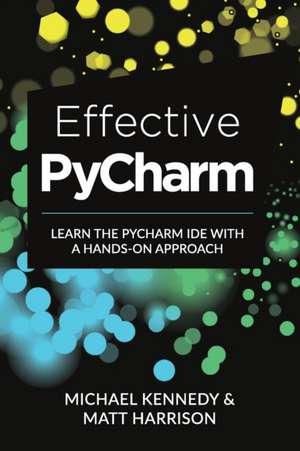
Effective PyCharm
Autor Matt Harrison, Michael Kennedyen Limba Engleză Paperback – 13 mai 2019
Găsim în Effective PyCharm un manual tehnic esențial pentru programatorii care au trecut de etapa sintaxei de bază și doresc să își maximizeze productivitatea într-un mediu de dezvoltare integrat (IDE). Considerăm că această resursă presupune o cunoaștere prealabilă a limbajului Python, fiind orientată către optimizarea fluxului de lucru, nu către predarea bazelor programării. Autorii, Matt Harrison și Michael Kennedy, structurează materialul pornind de la configurațiile inițiale ale proiectelor până la funcții complexe de analiză a performanței.
Observăm o atenție deosebită acordată editorului de text, pe care autorii îl numesc pe bună dreptate „vedeta spectacolului”. Suntem de părere că secțiunile despre refactorizarea automată sunt deosebit de valoroase, deoarece PyCharm înțelege structura întregului proiect, permițând modificări sigure inclusiv în docstring-uri. Cititorul care a aplicat deja bunele practici din Clean Python va găsi aici instrumentele concrete pentru a implementa acea rigoare în mod automatizat. În timp ce Clean Python se concentrează pe scrierea unui cod elocvent, Effective PyCharm oferă infrastructura necesară pentru a menține acea claritate prin instrumente de testare automată (pytest, unittest) și integrare Git.
Un aspect distinctiv îl reprezintă tratarea versiunii Professional, care include suport pentru baze de date și dezvoltare web (Django, Flask). Această abordare practică transformă cartea într-un ghid de inginerie software complet, acoperind și debugging-ul vizual sau profiling-ul, elemente care elimină nevoia de a ghici cauzele încetinirii unei aplicații. Este o lectură tehnică, densă, care transformă un simplu editor de text într-un aliat pentru proiecte de anvergură.
Preț: 223.03 lei
Preț vechi: 278.79 lei
-20%
Carte disponibilă
Livrare economică 31 octombrie-14 noiembrie
Specificații
ISBN-10: 1792310374
Pagini: 222
Dimensiuni: 152 x 229 x 12 mm
Greutate: 0.3 kg
Editura: Touchladybirdlucky Studios
V-ar putea interesa
-
 A Catalogue of the Works of Ralph Vaughan WilliamsMichael Kennedy-33%Preț: 1375.17 lei2049.37 lei
 -
 On the Foundations of ComputingGiuseppe Primiero-17%Preț: 401.43 lei481.14 lei
 -
 Computational Intelligence in Healthcare ApplicationsRajeev Agrawal-28%Preț: 839.26 lei1161.12 lei
 -
 Blockchain Chicken FarmXiaowei WangPreț: 93.56 lei
 -
 Possible Minds: Twenty-Five Ways of Looking at AIJohn Brockman-36%Preț: 83.22 lei129.23 lei
 -
 HTML, CSS, and JavaScript All in OneJennifer Kyrnin-20%Preț: 191.60 lei239.49 lei
 -
 Eyes on the Cross A Guide for ContemplationMichael KennedyPreț: 127.67 lei
 -
 The Jesus MeditationsMichael KennedyPreț: 132.45 lei
 -
 Building a Multinational Global Navigation Satellite SystemRosalind LewisPreț: 136.65 lei
 -
 Python Programming for the Absolute BeginnerMichael Dawson-20%Preț: 326.91 lei408.64 lei
 -
 American LabyrinthsMichael KennedyPreț: 93.33 lei
 -
 Murachs HTML5 and CSS3Zak Ruvalcaba-28%Preț: 383.86 lei534.95 lei
 -
 Active Learning for Recommender SystemsRasoul Karimi-20%Preț: 185.27 lei231.59 lei
De ce să citești această carte
Recomandăm această carte programatorilor Python care vor să facă tranziția de la editori de text simpli la un mediu de lucru profesional. Veți câștiga viteză în dezvoltare prin stăpânirea scurtăturilor de refactorizare, a instrumentelor de debugging vizual și a integrării cu bazele de date. Este investiția ideală pentru a reduce timpul petrecut cu sarcini repetitive și pentru a asigura stabilitatea codului prin testare automatizată.