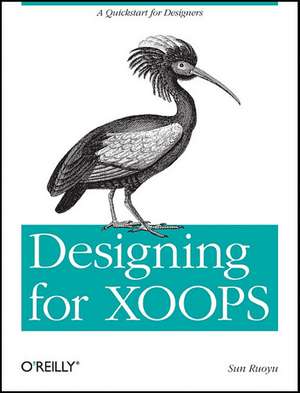
Designing for XOOPS
Autor Sun Ruoyuen Limba Engleză Paperback – 23 aug 2011
Web designers and current XOOPS users will learn how to create a site theme with CSS and jQuery libraries, including techniques for making additional modules conform to the site's look and feel. Although XOOPS uses the PHP-based Smarty templating system, all you need is a bit of XHTML and CSS experience to get started.Learn the workflow for turning an idea into a full-featured websiteBecome familiar with XOOPS theme-building tools, and set up PHP and MySQL environmentsPort an existing XHTML template to XOOPSCreate themes with the 960 Grid System to save time and reduce codeUse jQuery-based UI libraries to achieve complex effectsBlend new modules into your theme with the template override functionGo beyond traditional block layouts to customize your homepage"
Preț: 115.72 lei
Preț vechi: 144.64 lei
-20%
Puncte Express: 174
Carte tipărită la comandă
Livrare economică 03-17 decembrie
Livrare prin curier în România Termenul estimat este afișat lângă disponibilitate.
Transport gratuit de la 400.00 lei Plată online sau ramburs, în funcție de opțiunile comenzii.
Retur gratuit în 14 zile Comandă securizată și suport în română.
Specificații
ISBN-13: 9781449308964
ISBN-10: 1449308961
Pagini: 124
Dimensiuni: 179 x 232 x 8 mm
Greutate: 0.22 kg
Editura: O'Reilly
ISBN-10: 1449308961
Pagini: 124
Dimensiuni: 179 x 232 x 8 mm
Greutate: 0.22 kg
Editura: O'Reilly
V-ar putea interesa
-
 Xara Xtreme 5: The Official GuideGary David Bouton-20%Preț: 211.42 lei264.28 lei
 -
 PHP and MySQL for Dynamic Web SitesLarry Ullman-20%Preț: 305.76 lei382.21 lei
 -
 Adobe Photoshop Classroom in a Book 2026 ReleaseConrad ChavezPreț: 462.81 lei
 -
 PHP HacksJack D. Herrington-20%Preț: 134.12 lei167.65 lei
 -
 HTML and CSSJon Duckett-20%Preț: 149.27 lei186.59 lei
 -
 -20%Preț: 211.52 lei264.40 lei
 -
 Squarespace 6 for DummiesKris Black-20%Preț: 126.87 lei158.60 lei
 -
 HTML & CSSJon Duckett-20%Preț: 259.57 lei324.46 lei
 -
 -20%Preț: 319.65 lei399.56 lei
 -
 PHP & MySQL: Server-side Web DevelopmentJon Duckett-20%Preț: 275.79 lei344.74 lei
 -
 PHP & MySQLJon Duckett-20%Preț: 242.39 lei302.99 lei
 -
 WordPress For Dummies, 9th EditionL. Sabin-Wilson-20%Preț: 174.20 lei217.75 lei
 -
 -20%Preț: 528.19 lei660.24 lei
 -
 Building DIY Websites for DummiesJennifer DeRosa-20%Preț: 142.19 lei177.74 lei
 -
 Learning Web Design 5eJennifer Nieder Robbins-20%Preț: 393.45 lei491.82 lei
 -
 -35%Preț: 118.15 lei182.95 lei
 -
 -35%Preț: 360.33 lei552.28 lei
 -
 Web Design in Easy StepsSean McmanusPreț: 119.95 lei
 -
 Jquery for DesignersN. Maclees-20%Preț: 265.76 lei332.20 lei
 -
 Murach's HTML and CSSZak Ruvalcaba-20%Preț: 348.37 lei435.46 lei
Cuprins
Preface;
What Is XOOPS?;
Why Use XOOPS?;
Brief History of XOOPS;
What This Book Covers;
What You Need to Know;
Who Is This Book For?;
Conventions Used in This Book;
Using Code Examples;
We'd Like to Hear from You;
Safari® Books Online;
Acknowledgments;
Chapter 1: Before the Journey;
1.1 Prepare the Tools;
Chapter 2: Elements of a XOOPS Theme;
2.1 Necessary Elements of a XOOPS Theme;
2.2 A Simple Example;
Chapter 3: Converting an Existing XHTML Template;
3.1 Get the CSS Template;
3.2 Plug It into XOOPS;
3.3 Further Modifications;
Chapter 4: Styling XOOPS and Creating a Theme from 960;
4.1 More on Styling XOOPS;
4.2 Dealing with XOOPS Template Style;
4.3 Smarty: I Want to Know More;
4.4 More on Smarty: Tricks and Examples;
4.5 Create a Theme with 960;
Chapter 5: jQuery and UI Libraries for XOOPS Themes;
5.1 Link Your Theme to jQuery;
5.2 Case1: jQuery Used Separately (Adding a Slider to Your Theme);
5.3 Coding (X)HTML and CSS;
5.4 Adding jQuery Effect;
5.5 Case2: jQuery Integration (Transform Your Blocks into Tabs);
Chapter 6: Module Template Override;
6.1 An Experiment in Module Template Override;
6.2 Case Study: Gallery Slideshow Block;
6.3 A Look Back;
Chapter 7: Block Anywhere Techniques;
7.1 How to Get XOOPS Tools Module;
7.2 A First Play-around;
7.3 What's the Difference?;
Chapter 8: Case Study: My TinyMag;
8.1 Wireframing;
8.2 Mock Up a Design;
8.3 Code the Mock-Up Design;
8.4 Publisher FAQ;
8.5 Construct Header Feature;
8.6 Construct the Main Feature;
8.7 Construct the Content;
8.8 Construct Latest Article Categories;
8.9 Poll;
8.10 Archives and Discussions;
8.11 User Menu;
8.12 Publisher + Disqus;
8.13 Final Check;
XOOPS Cheatsheets;
XOOPS Resources;
More Resources;
Colophon;
What Is XOOPS?;
Why Use XOOPS?;
Brief History of XOOPS;
What This Book Covers;
What You Need to Know;
Who Is This Book For?;
Conventions Used in This Book;
Using Code Examples;
We'd Like to Hear from You;
Safari® Books Online;
Acknowledgments;
Chapter 1: Before the Journey;
1.1 Prepare the Tools;
Chapter 2: Elements of a XOOPS Theme;
2.1 Necessary Elements of a XOOPS Theme;
2.2 A Simple Example;
Chapter 3: Converting an Existing XHTML Template;
3.1 Get the CSS Template;
3.2 Plug It into XOOPS;
3.3 Further Modifications;
Chapter 4: Styling XOOPS and Creating a Theme from 960;
4.1 More on Styling XOOPS;
4.2 Dealing with XOOPS Template Style;
4.3 Smarty: I Want to Know More;
4.4 More on Smarty: Tricks and Examples;
4.5 Create a Theme with 960;
Chapter 5: jQuery and UI Libraries for XOOPS Themes;
5.1 Link Your Theme to jQuery;
5.2 Case1: jQuery Used Separately (Adding a Slider to Your Theme);
5.3 Coding (X)HTML and CSS;
5.4 Adding jQuery Effect;
5.5 Case2: jQuery Integration (Transform Your Blocks into Tabs);
Chapter 6: Module Template Override;
6.1 An Experiment in Module Template Override;
6.2 Case Study: Gallery Slideshow Block;
6.3 A Look Back;
Chapter 7: Block Anywhere Techniques;
7.1 How to Get XOOPS Tools Module;
7.2 A First Play-around;
7.3 What's the Difference?;
Chapter 8: Case Study: My TinyMag;
8.1 Wireframing;
8.2 Mock Up a Design;
8.3 Code the Mock-Up Design;
8.4 Publisher FAQ;
8.5 Construct Header Feature;
8.6 Construct the Main Feature;
8.7 Construct the Content;
8.8 Construct Latest Article Categories;
8.9 Poll;
8.10 Archives and Discussions;
8.11 User Menu;
8.12 Publisher + Disqus;
8.13 Final Check;
XOOPS Cheatsheets;
XOOPS Resources;
More Resources;
Colophon;