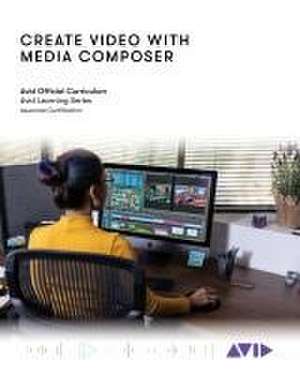
Create Video with Media Composer: Official Avid Curriculum
Autor Avid Technologyen Limba Engleză Paperback – 28 apr 2023
Each lesson and exercise will focus on a phase of the editing process, starting with organizing media, assembling a sequence, refining a sequence, creating titles and effects, and outputting your program so that others can view it. Although this book is not aimed at teaching the theory behind film and television production, the content provides some background on the craft of editing, making it appropriate for students and others new to the art.
For those interested in gaining official Avid certification, this book is also a valuable introduction for further learning and through the Avid Learning Series curriculum.
Preț: 185.85 lei
Preț vechi: 243.17 lei
-24%
Puncte Express: 279
Carte tipărită la comandă
Livrare economică 02-16 decembrie
Livrare prin curier în România Termenul estimat este afișat lângă disponibilitate.
Transport gratuit de la 400.00 lei Plată online sau ramburs, în funcție de opțiunile comenzii.
Retur gratuit în 14 zile Comandă securizată și suport în română.
Specificații
ISBN-13: 9781538173558
ISBN-10: 1538173557
Pagini: 324
Ilustrații: 25 b/w illustrations; 150 b/w photos; 5 tables; 10 textboxes
Dimensiuni: 198 x 252 x 22 mm
Greutate: 0.65 kg
Editura: Bloomsbury Publishing
Colecția Rowman & Littlefield
Locul publicării:New York, United States
ISBN-10: 1538173557
Pagini: 324
Ilustrații: 25 b/w illustrations; 150 b/w photos; 5 tables; 10 textboxes
Dimensiuni: 198 x 252 x 22 mm
Greutate: 0.65 kg
Editura: Bloomsbury Publishing
Colecția Rowman & Littlefield
Locul publicării:New York, United States
V-ar putea interesa
-
 Preț: 409.37 lei
 -
 -15%Preț: 423.59 lei498.33 lei
 -
 Adobe Photoshop Classroom in a Book 2026 ReleaseConrad ChavezPreț: 462.81 lei
 -
 -20%Preț: 373.06 lei466.32 lei
 -
 Adobe Photoshop Classroom in a Book (2023 release)Conrad Chavez-20%Preț: 391.11 lei488.89 lei
 -
 -20%Preț: 416.32 lei520.39 lei
 -
![Adobe Flash Professional CS5 Classroom in a Book: The Official Training Workbook from Adobe Systems [With DVD ROM]](https://i0.books-express.ro/bt/9780321701800/adobe-flash-professional-cs5-classroom-in-a-book.jpg) -20%Preț: 263.23 lei329.03 lei
-20%Preț: 263.23 lei329.03 lei -
 -20%Preț: 127.10 lei158.87 lei
 -
 Single-Camera Video: From Pre- to PostproductionStephen Price, JrPreț: 390.38 lei
 -
 Voice & Vision: A Creative Approach to Narrative FilmmakingMick Hurbis-Cherrier-8%Preț: 543.81 lei591.10 leiRecomandat
 -
 Preț: 384.83 leiRecomandat
 -
 Digital Filmmaking for Kids for DummiesNick WilloughbyPreț: 211.93 lei
 -
 Pro Tools 101Frank Cook-19%Preț: 389.30 lei480.62 lei
 -
 Media Composer 6Greg Staten-13%Preț: 429.50 lei491.29 lei
 -
 The Bare Bones Camera Course for Film and VideoTom SchroeppelPreț: 98.59 lei
 -
 Adobe Premiere ProBen Goldsmith-16%Preț: 281.61 lei335.49 lei
 -
 Adobe Indesign, 2nd EditionStephen LaskevitchPreț: 344.64 lei
 -
 Mastering Video Content CreationJustin EspejoPreț: 137.26 lei
Cuprins
Lesson 1: Introduction and Setup
Lesson 2: Opening, Playing, and Exiting
Lesson 3: Setting Up Your Project
Lesson 4: Ingesting Media
Lesson 5: Getting Started Editing
Lesson 6: Getting Deeper into the Edit
Lesson 7: Segment Mode Tools
Lesson 8: Trimming Clips and Keeping in Sync
Lesson 9: All About Audio
Lesson 10: Transitions and Titles
Lesson 11: Efficient Editing Techniques
Lesson 12: Exporting
Lesson 13: Effects
Lesson 14: The Narrative Rough Cut
Lesson 15: Motion Effects and FluidMorph
Lesson 16: Multiple Effects and Split Screens
Lesson 17: Color Correction
Lesson 18: Technical Fundamentals
Lesson 2: Opening, Playing, and Exiting
Lesson 3: Setting Up Your Project
Lesson 4: Ingesting Media
Lesson 5: Getting Started Editing
Lesson 6: Getting Deeper into the Edit
Lesson 7: Segment Mode Tools
Lesson 8: Trimming Clips and Keeping in Sync
Lesson 9: All About Audio
Lesson 10: Transitions and Titles
Lesson 11: Efficient Editing Techniques
Lesson 12: Exporting
Lesson 13: Effects
Lesson 14: The Narrative Rough Cut
Lesson 15: Motion Effects and FluidMorph
Lesson 16: Multiple Effects and Split Screens
Lesson 17: Color Correction
Lesson 18: Technical Fundamentals