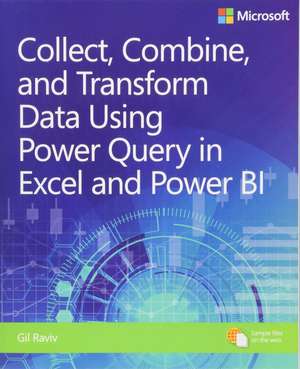
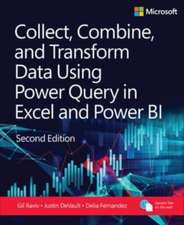
Collect, Combine, and Transform Data Using Power Query in Excel and Power BI
Autor Gil Raviven Limba Engleză Paperback – 12 dec 2018
Diferența majoră între acest volum și documentația tehnică standard rezidă în abordarea orientată spre fluxul de lucru real; în loc de o simplă enumerare a funcțiilor, Gil Raviv structurează materialul în jurul rezolvării problemelor concrete de business intelligence. Subliniem faptul că Collect, Combine, and Transform Data Using Power Query in Excel and Power BI nu se limitează la interfața grafică, ci ghidează cititorul spre stăpânirea limbajului M, motorul din spatele proceselor de extragere și transformare a datelor. Apreciem rigoarea cu care sunt tratate scenariile de „curățare” a datelor eterogene, de la gestionarea tabelelor care nu se potrivesc, până la automatizarea sarcinilor repetitive care consumă timp prețios. Dacă Power Query for Power BI and Excel v-a oferit cadrul teoretic și bazele procesului de import, această carte oferă instrumentele practice necesare pentru a construi mashup-uri de date flexibile și scalabile. Reținem includerea proiectului final, care servește drept laborator de testare pentru toate conceptele învățate, de la conexiuni la surse multiple până la tehnici avansate de unpivoting. Spre deosebire de alte ghiduri, Gil Raviv pune un accent deosebit pe colaborare și pe analiza rețelelor sociale, transformând Power Query dintr-un simplu utilitar de import într-o platformă robustă de pregătire a datelor. Tonul este tehnic și aplicat, fiind ideal pentru utilizatorii care au depășit etapa de începător și doresc să elimine pregătirea manuală a datelor în favoarea unor procese automatizate și predictibile.
Preț: 196.28 lei
Preț vechi: 245.35 lei
-20%
Carte disponibilă
Livrare economică 18 mai-01 iunie
Livrare express 02-08 mai pentru 46.34 lei
Specificații
ISBN-10: 1509307958
Pagini: 432
Dimensiuni: 187 x 229 x 24 mm
Greutate: 0.77 kg
Ediția:1. Auflage
Editura: Microsoft Press
V-ar putea interesa
-
 -20%Preț: 234.73 lei293.42 lei
 -
 Exam Ref DA-100 Analyzing Data with Microsoft Power BIDaniil Maslyuk-20%Preț: 198.46 lei248.07 lei
 -
 -20%Preț: 231.26 lei289.08 lei
 -
 -20%Preț: 225.90 lei282.37 lei
 -
 Excel 2016 in DepthBill Jelen-20%Preț: 201.19 lei251.48 lei
 -
 Excel 2019 All-In-One for DummiesGreg Harvey-20%Preț: 207.66 lei259.57 lei
 -
 Excel Data Analysis For DummiesPaul McFedries-20%Preț: 174.77 lei218.46 lei
 -
 Excel Power Pivot & Power Query For DummiesMichael Alexander-20%Preț: 164.52 lei205.65 lei
 -
 -20%Preț: 234.81 lei293.52 lei
 -
 Advanced Excel SuccessAlan Murray-20%Preț: 301.53 lei376.91 lei
 -
 Analyzing Data with Power BI and Power Pivot for ExcelAlberto FerrariPreț: 229.51 lei
 -
 Microsoft Excel 2019 Data Analysis and Business ModelingWayne Winston-20%Preț: 277.03 lei346.30 lei
 -
 -20%Preț: 200.10 lei250.13 lei
 -
 Microsoft Excel 2019 Step by StepCurtis Frye-20%Preț: 201.93 lei252.41 lei
 -
 -38%Preț: 161.68 lei260.20 lei
 -
 -20%Preț: 282.12 lei352.65 lei
 -
 -20%Preț: 166.16 lei207.69 lei
 -
 Python for Excel Users: Know Excel? You Can Learn PythonTracy Stephens-37%Preț: 223.13 lei351.73 lei
 -
 Excel Formulas and Functions 2020Adam Ramirez-20%Preț: 62.54 lei78.18 lei
 -
 Learning Power QueryAdam Szczepan Kope¿-20%Preț: 217.08 lei271.35 lei
De ce să citești această carte
Recomandăm această carte analiștilor și utilizatorilor de Excel care doresc să treacă de la manipularea manuală a celulelor la automatizarea fluxurilor de date. Veți câștiga timp prețios prin învățarea limbajului M și veți stăpâni tehnicile de transformare necesare pentru a pregăti seturi de date complexe pentru analiză în Power BI, transformând datele brute în informații acționabile prin proiecte practice bine documentate.
Despre autor
Gil Raviv este un expert recunoscut în soluții de business intelligence și un specialist de marcă în ecosistemul Microsoft. Cu o experiență vastă în implementarea soluțiilor de analiză a datelor, Raviv este cunoscut pentru capacitatea sa de a simplifica procesele complexe de transformare a datelor (ETL). Expertiza sa în Power Query și limbajul M l-a consacrat ca o voce autoritară în comunitatea Microsoft Press, oferind consultanță și resurse educaționale care ajută profesioniștii să maximizeze potențialul instrumentelor Excel și Power BI.
Descriere
Using Power Query, you can import, reshape, and cleanse any data from a simple interface, so you can mine that data for all of its hidden insights. Power Query is embedded in Excel, Power BI, and other Microsoft products, and leading Power Query expert Gil Raviv will help you make the most of it. Discover how to eliminate time-consuming manual data preparation, solve common problems, avoid pitfalls, and more. Then, walk through several complete analytics challenges, and integrate all your skills in a realistic chapter-length final project. By the time you're finished, you'll be ready to wrangle any data-and transform it into actionable knowledge. Prepare and analyze your data the easy way, with Power Query - Quickly prepare data for analysis with Power Query in Excel (also known as Get & Transform) and in Power BI - Solve common data preparation problems with a few mouse clicks and simple formula edits - Combine data from multiple sources, multiple queries, and mismatched tables - Master basic and advanced techniques for unpivoting tables - Customize transformations and build flexible data mashups with the M formula language - Address collaboration challenges with Power Query - Gain crucial insights into text feeds - Streamline complex social network analytics so you can do it yourself For all information workers, analysts, and any Excel user who wants to solve their own business intelligence problems.
Notă biografică
With 20 years of software development experience, and four U.S. patents in the fi elds of social networks, cyber security, and analytics, Gil has held a variety of innovative roles in cyber security and data analytics, and he has delivered a wide range of software products, from advanced threat detection enterprise systems to protection of kids on Facebook.
In his blog, DataChant.com, Gil has been chanting about Power BI and Power Query since he moved to his new home in the Chicago area in early 2016. As a Group Manager in Avanade's Analytics Practice, Gil is helping Fortune 500 clients create modern self-service analytics capability and solutions by leveraging Power BI and Azure.
You can contact Gil at gilra@datachant.com.
Descriere scurtă
Using Excel and Power BI, you can:
- Save time by eliminating the pain of copying and pasting data into workbooks and then manually cleaning that data.
- Gain productivity by properly preparing data yourself, rather than relying on others to do it.
- Gain effiiciency by reducing the time it takes to prepare data for analysis, and make informed decisions more quickly.