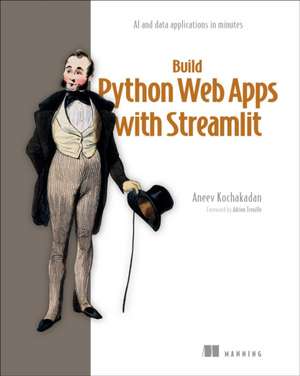
Build Python Web Apps with Streamlit
Autor Aneev Kochakadanen Limba Engleză Hardback – 29 iun 2026
You just built something amazing in Python and you’re ready to share it with the world! But does shipping it to the web mean…learning JavaScript? With the Streamlit framework, you can build interactive web apps entirely in Python incredibly fast. By providing a collection of pre-built UI components and streamlined configurations, Streamlit turns your ideas for data tools and AI workflows into usable applications without any tedious HTML, CSS, and JavaScript.
Build Python Web Apps with Streamlit follows a proven learn-by-building approach. Each chapter introduces a new hands-on project. You’ll create data dashboards, interactive checklists, and even an AI chatbot optimized with RAG and agentic patterns. You’ll also learn from intentional mistakes and real-world debugging challenges that teach you how Streamlit actually works. As you go, each project helps you master software engineering skills you might not have learned as a Python programmer—gathering requirements, persistence and database integration, user authentication, deployment, and troubleshooting.
• Build interactive web apps without HTML/CSS/JavaScript
• Understand Streamlit’s execution model
• Work with databases and persistent data
• Create and deploy production-grade architectures
• Implement user authentication and authorization
• Build AI-powered applications with LLMs
• Develop dashboards, and visualizations
• Implement security best practices
About the technology
With the Streamlit framework, you can build interactive web apps entirely in Python incredibly fast. By providing a collection of pre-built UI components and streamlined configurations, Streamlit turns your ideas for data tools and AI workflows into usable applications without any tedious HTML, CSS, and JavaScript.
About the book
Build Python Web Apps with Streamlit follows a proven learn-by-building approach. Each chapter introduces a new hands-on project. You’ll create data dashboards, interactive checklists, and even an AI chatbot optimized with RAG and agentic patterns. As you go, you’ll practice debugging, deployment, database integration and other software engineering skills.
What's inside
• Understand Streamlit’s execution model
• Work with databases and persistent data
• Implement user authentication and authorization
• Build AI-powered applications
About the reader
For Python programmers. No web app or AI skills required.
About the author
Aneev Kochakadan is a software engineer at OpenAI, with prior experience at Stripe and Google. He has designed and built systems ranging from online transactional services to data pipelines and business intelligence tools.
Table of Contents
Part 1
1 Introduction to Streamlit
2 Getting started with Streamlit
3 Taking an app from concept to code
4 Streamlit’s execution model
5 Sharing your apps with the world
Part 2
6 A dashboard fit for a CEO
7 The CEO strikes back: Supercharging the dashboard
8 Building a CRUD app with Streamlit
Part 3
9 Creating an AI-powered application
10 RAG and agentic apps with LangGraph and Streamlit
Part 4
11 Testing Streamlit apps
12 Packaging and deploying Streamlit apps
Appendixes
A Installing Python and Streamlit
Preț: 291.67 lei
Preț vechi: 364.59 lei
-20%
Puncte Express: 438
Carte disponibilă
Livrare economică 24 noiembrie-08 decembrie
Livrare express 10-14 noiembrie pentru 67.15 lei
Livrare prin curier în România Termenul estimat este afișat lângă disponibilitate.
Transport gratuit de la 400.00 lei Plată online sau ramburs, în funcție de opțiunile comenzii.
Retur gratuit în 14 zile Comandă securizată și suport în română.
Specificații
ISBN-13: 9781633436015
ISBN-10: 1633436012
Pagini: 480
Dimensiuni: 186 x 234 x 37 mm
Greutate: 0.66 kg
Editura: Manning Publications
ISBN-10: 1633436012
Pagini: 480
Dimensiuni: 186 x 234 x 37 mm
Greutate: 0.66 kg
Editura: Manning Publications
V-ar putea interesa
-
 Building Generative AI Services with FastAPIAli Parandeh-20%Preț: 356.35 lei445.44 lei
 -
 Flutter For DummiesBarry Burd-20%Preț: 138.06 lei172.58 lei
 -
 -20%Preț: 366.89 lei458.61 lei
 -
 -20%Preț: 226.43 lei283.04 lei
 -
 Pro Mern StackVasan Subramanian-20%Preț: 241.01 lei301.27 lei
 -
 -35%Preț: 204.24 lei315.48 lei
 -
 The Quick Python Book, Fourth EditionNaomi Ceder-20%Preț: 358.05 lei447.56 lei
 -
 Preț: 404.96 lei
 -
 Build a Website with ChatGPTPaul McFedries-20%Preț: 232.31 lei290.39 lei
 -
 AI-Powered DeveloperNathan B Crocker-20%Preț: 282.74 lei353.42 lei
 -
 Data Storytelling with Altair and AIAngelica Lo Duca-20%Preț: 293.24 lei366.56 lei
 -
 Build a Frontend Web Framework (from Scratch)Ángel Sola Orbaiceta-20%Preț: 346.06 lei432.58 lei
 -
 The Book of Dash: Build Dashboards with Python and PlotlyChristian Mayer-36%Preț: 177.47 lei279.28 lei
 -
 -35%Preț: 360.33 lei552.28 lei
 -
 -34%Preț: 297.24 lei447.85 lei
 -
 Python for Excel Users: Know Excel? You Can Learn PythonTracy Stephens-35%Preț: 241.34 lei368.95 lei
 -
 The Developer's Guide to AIJacob Orshalick-35%Preț: 275.08 lei423.20 lei
 -
 Python in Easy StepsMike Mcgrath-20%Preț: 80.55 lei100.69 lei
 -
 AI and MicroservicesDileep Kumar Pandiya-20%Preț: 263.90 lei329.88 lei
Descriere
The Streamlit framework empowers Python developers to build web applications quickly without writing a single line of HTML, CSS, or JavaScript. There’s no need to switch stacks just to add a web front-end to a Python application. This easy to use, lightweight toolkit is perfect for putting a friendly UI on an AI model or creating an interactive data dashboard.