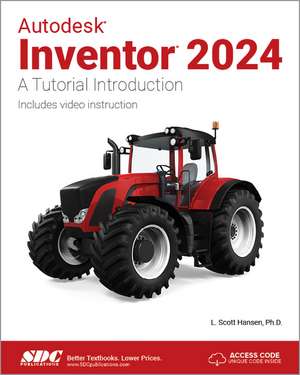
Autodesk Inventor 2024: A Tutorial Introduction
Autor L. Scott Hansenen Limba Engleză Paperback – 12 iun 2023
Suntem de părere că pachetul hibrid format din textul tipărit și resursele video incluse reprezintă una dintre cele mai eficiente metode de a stăpâni proiectarea asistată de calculator. Fiecare volum Autodesk Inventor 2024 vine echipat cu un cod de acces pentru 34 de tutoriale video realizate de L. Scott Hansen, care însumează peste 4 ore de demonstrații practice. Acestea nu sunt simple prezentări teoretice, ci urmăresc pas cu pas exercițiile din carte, oferind context vizual imediat pentru fiecare comandă executată.
Abordarea este una eminamente practică, eliminând descrierile textuale lungi în favoarea capturilor de ecran detaliate. Structura cursului este riguros organizată în 21 de capitole, pornind de la configurarea inițială și modelarea solidelor simple, până la fluxuri de lucru complexe precum analiza de stres (capitolul 12) sau utilizarea componentelor iLogic (capitolul 17). Ne-a atras atenția în mod deosebit secțiunea dedicată instrumentului Design Accelerator, unde cititorul învață să proiecteze elemente mecanice specifice: roți dințate, arbori și rulmenți.
Cititorul care a aplicat ideile din Parametric Modeling with Autodesk Inventor 2024 de Randy H. Shih va găsi aici o completare ideală prin accentul pus pe studiul individual și pe utilizarea mediilor de simulare și asamblare. În timp ce alte lucrări se concentrează pe teoria modelării parametrice, volumul de față prioritizează execuția rapidă și corectă în mediul profesional. Această lucrare se înscrie în linia editorială consacrată a lui L. Scott Hansen, fiind o rafinare a edițiilor anterioare, precum Autodesk Inventor 2023, menținând același standard de claritate care pregătește terenul pentru obținerea certificărilor oficiale Autodesk.
Preț: 521.80 lei
Preț vechi: 652.25 lei
-20%
Carte disponibilă
Livrare economică 18 noiembrie-02 decembrie
Livrare express 03-07 noiembrie pentru 53.38 lei
Specificații
ISBN-10: 1630575828
Pagini: 528
Dimensiuni: 210 x 280 x 28 mm
Greutate: 1.04 kg
Ediția:1
Editura: SDC Publications
Colecția SDC Publications
V-ar putea interesa
-
 Engineering Design Graphics with Autodesk Inventor 2017James Bethune-14%Preț: 596.61 lei693.74 lei
 -
 -20%Preț: 497.21 lei621.52 lei
 -
 Autodesk Inventor 2023 Essentials PlusDaniel T. Banach-20%Preț: 495.08 lei618.86 lei
 -
 AutoCAD 2024 Tutorial First Level 2D FundamentalsRandy H. Shih-20%Preț: 506.27 lei632.84 lei
 -
 -20%Preț: 492.11 lei615.14 lei
 -
 -20%Preț: 617.36 lei771.71 lei
 -
 -20%Preț: 513.62 lei642.02 lei
 -
 Residential Design Using Autodesk Revit 2025Daniel John Stine-20%Preț: 529.95 lei662.44 lei
 -
 -20%Preț: 506.97 lei633.71 lei
Public țintă
Professional Practice & Development, Professional Training, and Undergraduate AdvancedDe ce să citești această carte
Recomandăm acest volum studenților la inginerie și profesioniștilor care doresc să învețe Autodesk Inventor fără asistență externă. Câștigați o înțelegere profundă a modelării 3D prin exerciții practice și suport video exhaustiv. Este un instrument esențial pentru oricine dorește să treacă de la schițe de bază la ansambluri mecanice complexe și simulări de stres, utilizând un format vizual ușor de urmărit.
Descriere scurtă
The philosophy behind this book is that learning computer aided design programs is best accomplished by emphasizing the application of the tools. Students also seem to learn more quickly and retain information and skills better if they are actually creating something with the software program.
The driving force behind this book is "learning by doing." The instructional format of this book centers on making sure that students learn by doing and that students can learn from this book on their own. In fact, this is one thing that differentiates this book from others: the emphasis on being able to use the book for self-study. The presentation of Autodesk Inventor is structured so that no previous knowledge of any CAD program is required.
This book uses the philosophy that Inventor is mastered best by concentrating on applying the program to create different types of solid models, starting simply and then using the power of the program to progressively create more complex solid models. The Drawing Activities at the end of each chapter are more complex iterations of the part developed by each chapter’s objectives.
Since CAD programs are highly visual, there are graphical illustrations showing how to use the program. This reinforces the "learn by doing" philosophy since a student can see exactly what the program shows, and then step through progressive commands to implement the required operations. Rather than using a verbal description of the command, a screen capture of each command is replicated.
Included Videos
Each book includes access to extensive video training created by author Scott Hansen. The videos follow along with the table of contents of the book. Each chapter has one or more videos in which the author demonstrates how to use the tools that are covered in that chapter. Most videos follow an exercise from start to finish. The exercises created in the video are very similar to the exercise found in the corresponding chapter. Throughout the videos Scott Hansen describes how to perform each step, the reason behind these steps, and some of the other options available with the various tools. The author's clear and simple description of each exercise is a perfect companion to the text and makes learning Autodesk Inventor easier than ever. There are thirty-four videos with four hours and thirty-nine minutes of training in total.
To access the videos, you will need to follow the instruction included on the inside front cover to redeem the access code included with each book. Redeeming the code will add this book to your SDC Publications Library and allow you to access the videos whenever you want.