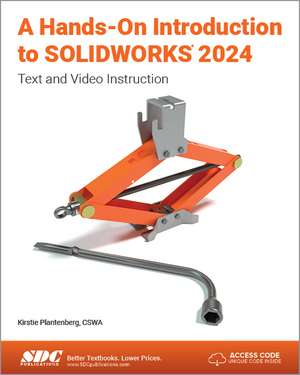
A Hands-On Introduction to SOLIDWORKS 2024: Text and Video Instruction
Autor Kirstie Plantenbergen Limba Engleză Paperback – 10 mai 2024
Recomandăm A Hands-On Introduction to SOLIDWORKS 2024 celor care fac primii pași în proiectarea asistată de calculator, volumul fiind conceput special pentru nivelul de începător. Nu sunt necesare cunoștințe prealabile solide, însă parcurgerea textului presupune o dorință de a înțelege fundamentele graficii inginerești prin aplicații practice. Structura cărții este una progresivă, de la modelarea pieselor de bază și realizarea desenelor tehnice, până la concepte complexe precum asamblările intermediare și avansate.
Remarcăm organizarea riguroasă a celor 15 capitole, care ghidează utilizatorul de la schițe 2D la modelare solidă parametrică și randare. Pe linia practică a volumului Design Workbook Using SOLIDWORKS 2024, dar cu un focus mai accentuat pe suportul vizual, această lucrare integrează instrucțiuni video pentru fiecare tutorial, facilitând învățarea pentru studenții care preferă demonstrațiile dinamice. Spre deosebire de alte ghiduri, Kirstie Plantenberg anticipează erorile comune ale începătorilor, oferind note și soluții pentru situațiile în care interfața software-ului nu răspunde conform așteptărilor.
În contextul operei autoarei, această ediție continuă tradiția stabilită în Engineering Graphics Essentials with AutoCAD 2024 Instruction, menținând o metodologie pedagogică bazată pe claritate și aplicabilitate imediată. Dincolo de simpla utilizare a comenzilor, cititorul este introdus în analiza statică FEA și în gestionarea toleranțelor și a filetelor, elemente critice pentru un viitor inginer. Cuprinsul reflectă o tranziție logică: după stăpânirea modelării de piese (capitolele 1-5), accentul se mută pe simulare și asamblări mecanice complexe, pregătind utilizatorul pentru provocările reale din industrie.
Preț: 482.54 lei
Preț vechi: 603.17 lei
-20%
Carte disponibilă
Livrare economică 17 septembrie-01 octombrie
Livrare express 02-08 septembrie pentru 61.96 lei
Specificații
ISBN-10: 1630576336
Pagini: 550
Dimensiuni: 210 x 280 x 35 mm
Greutate: 1.14 kg
Ediția:1
Editura: SDC Publications
Colecția SDC Publications
V-ar putea interesa
-
 A Hands-On Introduction to SOLIDWORKS 2023: Text and Video InstructionKirstie Plantenberg-20%Preț: 483.41 lei604.25 lei
 -
 -20%Preț: 523.55 lei654.44 lei
 -
 -20%Preț: 524.12 lei655.14 lei
 -
 -20%Preț: 559.68 lei699.61 lei
 -
 -20%Preț: 522.29 lei652.86 lei
 -
 Parametric Modeling with SOLIDWORKS 2025Paul Schilling-20%Preț: 535.95 lei669.94 lei
 -
 -20%Preț: 575.72 lei719.66 lei
 -
 A Hands-On Introduction to SOLIDWORKS 2025: Text and Video InstructionKirstie Plantenberg-20%Preț: 543.61 lei679.51 lei
 -
 SOLIDWORKS 2025 Quick StartDavid C. Planchard-20%Preț: 422.08 lei527.59 lei
 -
 -20%Preț: 538.51 lei673.13 lei
 -
 -20%Preț: 563.26 lei704.07 lei
 -
 -20%Preț: 486.20 lei607.75 lei
 -
 -20%Preț: 513.49 lei641.86 lei
 -
 Designing with SOLIDWORKS 2025Michael J. Rider-20%Preț: 503.12 lei628.89 lei
Public țintă
Professional Practice & Development, Professional Training, and Undergraduate AdvancedDe ce să citești această carte
Apreciem această resursă pentru abordarea sa hibridă, text și video, care elimină barierele de învățare ale unui software complex. Este alegerea ideală pentru studenții la inginerie sau profesioniștii aflați la început de drum care doresc să stăpânească SOLIDWORKS prin proiecte reale. Câștigați nu doar abilități tehnice de modelare 3D, ci și o bază solidă în documentația tehnică și analiza de stres.
Descriere scurtă
Instructional videos for all the tutorials and the end-of-chapter problems come with the book, so if you need more help, or are a visual learner, you can refer to them. Some problems are purposely left open ended to simulate real life design situations; therefore, more than one solution is possible. After completing all the tutorials in this book, you will be able to accurately design moderately difficult parts and assemblies and have a firm foundation in SOLIDWORKS.
Why this book?
Instructors and learners will appreciate the thoughtful and well-organized layout of A Hands-On Introduction to SOLIDWORKS 2024. Every chapter begins with the prerequisites needed to complete the tutorials found in the chapter and a list of what you will learn. You do not necessarily need to complete the tutorials within the book in order, but make sure that you have the pre-requisite knowledge before you begin. Practice modeling problems and/or quiz problems at the end of each chapter offer an extra challenge and let you practice your newfound skills.
Working with realistic part models and assemblies means that questions and problems might arise as they would when you are working on your real-life projects. The author anticipates these questions and how to address them. For example, if you are in the wrong standard or not on the correct layer, or an unexpected window appears on the screen, tips and notes quickly remedy the issue. Work alongside the author using the instructional videos included for every tutorial and end-of chapter problems in the book. Information on new commands or steps appear at the beginning of each chapter. They include definitions of new features and concepts and images of how they look on the screen. Everything is clearly labeled for easy identification. Throughout the book, readers are referred to the appropriate section of the chapter for more information on the command when needed. A command index at the back of the book lists where each command can be found for easy reference at any time.
Topics covered
- Part modeling
- Part configurations
- Assembly
- Static FEA
- Part Prints
- Assembly drawings
- Fasteners
- Tolerancing
- Parametric Modeling
- 3D-sketches
- Rendering Sample Video